
Speaker Diarization Explained: AI Transcription That Labels Who Said What
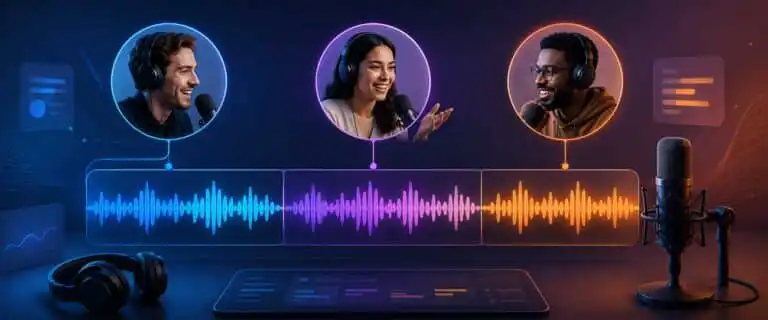
Speaker diarization is a part of AI transcription that separates a recording by speaker, so a transcript can show who spoke when rather than giving you one long block of text. In UK English, you will often see it written as “speaker diarisation”, but the search term and most technical documentation use “speaker diarization”.
This explainer is for people choosing, configuring or troubleshooting speech-to-text workflows for meetings, interviews, podcasts, call recordings and product features. It explains the problem diarization solves, how the machine learning pipeline usually works, how it differs from speaker recognition, why tools such as Whisper and pyannote get mentioned so often, and what to check before trusting a diarised transcript in a real workflow.
Straight to the point: speaker diarization does not usually identify a person by name. It normally assigns neutral labels such as Speaker 1, Speaker 2, or Guest-1, then keeps those labels as consistent as possible across the file. Human review or extra context is still needed when speaker attribution matters.
Star rating: ★★★★☆ 4.4/5 editorial usefulness rating for multi-speaker transcription workflows, not a provider score. Diarization is extremely useful for structured conversations, but it remains vulnerable to overlapping speech, similar voices, poor room audio, and over-compressed recordings.
What problem speaker diarization solves
Standard speech-to-text answers the question: what words were spoken? Speaker diarization adds a second layer: who spoke when? That difference sounds small until you work with real recordings.
A two-person interview without speaker labels is still readable, but it takes effort to follow. A five-person meeting without labels becomes a mess. You can see decisions, questions and commitments in the transcript, but you cannot reliably assign them to the right person. Diarization turns the transcript from a flat text dump into a conversation record.
The strongest use cases are practical rather than academic:
- Meetings: connect decisions, objections and action items to the right participant.
- Research interviews: keep the interviewer and participant responses separate before coding the material.
- Podcasts and videos: produce cleaner show notes, quotes, subtitles and social clips.
- Call analytics: separate agent and customer speech for coaching, sentiment review and compliance checks.
- Developer workflows: add speaker labels to transcripts returned by an API, usually in JSON, SRT, VTT or plain text.
For broader tool selection, DIY AI’s speech-to-text AI guide maps transcription tools by accuracy, latency, privacy, speaker handling and export workflow. This page focuses on the diarization layer itself, so it does not cannibalise the best-tools page.
Speaker diarization meaning: the who-spoke-when layer
The simplest definition of speaker diarization is this: it is the process of dividing an audio file into time segments and assigning each speech segment to a speaker label. A diarised transcript might show Speaker 1 at 00:00:04, Speaker 2 at 00:00:11, then Speaker 1 again at 00:00:19.
The word can look odd if you have not seen it before. To diarise an audio file means to mark the recording by speaker turns. A diarized, or diarised, transcript is the output after that process has been applied.
The key point is that most diarization systems do not know whether Speaker 1 is Sarah or Speaker 2 is Tom. They infer that two different voices are present. Names can sometimes be added later from meeting metadata, calendar invites, self-introductions, or manual review, but the diarization model itself usually groups voices rather than verifying identities.
Speaker diarization vs speaker identification vs speaker recognition
These terms are often mixed together, which is one reason search results around speaker identification can be confusing. For technical decisions, keep them separate.
| Term | What it answers | Typical output | Common mistake |
|---|---|---|---|
| Speech recognition or ASR | What was said? | Transcript text | Assuming transcription accuracy means speaker attribution is also accurate. |
| Speaker diarization | Who spoke when? | Speaker labels with timestamps | Assuming Speaker 1 is a verified identity. |
| Speaker identification | Which known person is this voice likely to be? | A matched identity from a known set | Using the term when the system only provides anonymous labels. |
| Speaker recognition or verification | Does this voice match a known speaker profile? | Match, no match or confidence score | Using it without considering consent, privacy and biometric data rules. |
| Channel separation | Which audio track did the speech come from? | Track or channel label | Confusing clean multi-track recording with AI voice separation. |
A clean recording with one microphone per person may not need complex diarization. If each participant is already on a separate track or channel, channel mapping can be more reliable than voice clustering. Diarization becomes more useful when the recording is mixed into a single file, which is exactly what happens with many Zoom exports, phone recordings, and uploaded meeting files.
How speaker diarization works in an AI transcription pipeline
Modern diarization is usually a pipeline, not a single magic step. Implementations vary, but most production systems have the same broad components.
Voice activity detection
The system first works out which parts of the file contain speech. This is voice activity detection, often shortened to VAD. Good VAD removes long silences, room noise and non-speech sounds before the speaker model starts grouping voices.
This stage matters more than many users realise. If the model treats keyboard noise, music bleed, or an echo as speech, later stages can create phantom speaker labels. That is one reason noisy meetings sometimes come back with eight speakers when only four people were present.
Speaker embeddings
Once speech regions are detected, the model creates compact mathematical representations of voice characteristics. These representations are often called speaker embeddings. They encode useful speaker cues such as timbre, pitch range, speaking rhythm and spectral patterns.
The system is not listening like a human. It is comparing patterns. Two speakers with similar voice profiles, microphones, and room positions can be harder to separate than two speakers with obvious acoustic differences.
Clustering and speaker turns
The embeddings are then grouped into clusters. Each cluster becomes a provisional speaker label. The system also estimates speaker turn boundaries, so it knows roughly where Speaker 1 stops and Speaker 2 begins.
This is where many diarization errors appear. Under-segmentation merges two speakers into one label. Over-segmentation splits one person into several labels. Label switching occurs when the model tracks the correct speakers for a while, then later in the file swaps them.
Speaker-attributed transcription
Some systems run diarization first, transcription second. Others run ASR first, then align speaker labels to words or segments. More advanced pipelines try to combine transcription and diarization so the output is speaker-attributed from the start.
Real-time diarization is more challenging because the system cannot inspect the entire recording before assigning labels. Microsoft’s real-time diarization quickstart is a useful official reference point because it shows the practical difference between batch transcription and speaker labels returned during continuous recognition.
What a diarized transcript looks like
A basic diarised transcript normally looks something like this:
[00:00:02] Speaker 1: Morning. Can we start with the migration risk?
[00:00:07] Speaker 2: Yes. The main issue is the old export format.
[00:00:13] Speaker 1: Is that a blocker or just extra cleanup?
[00:00:17] Speaker 3: It is cleanup, but it needs to happen before QA.
A better transcript may include word-level timestamps, confidence values, paragraph breaks, punctuation and a separate speaker map. In API workflows, JSON is often the most useful format because you can store each utterance as its own object with start time, end time, speaker label and text.
For content teams, SRT and VTT matter because captions need to be timed. For developers, the important part is usually preserving speaker labels in a structured format instead of flattening the transcript into plain text too early.
When diarization works well, and when it breaks
Speaker diarization performs best when the audio gives the model clear separation between voices. The ideal file has a small number of speakers, minimal overlap, stable microphone positions and limited background noise.
| Recording condition | Expected diarization quality | Why it matters |
|---|---|---|
| Two-person interview with clean audio | Usually strong | The model has clear voice contrast and predictable turn-taking. |
| Small meeting with 3-5 speakers | Good if people do not talk over each other | Speaker count is manageable, but interruptions increase attribution errors. |
| Podcast with separate microphones | Strong, especially if tracks are mixed cleanly | Consistent mic placement and clear speech help clustering. |
| Large group call with laptop microphones | Mixed | Compression, echo and similar voices create label instability. |
| Panel discussion with frequent cross-talk | Weak without human review | Overlapping speech is still one of the hardest diarization cases. |
| Legal, medical or compliance-sensitive transcript | Useful as a draft only | Attribution errors can have consequences, so manual verification is essential. |
The useful mental model is simple: diarization is strongest when people take turns and weakest when everyone talks at once. That is not a moral judgment about meetings. It is an audio separation problem.
Does OpenAI Whisper support speaker diarization?
The answer depends on which OpenAI or Whisper route you mean. Classic open-source Whisper and older Whisper-style workflows are excellent for transcription, but they do not natively support speaker diarization. That is why many developer tutorials pair Whisper with pyannote.audio, WhisperX or another diarization layer.
Current OpenAI transcription options are broader than classic Whisper. OpenAI’s newer speech-to-text documentation includes a diarization-specific model path, so the old blanket answer of “Whisper cannot do diarization” is no longer accurate. The safer distinction is that classic Whisper does not diarise by itself, whereas newer managed transcription options may include diarization when you choose the right model and parameters.
For a deeper view of where Whisper fits overall, see our OpenAI Whisper review. If cost is the blocker, the OpenAI Whisper API pricing guide is the better next read, since diarization is only one part of the overall workflow cost.
Pyannote and open-source speaker diarization
pyannote.audio is one of the most common names you will see around open-source speaker diarization. It is a Python toolkit used for speech activity detection, speaker change detection, overlap detection, speaker embeddings and diarization pipelines.
Searches such as pyannote.audio speaker diarization or pyannote/speaker-diarization-3.1 usually come from developers trying to add a speaker layer to a Whisper-style transcription stack. The attraction is control. You can run more of the workflow locally, tune parts of the pipeline and avoid sending every file to a third-party transcription service.
The trade-off is maintenance. Local diarization usually involves Python environments, model access, GPU performance, ffmpeg, audio decoding, dependency changes, and Hugging Face access tokens. That is fine for a technical team. It is a poor fit for a content editor who just wants a labelled transcript by lunchtime.
There is also a privacy angle. Local processing can reduce Cloud exposure, but only if the entire workflow remains local. Some hybrid setups transcribe locally but send files elsewhere for cleaning, summarisation, storage or review. Map the whole pipeline before making privacy claims.
Cloud API vs local diarization
Most teams choose between a managed Cloud API and a local or self-managed diarization pipeline. Neither is automatically better. The right choice depends on volume, latency, privacy, engineering capacity and how much control you need over model behaviour.
| Approach | Best fit | Main advantage | Main limitation |
|---|---|---|---|
| Managed transcription API with diarization | Apps, call analytics, meeting tools, live caption workflows | Fast integration, support, scaling and simpler operations | Usage cost, data handling review and less control over model internals |
| Local Whisper plus pyannote-style diarization | Technical teams needing control or local processing | Flexible, inspectable and easier to customise | More engineering work and more failure points |
| Manual transcription plus speaker labelling | High-stakes legal, medical, board or research transcripts | Human judgement on ambiguous attribution | Slower and more expensive at scale |
| Hybrid AI draft plus human review | Most serious business workflows | Good balance of speed and correction quality | Requires a review process, not just an upload button |
Our best AI speech-to-text tools guide is the better place to compare vendors. For this explainer, the practical point is that diarization quality depends on both the model and the workflow around it.
Common misconfigurations and pitfalls
Assuming speaker labels are names
Speaker 1 is not a person’s verified identity. It is a cluster label. If your meeting notes need named attribution, add a review step in which someone maps labels to names using the audio, meeting context, or self-introductions.
Ignoring expected speaker count
Some systems let you set a minimum and maximum number of speakers. Use those controls when available. A model that knows a file should contain three speakers is less likely to invent seven labels than a model left completely open.
Uploading over-processed audio
Noise suppression can aid transcription, but aggressive processing can also degrade the subtle voice cues that diarization relies on. Echo cancellation, compression and background removal may make a call sound cleaner to a human while making speaker clustering less stable.
Trusting overlap attribution too much
Cross-talk is difficult because two voices occupy the same time window. The model may assign the dominant voice, miss the quieter voice or split the segment badly. If a transcript is being used for quotes, compliance or decisions, mark overlapping sections for manual listening.
Flattening structured output too early
Developers often lose useful information by converting a rich JSON response into plain text too soon. Keep timestamps, speaker IDs and confidence metadata in storage, even if the front-end only displays a simple transcript. That extra context makes later correction much easier.
Using diarization as a privacy shortcut
Anonymous labels do not automatically make audio safe to process. Voice can be sensitive data, and diarization may create speaker-level records that are more revealing than a basic transcript. For internal or customer recordings, review consent, retention and access rules before scaling.
How to improve speaker diarization accuracy before upload
Most diarization gains come from better input audio rather than clever post-processing. A few small recording habits can save a lot of correction work later.
- Record separate tracks where possible: one mic per speaker is still the cleanest solution.
- Ask people to introduce themselves: a spoken roll call helps later name mapping.
- Reduce overlap: short gaps between speakers improve boundary detection.
- Keep microphones stable: moving closer and farther away changes the acoustic signature.
- Avoid background voices: side conversations can become fake speaker labels.
- Export high-quality audio: WAV or high-quality M4A is usually safer than a heavily compressed MP3.
- Keep the original file; do not store only the cleaned version, as review teams may need the source.
For API-first workflows, the choice of tool also matters. Developer teams building live products should read the Deepgram review, then check the separate Deepgram pricing guide if diarisation add-ons or streaming volume affect the budget. Teams already committed to Google Cloud can use our Google Speech-to-Text review to sense-check ecosystem fit.
See more of our reporting in Google Top Stories, AI Overviews and AI Mode.
Pros and cons of speaker diarization
| Pros | Cons |
|---|---|
| Makes meetings, interviews and podcasts easier to read because the conversation is separated by speaker turns. | Speaker labels are not guaranteed names or verified identities. |
| Improves action-item review, quote extraction, call analytics and transcript navigation. | Overlapping speech, similar voices and poor microphones can cause label switching. |
| Works well as a first draft for multi-speaker content, especially when audio is clean. | High-stakes transcripts still need manual review before publication or formal use. |
| Structured outputs can feed search, summarisation, captions and analytics systems. | Can reduce manual clean-up time when the speaker count is small and turn-taking is disciplined. |
| Can reduce manual clean-up time when the speaker count is small and turn-taking is disciplined. | Bad configuration can create too many speakers, merge speakers or lose useful timestamp metadata. |
A practical speaker diarization checklist
- Confirm the goal: transcript readability, captions, analytics, compliance review or named minutes.
- Count expected speakers: set min and max speaker values if the tool allows it.
- Check the audio source: separate tracks, clean room audio and stable mic positions are preferred.
- Choose the workflow: managed API, local pipeline, manual review or hybrid process.
- Keep structured output: preserve timestamps, speaker IDs, confidence and utterance boundaries.
- Map labels to names carefully: use self-introductions, context and manual listening.
- Audit known failure points: overlap, interruptions, similar voices, background speakers and label switches.
- Decide review level: light edit for meeting notes, full verification for legal, medical or public records.
- Document retention rules: decide how long to store the audio, transcript and speaker-labelled data.
A simple prompt for mapping speaker labels to names
After diarization, you may have a transcript with Speaker 1, Speaker 2 and Speaker 3 but no names. A language model can help with context clues, but it should not be treated as proof. Use this as an editorial aid, then verify against the audio.
I have a diarized transcript with anonymous speaker labels.

Known participants:
[Add names, roles and any meeting context]

Task:
1. Identify likely names for each speaker label using self-introductions, direct address, role clues and conversation context.
2. Give a confidence level for each mapping.
3. Quote the transcript evidence that supports each mapping.
4. List any sections that need manual audio review.
5. Provide safe find-and-replace suggestions only for high-confidence labels.

Transcript:
[Paste transcript here]
The important word is likely. If the transcript lacks a self-introduction and the two participants have similar roles, the model may infer too much. In that case, leave the label unresolved until a human checks the audio.
Speaker diarization FAQs
What is speaker diarization?
Speaker diarization is the process of separating an audio recording into speaker-labelled segments. It tells you which parts of the transcript belong to Speaker 1, Speaker 2 and so on. A common shorthand definition is “who spoke when”.
What does diarized mean?
Diarised means the audio or transcript has been processed so speaker turns are labelled. A diarised transcript is easier to scan because each utterance is associated with a speaker label and a timestamp.
Is speaker diarization the same as speaker identification?
Not exactly. Diarization usually separates speakers without knowing their names. Speaker identification tries to match a voice to a known person or profile. Many transcription tools market anonymous diarization as speaker identification, so check what the output actually provides.
Does OpenAI Whisper support speaker diarization?
Classic Whisper does not natively add speaker labels. Developers often combine Whisper with a separate diarization tool, such as pyannote, or use a managed transcription model that includes diarization support. The exact answer depends on the model and API route being used.
What is Pyannote Speaker Diarization?
pyannote.audio is a Python toolkit widely used for speaker diarization research and production pipelines. It is often paired with Whisper-style transcription when developers want local control over speaker segmentation and labelling.
Can speaker diarization identify people by name?
Usually no. It normally creates anonymous labels. Names require extra context, a known speaker database, manual review or a separate speaker recognition process. Treat automatic names with caution unless you have a verified identity workflow.
How accurate is speaker diarization?
Accuracy depends heavily on audio quality, speaker count, overlap, voice similarity and model configuration. Two clean speakers can work very well. A noisy group call with interruptions and similar voices will need review.
What is the diarization error rate?
Diarization error rate, often shortened to DER, is a common evaluation metric for speaker diarization systems. It captures errors such as missed speech, false-alarm speech, and incorrect speaker assignment. It is useful for benchmarking, but the real-world usefulness of transcripts still depends on the types of errors and the use case.
Does speaker diarization work in real time?
Some speech-to-text systems support real-time diarization, but batch processing is usually easier to stabilise because the model can inspect more of the recording before finalising labels. Real-time labels may shift as more context arrives.
Why did my transcript create too many speakers?
The most common causes are background noise, echo, changes in microphone distance, changes in voice style, aggressive audio processing, or no speaker-count constraint. Set the expected speaker range, if available, and review the raw audio for false speaker changes.
Verdict: Diarization is essential, but not the automatic truth
Speaker diarization is one of the most useful layers in AI transcription because it turns a raw transcript into a readable record of the conversation. For meetings, interviews, podcasts and call analytics, it can save hours of manual labelling and make downstream summaries far more useful.
The mistake is treating diarization as identity verification. It is not. It is speaker separation under imperfect audio conditions. Use it confidently for drafts, navigation, and workflow automation, but add a review when attribution affects money, legal risk, medical records, public quotes, or customer trust.
The best workflow is usually simple: record cleaner audio, preserve structured output, constrain the expected speaker count where possible, then verify the sections where the model is most likely to fail. That gives you the speed benefit of AI transcription without pretending speaker labels are flawless.
You Might Also Like:

Best AI Speech To Text Tools 2026
OpenAI Whisper Review 2026

OpenAI Whisper API Pricing
