
Pixomi AI Review 2026: Is the Rebranded Banana Pro Worth Using?
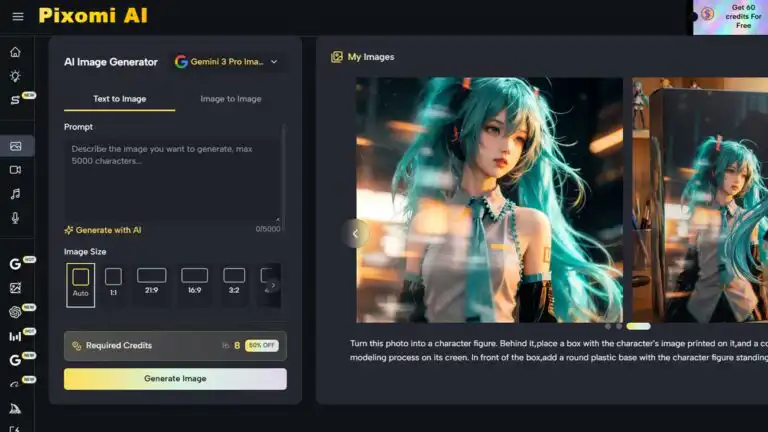
Pixomi AI is the new name for Banana Pro AI. This Pixomi AI review examines whether the rebrand has produced a genuinely broader creative platform or simply placed a new identity over the same image generator.
The short answer is that Pixomi AI is worth testing for creators, bloggers, marketers, and small teams who want multiple image and video models in one account. Its strongest features are model choice, prompt-led image editing, watermark-free downloads, private generations and a visual canvas for linking image, video, music and voice tasks. It is less convincing for organisations that need detailed licensing language, formal asset governance or the precise manual control available in professional design software.
Our 8.4/10 review score uses the DIY AI image-generation framework: image quality, prompt fidelity, style range, consistency, editing capability, commercial safety, realism, model variety and ease of use. We also checked the June 2026 rebrand, current pricing, free credits, model limits, account continuity, and the differences between Pixomi AI, the old Banana Pro AI platform name, and Google’s Nano Banana image models.
Pixomi AI verdict
| Review area | DIY AI verdict |
|---|---|
| Overall rating | 8.4/10 |
| Star rating | ★★★★☆ 4.2/5 |
| Best for | Creators, content sites, marketers, ecommerce sellers and small teams that want multi-model generation in one workspace. |
| Not ideal for | Enterprise brand teams, legally sensitive campaigns, print-critical work or designers who need layered manual editing. |
| Main strength | Broad model access combined with image editing, reusable workflows and several media types. |
| Main weakness | The product is broader than before, but its legal documentation and model labelling are still less clear than those of major first-party platforms. |
Pixomi solves a practical problem. Creators often end up moving the same prompt and reference assets between separate image, video and editing tools. The appeal here is not about access to a single exclusive model. It is the ability to generate an image, edit it, compare it with another model, and feed the result into a video workflow without rebuilding the project elsewhere.
That convenience has limits. Pixomi is still an access and workflow layer over several external model families. Output quality, restrictions, and credit consumption vary with the selected model. A strong result from GPT Image 2 or Gemini 3 Pro Image should not automatically be treated as proof that every Pixomi model performs at the same level.
Banana Pro AI is now Pixomi AI
Banana Pro AI rebranded as Pixomi AI in June 2026 as the product expanded beyond image generation. Existing users keep the same login, generation history, saved work, credits, subscription status and purchase records. No account migration or new registration is required.
The new name is more accurate because the platform now covers image generation, image editing, video, music, voice and visual workflow automation. Pixomi is also available on the web, iOS, and Android, so users can access their assets and generation history outside the desktop browser.
The transition is not completely tidy yet. Several pages on the Pixomi website still use the wording “Banana Pro AI,” while “Banana Pro” also appears as a model label on the image product. That creates avoidable confusion. In this review, Pixomi AI means the overall platform. Banana Pro AI means the former brand, while Nano Banana Pro refers to Google’s Gemini 3 Pro Image model.
Pixomi AI scores
| Metric | Score | What it means in practice |
|---|---|---|
| Image quality | 8.8/10 | Strong results are possible for editorial visuals, product scenes, social assets and concept work, especially through the higher-end models. |
| Prompt fidelity | 8.5/10 | Clear briefs work well, but exact small text, logos, hands, layouts and fixed product details still need checking. |
| Style range | 8.7/10 | Good coverage across photorealism, illustration, anime, cinematic work, product imagery and graphic styles. |
| Consistency | 8.2/10 | Useful for iterative concepts and reference-led edits, but not a substitute for a controlled brand or character system. |
| Editing capabilities | 8.6/10 | Natural-language editing, image-to-image transformation and canvas workflows make it more useful than a basic prompt box. |
| Commercial safety | 7.6/10 | Pixomi promotes commercial usage rights, but risk-sensitive users should review the current terms and the rules of the selected model. |
| Realism | 8.8/10 | Realistic lifestyle and product-style output can be convincing, although quality varies by model and prompt. |
| Model variety | 9.1/10 | One of the strongest reasons to use Pixomi. The current platform lists image and video models from several major providers. |
| Ease of use | 8.4/10 | Approachable for non-technical creators, but the credit table and overlapping model names take time to understand. |
| Overall | 8.4/10 | A capable multi-model creative workspace with genuine workflow value, but weaker documentation than the leading first-party ecosystems. |
What is Pixomi AI?
Pixomi AI is a browser- and mobile-based creative platform that provides access to text-to-image, image-to-image, image editing, text-to-video, image-to-video, music, and voice tools. It is best understood as a multi-model workspace rather than a single proprietary image generator with one fixed visual style.
The current image model list includes Gemini 3.1 Flash Image, Gemini 3 Pro Image, GPT Image 2, GPT-4o Image, Flux Kontext Pro and Max, Seedream, Qwen Image Edit, Grok Imagine Image, Z-Image Turbo, Midjourney and Wan Image. Availability and naming can change, so the live model selector matters more than old screenshots or reviews.
This is different from directly comparing the underlying models. Our best AI image generators guide ranks the performance of models and providers. This review judges Pixomi as a platform, including its billing, interface, workflow tools, storage, privacy claims, documentation and ease of switching between models.
Pixomi AI features reviewed
Multi-model text-to-image generation
The basic workflow is straightforward: choose a model, enter a prompt, set the format and generate. The benefit is choice. A fast model can handle rough concepts, while a more expensive model can be reserved for final-product scenes, text-heavy graphics, or detailed image edits.
Model choice is also the first source of friction. Pixomi’s headline allowance of “up to” a certain number of images assumes the cheapest eligible model. Higher-end models consume more credits. Users who ignore that difference can burn through a plan much faster than expected.
Image-to-image editing
Pixomi supports uploaded reference images and prompt-led changes such as replacing backgrounds, restyling scenes, changing lighting, removing objects and creating variations. This is useful for ecommerce images, campaign concepts, thumbnails and blog graphics where an existing visual needs to be adapted rather than replaced.
Reference preservation still depends on the instruction and model. State exactly what must remain fixed: product shape, label placement, face, pose, clothing, colours or camera angle. Our AI image combiner guide explains the difference between preserving source images and generating a loose visual blend.
Canvas Workflow
The Canvas Workflow is Pixomi’s clearest point of difference from a simple image-generator front end. It uses a visual, node-based workspace where users can connect generation and editing steps. A text prompt can produce an image, branch into several style variations and then feed the chosen result into an image-to-video model.
This is the feature most likely to justify using an aggregator rather than visiting each model provider directly. The useful unit becomes the saved workflow, not the individual generation. A repeatable product-ad pipeline or content-thumbnail process can be reopened and adapted instead of rebuilt from scratch.
Asset library, private generations and watermark-free downloads
Pixomi’s pricing page lists private generation, unlimited storage and HD watermark-free downloads across its plans, including the free option. It also says private generations are not shared publicly or used for training. Those are valuable promises for users who do not want their drafts appearing in a public gallery.
Professional users should still avoid uploading confidential client material without reviewing current policies and contractual requirements. A private-generation label is useful, but it is not a replacement for a negotiated data-processing agreement or enterprise security review.
Video, music and voice generation
The rebrand makes more sense when Pixomi is judged as a wider media platform. Current video options include the Veo, Seedance, Kling, Wan, Runway, and Grok models, with separate allowances for music and voice generation. This can suit a small team that wants to turn one creative concept into an image, a short video, and an audio asset under a single account.
It can also become expensive if the team experiments without a plan. Video models consume credits much faster than image models. Pixomi is most useful when the workflow reduces repeated failed attempts, not when it simply makes it easier to click more models.
Pixomi AI pricing and free credits
Pixomi uses credits rather than a flat unlimited-generation model. At the time of this review, it offered free, monthly, yearly and pay-once purchasing routes. The live pricing page also displayed temporary discounts, so buyers should compare the actual billed amount rather than relying on a promotional monthly equivalent.
| Option | Current allowance | Best fit |
|---|---|---|
| Free | 10 credits after login, weekly check-in credits and up to 5 initial images | Testing the interface and checking whether the available models suit your prompts. |
| Entry monthly | $29.90 per month for 800 credits | Short projects or users who do not want an annual commitment. |
| Entry yearly | $100 per year for 2,400 credits | Light, regular image generation with a low annual cost. |
| Mid-tier | $49.90 monthly for 1,800 credits, or $360 yearly for 21,600 credits | Frequent creators and small teams using both image and video models. |
| Highest tier | $99.90 monthly for 4,000 credits, or $599 yearly for 48,000 credits | Higher-volume generation across several media types. |
The credit total alone is a poor measure of value. On the 2,400-credit yearly plan, the pricing table showed allowances ranging from 2,400 Gemini 3.1 Flash images during a temporary promotion to 480 GPT Image 2 images, 300 Gemini 3 Pro Image generations or 120 Midjourney images. The same plan can therefore feel generous or restrictive depending on the model used.
Judge Pixomi by cost per usable asset. Track how many generations are needed before an image is publishable, then include any editing or video steps. Cheap generations are not good value when ten attempts are needed to produce one usable result.
Pixomi AI commercial use and licensing
Pixomi’s product pages state that generated images can be used commercially and downloaded without watermarks. The current terms also require users to have the rights and permissions needed for uploaded and generated content and prohibit intellectual property infringement.
The weakness is detail. The marketing copy makes broad commercial-rights claims, but the current terms page does not provide equally detailed language explaining output ownership, model-specific conditions or how third-party provider terms interact with Pixomi’s promise. This does not make the platform unusable. It means client campaigns, merchandise and regulated work deserve a written terms check rather than relying on a feature-page sentence.
A sensible rule is to keep records of the model used, the prompt, the source files, the generation date, and the downloaded output. Do not upload images you lack permission to edit, and avoid protected characters, brand assets, celebrity likenesses or living artists’ exact styles where the rights position is unclear.
Pixomi AI compared with leading image generators
The scores below are not perfectly like-for-like. Pixomi’s 8.4/10 is a platform review score. The other scores come from the DIY AI image-generation dataset and assess the underlying model or provider family.
| Tool | Best fit | Score | Main trade-off |
|---|---|---|---|
| Pixomi creative platform | Multi-model creation, editing and reusable media workflows | 8.4/10 | Convenient, but model costs and licensing language require closer checking. |
| OpenAI GPT Image 2 | Best all-round image generation and editing | 9.6/10 | Strong direct workflow, but not a marketplace for switching between many providers. |
| Google Gemini Image | Text-rich visuals, editing and Google ecosystem use | 9.4/10 | Use it directly when Google’s image models are the main reason for subscribing. |
| Midjourney | Art direction, moodboards and cinematic visuals | 9.1/10 | Excellent visual taste, but less convenient for exact business edits and text-heavy layouts. |
| Adobe Firefly | Commercially safer creative production and Adobe workflows | 8.9/10 | Better governance and manual refinement, but less attractive for low-cost multi-model experimentation. |
Use Pixomi when reducing tool switching is the main goal. Use a provider directly when one model already meets the workflow, and you want the clearest route to its native controls, support and terms.
Pixomi AI pros and cons
| Pros | Cons |
|---|---|
| Access to several major image and video model families from one account. | Credit consumption varies sharply between models. |
| Canvas Workflow can connect generation, editing and video steps. | The rebrand is live, but parts of the website still use Banana Pro terminology. |
| Free credits allow you to test the interface before paying. | The free allowance is too small for a serious quality comparison. |
| Watermark-free downloads, private generations and asset storage are useful creator features. | Commercial-use marketing claims are clearer than the detailed terms language. |
| Web and mobile access suit creators who work across devices. | It is not a replacement for Photoshop, Firefly or another layered professional editor. |
| Good fit for images that will later be adapted into short videos or other media. | More available models can create decision overhead for beginners. |
See more of our reporting in Google Top Stories, AI Overviews and AI Mode.
Who should use Pixomi AI?
Pixomi is a good fit for bloggers producing featured images, YouTubers testing thumbnail directions, ecommerce sellers creating product scenes, freelancers building moodboards and small marketing teams repurposing one idea across several formats.
It also suits users who have not settled on a preferred image model. Testing the same brief across Gemini, GPT Image, Flux, Seedream or Midjourney can reveal which model handles a particular product, visual style or editing task best.
Pixomi is not the first recommendation for highly regulated brands, confidential product development, identity-sensitive imagery or production work requiring formal colour, typography and asset controls. In those cases, direct provider contracts and established professional software are usually easier to govern.
Common Pixomi AI mistakes
Choosing a model without checking its credit cost
A plan’s headline image allowance applies only to particular low-cost models. Check the model table before starting a batch. Reserve expensive options for the work that benefits from them.
Using one vague prompt across every model
Models interpret the same wording differently. Keep the creative brief stable, but adjust the structure when a model needs clearer instructions about composition, text, references or elements that must not change.
Assuming image editing will preserve every detail
Tell the model what to lock. “Change the background” is not enough when a product’s shape, logo, stitching and reflections must remain identical. Use the DIY AI photo prompt framework to specify subject, setting, composition, lighting and fixed details.
Treating a commercial-use claim as complete legal clearance
The tool cannot grant rights to an uploaded photo, logo or protected character that the user did not own in the first place. Commercial projects need both suitable platform terms and lawful source material.
A practical Pixomi AI prompt
Pixomi works best with a concise art-direction brief rather than a pile of keywords. Google’s image prompt guide recommends defining the subject, setting, style and overall feel. The same structure transfers well to the models available through Pixomi.
Create a realistic editorial product photograph of a matte black insulated water bottle on a light oak kitchen island. Use soft morning window light from the left, natural shadows, a 50mm lens look and shallow depth of field. Keep the bottle shape simple and leave clean negative space on the right for headline text. Do not add a logo or text inside the image.For an edit, be more restrictive:
Use the uploaded product photo as the exact reference. Keep the product shape, colour, label position and proportions unchanged. Replace only the background with a warm modern kitchen, then match the reflections and shadows to the new scene. Do not alter the product design or add text.Is Pixomi AI legit?
Pixomi AI is an active creative platform with live image, video, music and voice tools, account billing, mobile apps, published policies and a formal transition page for existing Banana Pro AI users. Existing accounts and purchases continue under the new brand.
The better question is whether its trust level matches the job. For blog graphics, social content, concept work and low-risk marketing drafts, Pixomi offers a practical set of tools. For major client campaigns or rights-sensitive production, review the latest terms, confirm model-specific restrictions and retain generation records.
Final verdict: Is Pixomi AI worth using?
Pixomi AI is worth trying when the main problem is a fragmented creative workflow. Its model range, natural-language editing, media tools and Canvas Workflow give it more substance than a basic third-party image generator. The rebrand reflects what the product has become: a broader workspace for moving from prompt to image, edit and video.
It does not beat every underlying model. Users who only want Gemini Image, GPT Image 2, Midjourney, or Firefly may find clearer controls and terms by going directly to those providers. Pixomi earns its place when a single account and a single reusable workflow are more valuable than first-party purity.
Start with the free credits, run the same real brief across two or three models and calculate the cost per usable result. For direct side-by-side model testing, use the DIY AI Image Prompt Playground. For a wider workspace that covers images, video, audio, and music, explore DIY AI Studio.
Pixomi AI FAQs
What happened to Banana Pro AI?
Banana Pro AI rebranded as Pixomi AI in June 2026. Existing logins, credits, subscriptions, purchases, saved work and generation history remain available without migration.
Is Pixomi AI the same as Nano Banana Pro?
No. Pixomi AI is a multi-model creative platform. Nano Banana Pro is Google’s Gemini 3 Pro Image model. Pixomi can provide access to Google image models, but it is a separate company and interface.
Is Pixomi AI free?
Pixomi offers free login credits and weekly check-in credits. The allowance is suitable for checking the interface, but a meaningful comparison across expensive models will usually require paid credits.
Does Pixomi AI add watermarks?
The current pricing page lists HD watermark-free downloads on free and paid options. Check the live plan before relying on this in production, as plan rules can change.
Can Pixomi AI images be used commercially?
Pixomi’s product pages state that generated images include commercial use rights. Users remain responsible for source-image permissions and intellectual-property compliance. Rights-sensitive projects should review the current terms and any relevant model conditions.
What is Pixomi AI best for?
It is best for multi-model experimentation, blog graphics, social visuals, product-scene concepts, prompt-led image editing and workflows that move an image into video or other media.
What are the best Pixomi AI alternatives?
OpenAI GPT Image 2 is the strongest all-round image option in the DIY AI dataset. Google Gemini Image is excellent for text-rich visuals and editing, Midjourney is strong for art direction, and Adobe Firefly is better suited to commercially governed creative production.
Should existing Banana Pro users create a new Pixomi account?
No. Pixomi says existing Banana Pro AI accounts retain the same login, history, credits, subscription, and purchase records.
You Might Also Like:

Best AI Image Tools 2026

AI Image Combiner

AI Photo Prompt
