
AI Photo Prompt: How to Write Prompts That Generate Realistic Images
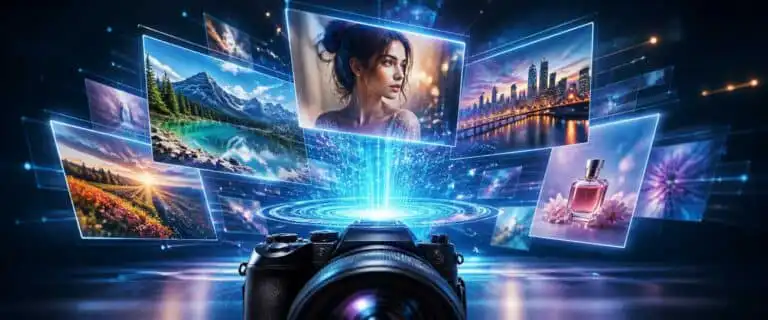
An AI photo prompt is a written instruction that tells an image generator what kind of photo to create, including the subject, setting, camera style, lighting, composition and final mood. A weak prompt usually gives the model a vague idea. A strong prompt gives it enough visual direction to produce an image that looks intentional rather than random.
The fastest working formula is simple: describe the subject, then the scene, then the photographic treatment. For example: “A close-up product photo of a black ceramic coffee mug on a walnut desk, soft morning window light, shallow depth of field, 50mm lens, realistic shadows, editorial lifestyle photography.”
This guide explains how to write an AI photo prompt for realistic portraits, products, interiors, food, travel, ecommerce and social content. It covers prompt structure, examples, common mistakes, camera terms that actually help, and a practical checklist you can use before generating. For tool selection rather than prompt writing, see our guide to the best AI image tools.
The Best AI Photo Prompt Formula
A reliable AI photo prompt should give the model six things:
- Subject: what the image is mainly about
- Context: where the subject is and what is happening
- Composition: close-up, wide shot, overhead, centred, rule of thirds
- Lighting: soft daylight, studio flash, golden hour, neon, low-key lighting
- Camera language: lens, depth of field, angle, focal length, film style
- Finish: realistic, editorial, documentary, luxury product, natural skin texture
Here is the reusable structure:
[Subject] in/on/at [setting], [action or pose], [composition], [lighting], [camera or lens style], [texture/detail notes], [mood], [realistic photo style]That may look basic, but it solves the most common problem with AI photos: the model fills in missing information by guessing. Sometimes that guess is useful. Often it produces plastic skin, strange lighting, distorted props or a scene that feels like a stock image with no visual discipline.
Copy-and-Paste AI Photo Prompt Template
Use this template when you want predictable results:
Create a realistic photo of [main subject]. The scene is [location or environment]. The subject is [pose/action/arrangement]. Use [composition/framing], [lighting style], and [camera/lens style]. The image should feel [mood or editorial style]. Include [important details]. Avoid [things you do not want, if the tool supports negative instructions].Example:
Create a realistic photo of a handmade leather notebook on a wooden cafe table. The scene is a quiet independent coffee shop with blurred background shelves and warm interior lighting. Use a close-up composition, shallow depth of field, natural shadows and a 50mm lens look. The image should feel calm, tactile and editorial. Include visible leather grain, slightly worn paper edges and a ceramic coffee cup in the background.This gives the model enough hierarchy. The notebook is the subject. The cafe is the context. The lens and lighting steer the visual style. The texture notes stop the result looking too clean.
AI Photo Prompt Examples by Use Case
The right prompt depends on the job. A product image needs control and clean detail. A portrait needs believable skin, pose and lighting. A travel-style image needs atmosphere without turning into fantasy art.
| Use case | Prompt example | Best for |
|---|---|---|
| Product photo | Realistic studio product photo of a matte black wireless keyboard on a light grey desk, top-down composition, softbox lighting, clean shadows, minimal tech editorial style, crisp edges, no text or logos | Ecommerce, affiliate pages, landing pages |
| Portrait | Natural portrait photo of a freelance designer sitting beside a large window in a small studio, relaxed expression, soft daylight, 85mm lens look, shallow depth of field, realistic skin texture, documentary editorial style | Author pages, personal branding, creative sites |
| Interior | Realistic interior photo of a compact home office with oak desk, ergonomic chair, plants and laptop, wide-angle composition, late afternoon sunlight, natural shadows, Scandinavian design, lived-in but tidy | Home office, productivity, design content |
| Food | Close-up food photography of a sourdough sandwich on a ceramic plate, rustic wooden table, side lighting, shallow depth of field, visible crumb texture, natural colours, magazine-style food photo | Recipe blogs, restaurant mockups, social posts |
| Travel | Realistic travel photo of a narrow stone street in a coastal Mediterranean town, early morning light, small balconies, quiet atmosphere, 35mm documentary photography, natural colours, no crowds | Travel guides, editorial headers, moodboards |
| Social media | Bright lifestyle photo of a reusable water bottle beside running shoes on a park bench, sunrise light, energetic but natural mood, shallow depth of field, realistic fitness photography | Instagram, Pinterest, newsletters |
What Makes an AI Photo Prompt Look Real?
Realism usually comes from constraints, not from adding the word “realistic” ten times. A believable photo has coherent lighting, a plausible lens, correct physical scale and small imperfections. The best prompts guide those details without overloading the model.
Use photographic language only where it helps
Camera terms can improve results, but only when they match the image you want. “85mm lens” suits portraits because it suggests compression, shallow depth of field and flattering proportions. “24mm wide-angle” suits interiors and travel scenes, but it can distort faces if used carelessly.
Useful terms include:
- 50mm lens: natural perspective for lifestyle and product-adjacent scenes
- 85mm lens: flattering portrait look with background blur
- 35mm lens: documentary, street, travel and environmental portraits
- macro photography: close-up detail for textures, jewellery, food or small objects
- shallow depth of field: blurred background with subject emphasis
- overhead flat lay: clean top-down product or desk compositions
Do not stack every camera phrase you know. “Ultra realistic DSLR cinematic 8K macro portrait wide-angle drone photo” is not precise. It is visual noise.
Specify the lighting
Lighting controls realism more than most beginners expect. If the prompt does not define light, the model often defaults to glossy stock-photo lighting.
For natural photos, use phrases like:
- soft morning window light
- overcast daylight
- golden hour side light
- diffused studio lighting
- low-key lighting with gentle shadows
- natural indoor light, not overexposed
For cleaner commercial images, studio terms work better: softbox lighting, controlled shadows, white sweep background, rim light, product catalogue style. For editorial images, use mood-driven lighting: late afternoon sunlight, muted tones, documentary flash, warm tungsten light.
Give the image a physical setting
“A laptop on a desk” is too thin. What desk? What room? What time of day? What objects are nearby? The setting gives the model visual logic.
Compare these two prompts:
AI photo prompt: a laptop on a desk

Result:
Better AI photo prompt: realistic photo of a silver laptop open on a compact oak desk in a small flat, notebook and black coffee beside it, soft cloudy daylight through a window, slight background blur, natural work-from-home atmosphere

Result: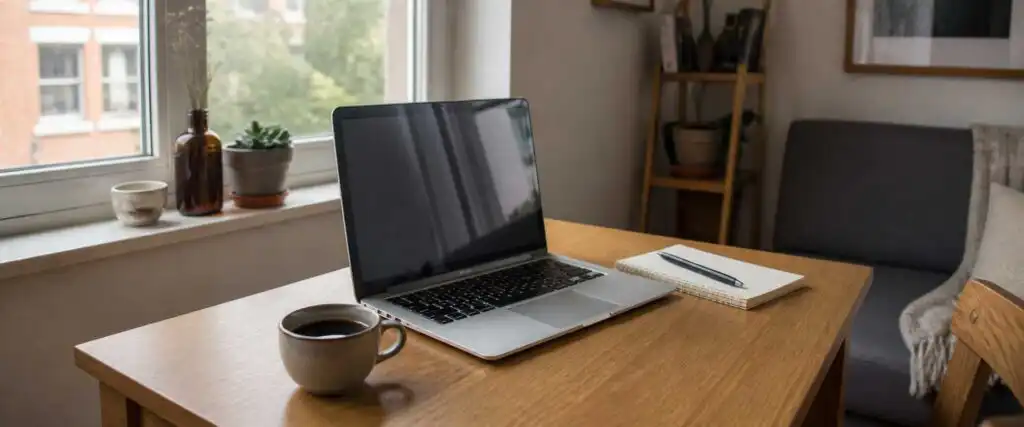
The second prompt is not longer for the sake of it. It gives the image a real environment.
Prompt Terms That Often Improve AI Photos
Some prompt terms are genuinely useful because they affect composition, light or texture. Others are weak because they sound impressive without giving the model a clear instruction.
| Prompt term | What it does | Use with care? |
|---|---|---|
| Realistic photo | Pushes away from illustration or 3D render | No, but use once |
| Natural skin texture | Reduces overly smooth portrait results | Yes, avoid over-detailing faces |
| Shallow depth of field | Blurs the background and isolates the subject | No |
| Editorial photography | Adds a magazine-style composition and finish | No |
| Studio product photography | Creates controlled lighting and clean object presentation | No |
| Cinematic | Can add dramatic lighting and colour grading | Yes, often overused |
| Ultra detailed | Can improve texture but may create artificial sharpness | Yes |
| 8K | Usually acts as a vague quality signal, not a true resolution control | Yes |
Modern image models are better at following natural prompts than older systems, so you do not need to write like a keyword list. OpenAI’s own image generation prompting guide also points towards clear production-style instructions rather than messy prompt stuffing.
AI Photo Prompts for Different Styles
Realistic portrait prompt
Realistic portrait photo of a 35-year-old small business owner standing in a compact workshop, relaxed posture, soft window light from the left, 85mm lens look, shallow depth of field, natural skin texture, muted background, documentary editorial photography, no heavy retouchingWhy it works: the subject has a role, the location supports the story, the lighting direction is clear and the finish avoids plastic skin.
Professional headshot prompt
Professional headshot photo of a software consultant against a warm neutral studio background, shoulders-up framing, confident natural expression, soft diffused studio lighting, 85mm portrait lens look, realistic skin texture, clean business editorial styleFor headshots, keep the prompt restrained. Too many props or background details can distract from the face.
Product photography prompt
High-quality product photo of a stainless steel water bottle standing on a pale stone surface, soft studio lighting, subtle shadow, front three-quarter angle, minimal background, crisp reflections, realistic ecommerce photography, no brand logo, no textProduct prompts should control surface, angle and reflection. Metallic and glass objects often need extra instruction because AI models can exaggerate shine.
Fashion photo prompt
Editorial fashion photo of a model wearing a charcoal wool coat on a quiet city street, overcast daylight, full-body composition, 50mm lens look, natural movement, muted urban background, realistic fabric texture, modern magazine photographyFashion prompts work best when you define the garment, body framing, movement and environment. Otherwise the model may focus on the face and under-describe the clothing.
Food photo prompt
Realistic food photo of handmade pasta in a shallow ceramic bowl, fresh basil and parmesan on top, rustic kitchen table, side window light, shallow depth of field, visible sauce texture, warm natural colours, editorial restaurant photographyFood needs texture. Mention crumb, steam, sauce, glaze, char, grain or freshness where relevant.
Travel photo prompt
Documentary travel photo of a quiet mountain village at sunrise, stone houses, mist in the valley, warm light touching the rooftops, wide composition, 35mm lens look, natural colours, realistic atmosphere, no tourists in foregroundTravel prompts often become postcard clichés. Add time of day, weather and a specific human-scale detail to make them feel less generic.
How to Improve a Bad AI Photo Prompt
When a prompt fails, do not rewrite everything at once. Change one variable: lighting, composition, subject detail or style. This makes it easier to see what caused the improvement.
| Weak prompt | Problem | Improved prompt |
|---|---|---|
| A realistic office | No subject, angle or lighting | Realistic photo of a small modern home office, oak desk facing a window, laptop open, notebook and desk lamp, wide-angle composition, soft morning daylight, tidy but lived-in |
| A woman drinking coffee | Too generic and likely stock-looking | Natural lifestyle photo of a woman drinking coffee at a small kitchen table on a rainy morning, relaxed expression, soft window light, 50mm lens look, muted colours, realistic skin texture |
| Cool tech product photo | “Cool” gives no visual instruction | Studio product photo of a compact black smart speaker on a matte grey surface, controlled softbox lighting, subtle reflection, front three-quarter angle, minimal premium tech aesthetic |
| A dramatic car photo | Missing location and camera treatment | Realistic automotive photo of a dark blue electric car parked on a wet city street at night, neon reflections on the road, low camera angle, 35mm lens look, cinematic but natural lighting |
Common AI Photo Prompt Mistakes
Writing a prompt that is too short
Short prompts are fine for exploration, but poor for control. “Luxury watch photo” may produce something attractive, but you have not controlled the strap, dial, surface, lighting, angle or brand safety. For commercial use, that is risky.
Mixing incompatible styles
“Documentary studio flash golden hour flat lay macro wide-angle portrait” pulls the model in several directions. Choose one main visual language. A documentary street photo and a polished studio product shot are different instructions.
Overusing quality words
Words like “stunning”, “beautiful”, “amazing” and “high quality” do less than beginners expect. They describe your desired reaction, not the image. Replace them with physical details: light, surface, colour, framing, subject position and texture.
Forgetting what should not appear
If the tool supports negative prompts or exclusion instructions, use them. This is especially useful for ecommerce and editorial work where you may want no text, no logo, no watermark, no extra fingers, no distorted hands, no duplicate objects or no people in the background.
Expecting perfect text inside images
AI image models have improved at rendering text, but text-heavy images can still fail. For serious banners, posters, infographics or product labels, generate the visual first and add final typography in a design tool. That gives you control over spelling, hierarchy and accessibility.
See more of our reporting in Google Top Stories, AI Overviews and AI Mode.
Negative Prompts for AI Photos
Negative prompts tell the model what to avoid. Not every tool handles them in the same way, so treat them as guidance rather than a guarantee.
Useful negative instructions include:
- no text
- no watermark
- no logo
- no extra fingers
- no distorted hands
- no plastic skin
- no overexposure
- no duplicate objects
- no cartoon style
- no 3D render
- no unrealistic reflections
For natural images, “no over-smoothed skin” and “no artificial studio glow” can help. For product photos, “no brand logo” and “no text” are often essential.
AI Photo Prompt Checklist
Before generating, check your prompt against this list:
- Is the main subject obvious?
- Have you described the setting?
- Have you chosen a camera angle or composition?
- Have you specified the lighting?
- Have you used only one main visual style?
- Have you included important textures or materials?
- Have you removed vague quality words?
- Have you listed anything that should not appear?
- Does the prompt sound like a photo brief rather than a keyword dump?
If the answer is yes, the prompt is usually strong enough to test.
Best AI Photo Prompt Structure for Beginners
Beginners should start with a plain-language brief rather than trying to memorise prompt jargon. The best beginner structure is:
Photo of [subject] in [place], [what the subject is doing], [lighting], [camera angle], [style], [details to include], [details to avoid].Example:
Photo of a wooden desk setup in a small apartment, laptop open with notebook and coffee beside it, soft morning light from a nearby window, slightly angled overhead view, realistic lifestyle photography, include natural shadows and tidy cables, avoid text and logos.This works because it mirrors how a photographer would receive a simple creative brief. It is not trying to trick the model. It is giving it a clear job.
How Long Should an AI Photo Prompt Be?
Most good AI photo prompts are between 25 and 80 words. Shorter prompts are useful for quick ideation. Longer prompts are better when you need a specific outcome, but only if the extra words add visual instruction.
A practical rule: if a word does not affect the subject, setting, composition, lighting, texture, mood or exclusions, cut it.
For example, this is bloated:
An incredibly beautiful and visually stunning professional high-quality realistic image of a premium modern luxury workspace that looks amazing and attractive for online contentThis is stronger:
Realistic photo of a premium modern workspace with walnut desk, black monitor, leather chair and warm desk lamp, low-angle composition, soft evening lighting, subtle shadows, editorial interior photographyThe second prompt gives the model things it can actually render.
FAQ
An AI photo prompt is a written description used to generate a photo-style image with an AI image tool. It usually includes the subject, scene, lighting, composition, camera style and mood.
Start with the subject, add the setting, choose the lighting, define the camera angle and include realistic details such as material, texture and shadows. Avoid vague words and do not mix too many styles in one prompt.
Include the subject, environment, action or pose, composition, lighting, lens style, mood, textures and any exclusions. For commercial work, also mention whether logos, text, watermarks or people should be avoided.
Yes, but only when used carefully. Terms like 35mm, 50mm, 85mm, macro photography, shallow depth of field and overhead flat lay can steer the image. Random camera jargon can make the prompt less coherent.
Yes. Product prompts work best when they specify the product material, surface, angle, lighting, background and reflection style. For ecommerce use, always check details carefully before publishing.
Common causes include vague prompts, mismatched lighting, overused words like “cinematic”, too much smoothing, unrealistic reflections or missing physical context. Add specific lighting, texture and camera direction to improve realism.
Final Takeaway
A good AI photo prompt is not a pile of impressive adjectives. It is a compact photo brief. Tell the model what the subject is, where it is, how it should be lit, how it should be framed and what visual details matter.
For quick experiments, keep the prompt short. For publishable images, be more deliberate. The best results usually come from one clear visual idea, realistic constraints and a second pass where you refine the weak parts instead of starting again from scratch.
You Might Also Like:

Best AI Image Tools 2026
AI Image Combiner
Best AI Image Generator For Realistic Photos
