
Best AI Pet Portrait Generators 2026: Free Tools for Dogs, Cats and Custom Pet Art
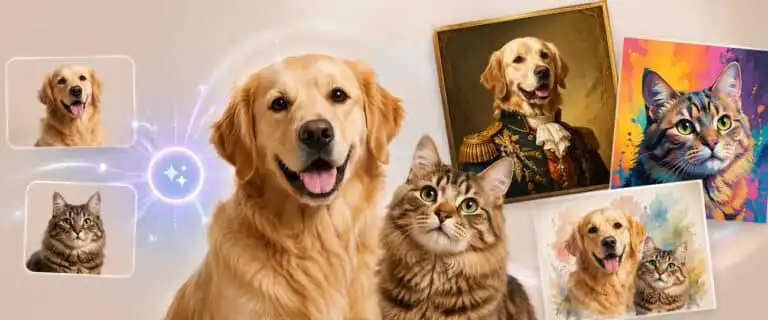
The best AI pet portrait generator depends on what you want from the final image: a quick, free dog portrait, a polished cat painting for print, a funny royal pet avatar, or a repeatable workflow for gifts and social posts. This comparison covers the strongest options for AI pet portraits in 2026, including free tools, app-based generators, style-led portrait tools and generators that work better for commercial-safe creative use.
We compared the tools using a practical pet portrait framework: photo upload friction, identity preservation, dog and cat handling, style range, download quality, free access, watermark risk, pricing clarity, and the level of control you get after the first result. For broader model quality, see our best AI image tools ranking, but this page is narrower: it is about turning a real pet photo into a usable portrait without wasting credits on poor first drafts.
The quick verdict: Adobe Firefly is the safest all-around pick, DreamPets is the most pet-specific mobile option, PixelBin is useful for fast free tests, PawToAI is better for trained pet model packs, VisualGPT is good for no-sign-up experimentation, and Kaze.ai is worth trying for free stylised portraits. The right choice depends less on the headline promise and more on how well the tool keeps your pet recognisable.
Best AI pet portrait generators: quick comparison
| Tool | Best for | Free access | Main trade-off | Pet portrait rating |
|---|---|---|---|---|
| Adobe Firefly | Brand-safe pet portraits, posters, cards and polished creative edits | Free to start, more generative credits on paid Adobe plans | Less pet-specific than dedicated apps | 4.5/5 |
| DreamPets | Mobile-first dog and cat portraits with lots of preset styles | Free to start, PRO upgrades for heavier use | Subscription prompts can appear quickly | 4.2/5 |
| PixelBin | Fast browser-based free pet portrait tests | Free online tool, with credit limits across related AI tools | Less advanced art direction than bigger image models | 4.0/5 |
| PawToAI | Pet owners who want a trained model from multiple photos | Free demo portraits using demo models | Needs more setup because it asks for multiple pet photos | 3.9/5 |
| VisualGPT | No-sign-up pet portrait experiments | Free, no sign-up route available | Output control can be lighter than specialist editors | 3.8/5 |
| Kaze.ai | Free stylised portraits for dogs, cats and less common pets | Free tool | Best treated as a casual generator rather than a print workflow | 3.7/5 |
How we judge an AI pet portrait generator
Pet portraits are harder than generic AI art. A fantasy castle, oil painting texture or comic background may look impressive, but the result fails if the dog no longer looks like the same dog. The strongest tools preserve the animal’s face shape, colouring, ear position, markings and expression while still changing the scene or art style.
For a fair page-level test, use the same two reference images across every tool: one clear dog photo and one clear cat photo. The dog photo should show fur detail, eyes and muzzle shape. The cat photo should include whiskers, eye colour and coat markings. Avoid heavily filtered phone images because they make every generator look worse.
We score each tool against these practical criteria:
- Pet likeness: Does the output still resemble the original animal?
- Dog and cat handling: Does it work across both common pet types?
- Style control: can you choose royal, cartoon, sketch, watercolour, fantasy or realistic styles?
- Free access: Can a reader create something useful without paying first?
- Download quality: Is the output good enough for social media, gifts, or small prints?
- Workflow friction: does it need an account, multiple uploads, credits or an app install?
- Commercial confidence: Would we trust the output for a public-facing project?
That last point matters. A pet owner making a funny WhatsApp image has different needs from a small shop selling personalised pet mugs. If the image will be printed, sold, used in ads or placed on a product page, commercial safety and output consistency become more important than novelty.
Adobe Firefly: best overall AI pet portrait generator
Rating: 4.5 out of 5
Adobe Firefly pet portrait generator is the best all-around choice for most people because it balances image quality, editing control and commercial safety better than the smaller pet-only tools. It lets you upload a pet photo, use it as a reference, add a prompt and explore styles such as cartoon, watercolour, fantasy, sketch, realism and royal portrait treatments.
Firefly is not only useful for one-off pet art. It also fits into a wider creative workflow. You can generate a portrait, refine the prompt, change the composition, adjust the tone and continue editing inside the Adobe ecosystem. That makes it a better choice for creators who might turn a pet portrait into a card, poster, social graphic, digital comic panel or printed gift.
In our 2026 image generation dataset, Adobe Firefly scores 8.9/10 overall, with particularly strong scores for editing capabilities and commercial safety. For pet portraits, that matters because the output is often emotional, shareable and sometimes commercial. A funny dog astronaut image is harmless enough for personal use, but a print-on-demand design or paid brand asset needs a more careful tool choice.
| Pros | Cons |
|---|---|
| Strong image quality and polished creative styles | Not built only for pet portraits, so some pet-specific presets are less direct |
| Good editing controls after the first generation | More advanced use may need Adobe credits or a paid plan |
| Better commercial safety than most small pet generators | Can take more prompting than simple one-click pet apps |
Best for: pet owners who want high-quality results, creators making pet-themed assets, small businesses creating printable designs and anyone who already uses Adobe tools.
DreamPets: best pet-specific app for quick dog and cat portraits
Rating: 4.2 out of 5
DreamPets is one of the most obvious dedicated AI pet portrait tools because the whole product is built around pets rather than general image generation. It is designed for playful styles, avatars, videos and pet art from a single photo. That makes it easier for casual users than a blank-image generator, where you have to write a detailed prompt from scratch.
The main advantage is focus. A pet-specific app can guide people into the styles they actually want: royal portraits, cartoon pets, fantasy scenes, cute avatars, seasonal looks and social-friendly images. For gift-giving moments, that matters. Most users do not want to learn prompt engineering to make their spaniel look like a Victorian duke.
The trade-off is pricing and control. DreamPets has free access routes, but its app listings show PRO upgrades and in-app purchase options. That does not make it a bad choice, but it does mean you should test the first few outputs before paying for a subscription. Pet portrait apps can look fantastic in examples and still struggle with your exact animal’s markings.
| Pros | Cons |
|---|---|
| Purpose-built for pet owners rather than general design work | Subscription-style upgrades may appear quickly |
| Good choice for casual dog and cat portraits | Less suitable for users who want full creative control |
| Strong preset-style workflow for gifts and social sharing | App-first experience may not suit desktop editing workflows |
Best for: pet owners who want a simple mobile app with lots of pet-specific styles and minimal setup.
PixelBin: best free browser option for fast pet portrait tests
Rating: 4.0 out of 5
PixelBin’s pet portrait generator is a useful choice when you want a quick browser-based test without installing an app. It is positioned as a free online tool for turning a pet photo into an animated or stylised character, which aligns well with the search intent behind “ai pet portrait generator free”.
The best reason to use PixelBin is speed. Upload a clear pet photo, choose or describe the style, and see whether the tool can keep the animal recognisable. That makes it a good first stop before using a more credit-sensitive platform. If the source photo is poor, PixelBin can also help you spot problems early: bad lighting, hidden eyes, cropped ears, or a cluttered background.
Its limitation is depth. PixelBin is useful for quick pet portraits, avatars and social images, but it is not the strongest option for advanced art direction or commercial brand control. For more deliberate image prompting, read our AI photo prompt guide before running your final pet portrait prompt through a higher-control generator.
| Pros | Cons |
|---|---|
| Fast browser workflow for quick pet portrait tests | May be limited by credits or related tool restrictions |
| Useful for avatars and casual social images | Less suitable for highly controlled print assets |
| Simple enough for non-designers | Output review is still needed for fur detail and facial accuracy |
Best for: readers who want a free AI pet portrait generator they can test quickly in a browser.
PawToAI: best for trained pet model portraits
Rating: 3.9 out of 5
PawToAI takes a different route from the quick one-photo tools. It asks users to upload multiple photos of the same pet, then generates custom AI portraits from that pet model. This can be a better fit when likeness matters, and you want more than one usable result from the same animal.
The setup takes longer because PawToAI asks for a set of pet photos rather than a single upload. That is not necessarily a weakness. Multiple images can help a system better understand markings, face shape, and colouring, especially for pets with distinctive features. A black-and-white cat, a brindle dog, or a pet with one unusual ear often benefits from more reference material.
The downside is friction. Casual users may not want to upload 15 photos before seeing something fun. PawToAI does offer a free tier with demo model portraits, but the proper value is in the more committed workflow. Treat it as a pet portrait pack generator rather than a quick free toy.
| Pros | Cons |
|---|---|
| Better suited to repeated portraits of the same pet | Requires more photos and setup than one-click tools |
| Useful for pet owners creating a gift pack or print set | Not the fastest option for a single casual portrait |
| A one-off pricing model may suit people who avoid subscriptions | Free access is more limited than fully free browser tools |
Best for: pet owners who want several portraits of the same dog or cat and are willing to upload multiple reference photos.
VisualGPT: best no-sign-up AI pet portrait generator
Rating: 3.8 out of 5
VisualGPT is useful because it lowers the barrier to entry. Its AI pet portrait generator is presented as free and no-sign-up, which is exactly what many searchers want when they type “ai pet portrait generator free”. They do not want a trial funnel. They want to upload one image and see if the idea works.
This makes VisualGPT a good experimental tool. Try it when you are testing styles, checking whether a pet photo is usable, or creating a quick portrait for a profile image or social post. It is also a sensible choice for readers who are wary of installing another mobile app to create a single image.
The trade-off is precision. Lightweight browser tools are often better for first drafts than polished final images. Check the eyes, paws, whiskers, ears and fur pattern before using the result publicly. If the portrait turns a Labrador into a generic golden dog, the style has beaten the subject. That is not a good pet portrait.
| Pros | Cons |
|---|---|
| No-sign-up workflow is ideal for quick tests | Less reliable for high-control edits |
| Good for simple pet art and casual portraits | May need several generations before the likeness feels right |
| Low-friction option for beginners | Not the strongest choice for print-quality work |
Best for: users who want to test AI pet art quickly without creating an account first.
Kaze.ai: best free tool for unusual pet styles
Rating: 3.7 out of 5
Kaze.ai is worth including because it supports more than the standard dog-and-cat examples. Its pet portrait page shows different animals and stylised outputs, including painterly and classical looks. That is useful for owners of rabbits, parrots, guinea pigs, reptiles and other pets that are often ignored by simpler dog portrait tools.
The best use case is casual creative exploration. If you want to see a rabbit as a Rococo painting, a cat in a Van Gogh-style scene, or a dog in a soft garden portrait, Kaze.ai can produce fun first drafts. It is especially useful when the goal is charm rather than strict realism.
The limitation is that free generators can vary in consistency. A tool may produce a lovely example on its homepage but struggle with a darker photo, a busy background, or an animal photographed from an unusual angle. Use Kaze.ai as a free creative test, then move to Firefly or a more controlled workflow if the image needs polishing.
| Pros | Cons |
|---|---|
| Good for playful styles and less common pets | Better for casual portraits than finished commercial assets |
| Free access makes it easy to test | Output consistency may depend heavily on source photo quality |
| Useful for quick gift ideas and social posts | Limited professional editing depth compared with Firefly |
Best for: pet owners who want free stylised portraits of dogs, cats and other small animals.
Which AI pet portrait generator is actually free?
“Free” can mean several different things in this niche. Some tools are free with no sign-up. Some are free until you hit a credit wall. Some are free to install but push premium styles, HD downloads or subscription access. That distinction matters because many pet portrait searches are casual. A reader may only want one funny image for a birthday card.
| Tool | Free status | What to check before relying on it |
|---|---|---|
| Adobe Firefly | Free to start | Generative credit limits and paid Adobe plan benefits |
| DreamPets | Free to start | PRO prompts, export limits and style restrictions |
| PixelBin | Free online tool | Credit limits across related AI image tools |
| PawToAI | Free demo portraits | Whether the demo model is enough or you need paid custom pet portraits |
| VisualGPT | Free no-sign-up route | Download quality, usage limits and watermark behaviour |
| Kaze.ai | Free tool | Output quality on your specific animal and style |
For a genuinely free first attempt, start with VisualGPT, PixelBin or Kaze.ai. For the best balance of quality and safer creative use, start with Firefly. For a multi-image gift set, PawToAI is more logical because its workflow is built around repeated portraits of the same animal.
Best AI dog portrait generator
For AI dog portraits, the most important test is the preservation of the muzzle and ears. Many generators can make a dog look cute, but fewer keep the actual face shape intact. This is especially noticeable in breeds with strong visual structure: dachshunds, French bulldogs, huskies, poodles, spaniels, and German shepherds.
Adobe Firefly is the strongest all-around dog portrait option because it offers better prompts and editing controls. DreamPets is easier for casual app users who want a preset style quickly. PawToAI is the better option if you want many outputs of the same dog and are willing to upload more photos.
A good dog portrait prompt should mention the breed, coat colour, expression, pose, art style and what must remain unchanged. For example: “Create a royal oil painting portrait of this golden retriever, keep the same face shape, black nose, soft brown eyes and wavy golden fur, seated in a dark green velvet chair, warm studio lighting, detailed brush texture.”
Best AI cat portrait generator
AI cat portraits often fail in quieter ways than AI dog portraits do. The output may look attractive, but the whiskers, eye colour, face width or coat markings drift. With tabby, tuxedo, and tortoiseshell cats, markings are part of their identity. If the generator treats them as decorative texture, the portrait loses the pet.
Firefly is again the best controlled option. VisualGPT and Kaze.ai are useful for quick cat art tests, especially if the goal is a fun image rather than a print. For more repeated cat portraits, PawToAI can make sense, as multiple photos provide the system with more reference material.
Use prompts that protect the exact features. Mention “keep the white patch on the chest”, “preserve the green eyes”, “keep the left ear marking” or “do not change the tabby stripe pattern” if the tool supports detailed instruction. Small details make the difference between a generic cat painting and a portrait that feels personal.
See more of our reporting in Google Top Stories, AI Overviews and AI Mode.
What makes a good source photo for a pet portrait?
The source photo matters more than the tool marketing suggests. A pet portrait generator is not a mind reader. If the photo hides the eyes, blurs the fur or cuts off the ears, the model has to invent details. Sometimes that invention is charming. Often it produces a portrait that looks like the right species but not the right pet.
Use this quick checklist before uploading:
- Choose a photo where the pet’s face is clear and well-lit.
- Avoid heavy shadows across the eyes or muzzle.
- Use a photo with both ears visible if ear shape matters.
- Keep the background simple where possible.
- Do not use a low-resolution screenshot from social media if you have the original.
- For black pets, increase exposure slightly before uploading so the model can read fur detail.
- For white pets, avoid blown-out highlights that erase coat texture.
If your goal is a multi-pet portrait, start with Firefly or another tool that handles reference images and composition well. Combining several animals into a single frame is closer to an AI image-combining task than to a simple one-pet portrait.
Buying guide: how to choose the right AI pet portrait tool
Choose Adobe Firefly if you care about polish and safer commercial use
Firefly is the most sensible first pick for creators, small shops and anyone planning to use the image beyond a private message. It offers stronger editing controls and integrates into a broader design workflow. That matters if you want a portrait for a card, poster, calendar, mug mock-up or public social campaign.
Choose DreamPets if you want the easiest pet-specific app
DreamPets makes sense for users who want a guided mobile experience. The styles are easy to understand, and the app is clearly aimed at pet owners. The trade-off is that you need to watch subscription prompts and export limitations.
Choose PixelBin, VisualGPT or Kaze.ai for free first drafts
These tools are useful when the question is simple: “Can this photo become a decent AI pet portrait?” Use them to test the source image and style direction. If the result is promising but not finished, move to a more controlled generator for the final version.
Choose PawToAI for repeat portraits of one pet
PawToAI is the better fit when you want a set of outputs from the same animal. It is not the fastest route, but the multi-photo model approach makes sense for pet owners planning a gift pack or several themed images.
Common mistakes with AI pet portraits
The first mistake is choosing style before likeness. A dramatic Renaissance background means little if the cat no longer looks like your cat. Check the face first, then judge the art style.
The second mistake is uploading only one poor photo and blaming the generator. AI tools are sensitive to the quality of the references. Give them a clean image with clear eyes, visible markings and enough resolution.
The third mistake is assuming “free” means “free for the final image”. Some tools let you preview for free but charge for HD downloads, watermark removal, extra styles or repeated generations. Always check the export before spending time refining a portrait.
The fourth mistake is using pet portraits commercially without reading the terms. Personal gifts and social posts are low risk. Paid products, ads, and client work require greater caution. For that reason, Firefly is the safest recommendation in this list.
FAQ
What is the best AI pet portrait generator?
Adobe Firefly is the best overall AI pet portrait generator for most users because it combines strong image quality, editing control and safer commercial use. DreamPets is better for casual mobile users who want a pet-specific app, while PixelBin, VisualGPT and Kaze.ai are useful for free first drafts.
What is the best free AI pet portrait generator?
VisualGPT, PixelBin and Kaze.ai are the best places to start if you want a free AI pet portrait generator. Firefly is also free to start, but heavier use depends on Adobe’s generative credit system.
Can AI make a portrait of my dog?
Yes. Upload a clear dog photo, choose a style and describe what should stay the same, such as breed, coat colour, eye colour, ear shape and expression. Dog portraits work best when the source photo clearly shows the face.
Can AI make a portrait of my cat?
Yes, but cat portraits need careful checking because models can change whiskers, eye colour and coat markings. Use a sharp photo and mention distinctive details in the prompt.
Can I print an AI pet portrait?
You can print an AI pet portrait if the download resolution is high enough and the tool terms allow it. For gifts and wall art, check the image at full size before printing. Look for distorted paws, odd eyes, messy fur patterns and background artefacts.
Are AI pet portraits good for memorial gifts?
They can be, but choose the tool carefully. For a memorial portrait, likeness matters more than novelty. Use the clearest original photo you have, avoid overly stylised treatments, and generate several versions before choosing one to print.
Do AI pet portrait generators work for rabbits, birds and reptiles?
Some do. Kaze.ai and Firefly are better options for less common pets because they are not limited to dog and cat presets. Use a clear, close-up photo and keep the prompt simple.
Final verdict: Which AI pet portrait generator should you use?
Start with Adobe Firefly if you want the best balance of quality, control and safer public use. It is the strongest all-around recommendation for AI pet portraits in 2026, especially when the final image needs to look polished rather than merely funny.
Use DreamPets if you want the easiest pet-first app. Use PixelBin, VisualGPT, or Kaze.ai for a free first attempt. Use PawToAI if you want repeated portraits of the same animal and are willing to upload additional reference photos.
The winning workflow is simple: test the source photo for free, check likeness before style, then move the best prompt and reference image into the tool that gives you the right level of control. A good AI pet portrait should not just look like a dog or a cat. It should look like yours.
You Might Also Like:
Best AI Image Tools 2026

AI Image Combiner
AI Photo Prompt

Useful rundown — the bit about free tiers being genuinely usable is the part I’d underline, since a lot of ‘free’ generators watermark everything or force a subscription before you’ve seen one finished piece.