
Google Gemini Nano Banana Explained: Why AI Image Editing Just Changed
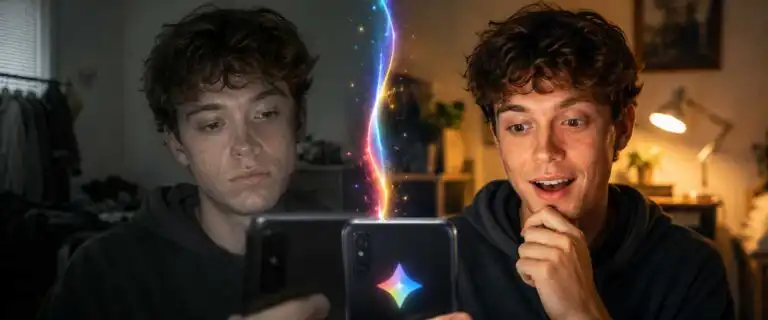
Google Gemini Nano Banana changed AI image editing by making it feel less like generating a replacement picture and more like directing an editor. Upload a photo, describe one change in ordinary language, inspect the result, then continue refining the same scene without rebuilding everything from scratch.
It tackles familiar failures: faces drifting between edits, pets becoming unrecognisable, products changing shape and useful details disappearing after the second prompt. This explainer covers what Nano Banana is, why it matters and which limitations creators still need to work around.
DIY AI rating: 9.4/10 overall score for Google Gemini Image in the DIY AI 2026 image-generation dataset.
What Nano Banana actually is
Nano Banana is the public name used for Google’s Gemini image generation and editing model family. The original model arrived in the Gemini app in August 2025 with a strong emphasis on preserving the identity of people and pets during edits. Google later added Nano Banana Pro for more precise visual work and Nano Banana 2, also known as Gemini 3.1 Flash Image, for faster high-quality generation and editing.
The easiest way to understand it is to think of it as a multimodal image editor within Gemini. It reads an uploaded image, interprets a written instruction and generates a revised version that attempts to keep everything you did not ask it to change. You can try Nano Banana in Gemini without learning layers, masks or specialist retouching controls.
Google’s original Nano Banana announcement focused on maintaining likeness, blending photos, transferring a style or texture and supporting multi-turn edits. Those abilities remain the reason the model matters. The breakthrough is not simply a better-looking generation. There is stronger continuity between the source image, the first edit and the next instruction.
| Model | What it is | Best suited to |
|---|---|---|
| Nano Banana | The original Gemini 2.5 Flash Image model | Fast conversational edits, likeness preservation and photo blending |
| Nano Banana Pro | Google’s Gemini 3 Pro Image model | Detailed compositions, text-heavy graphics and higher-control work |
| Nano Banana 2 | Gemini 3.1 Flash Image | Fast high-fidelity edits, stronger instructions and scaled workflows |
Why are people talking about it?
Earlier AI image generators were strongest when creating a fresh picture. Editing a real photo was less dependable. Change a jacket colour, and the face might shift. Remove a chair, and the room could warp. Add a second person, and both subjects might become generic approximations.
Nano Banana reduced that sense of visual amnesia. A creator could upload a photo of a person, move them to another location, change their outfit, and continue refining the scene while the subject remained broadly recognisable. The same principle applies to pets, products, interiors and recurring characters.
It also opened advanced-looking edits to people who do not use Photoshop. Instead of selecting hair or rebuilding shadows, the user can ask Gemini to preserve the person, replace the background and match the new lighting.
A weak first result is not automatically wasted. You can ask Gemini to restore the original face, remove only one object or keep a product’s red stitching unchanged. The DIY AI photo prompt guide explains how to specify subject, composition, lighting and details that must stay fixed.
Real-world image editing examples
Changing a product background
A small business owner can upload a plain product photo and place the item into a lifestyle scene. The useful instruction is not merely “put this in a kitchen”. It is “keep the bottle shape, label position, colour and proportions unchanged; replace only the background with a bright modern kitchen and add realistic reflections beneath the product”.
This can produce campaign concepts quickly, but the packaging text and product geometry still need to be checked before publication.
Combining people or pets from separate photos
Separate photos of a person and a pet can be combined into a single scene, or family members photographed at different times can be placed in a single portrait. The challenge is matching scale, lighting, perspective and identity.
Our guide to the best AI image combiners ranks Nano Banana highly for realistic merging because it tends to treat uploaded images as source material to preserve rather than as loose inspiration. Clear, well-lit inputs still give the model a better chance of keeping each subject recognisable.
Iterating on an interior
An empty-room photo can be edited step by step: repaint the walls, add shelves, replace the sofa and test another lighting mood. This suits mood boards, renovation ideas, and early client discussions. It is not an accurate architectural visualisation, so dimensions, clearances and build feasibility still require proper tools and professional judgement.
Where Nano Banana beats traditional AI image tools
| Task | Traditional one-shot generator | Nano Banana approach |
|---|---|---|
| Edit one detail | May reinterpret the whole image | Attempts to preserve the unchanged areas |
| Keep a person recognisable | Identity can drift between generations | Designed around stronger subject consistency |
| Refine several times | Each output can feel like a new composition | Supports conversational, multi-turn editing |
| Combine source images | Often treats them as vague references | Can blend people, pets, objects, styles and environments |
Its strongest advantage is control without a complex interface. Nano Banana sits between a basic generator and a manual editor, understanding the source better than a background remover without requiring a professional editing suite.
The model also interprets text and image context together. That helps when a request depends on relationships between several visual elements. In the DIY AI ranking of the best AI image tools, Google Gemini Image scores particularly well for prompt fidelity, consistency, editing, realism and ease of use.
Nano Banana pros and cons
| Pros | Cons |
|---|---|
| Preserves people, pets and source details more reliably than many earlier image editors. Supports natural-language, multi-turn refinement. Handles photo blending, background changes and style transfer. Requires little technical editing knowledge. | Repeated edits can still introduce visual drift. Exact text, logos and product geometry need manual checks. Outputs are not layered production files. Privacy, consent and usage rights remain the creator’s responsibility. |
The limitations creators should not ignore
Nano Banana is more consistent than earlier editing models, but not perfectly deterministic. Faces can still soften, products can gain invented details, and repeated edits may gradually move away from the original. Keep the source file, save strong intermediate versions and return to the best clean result rather than stacking endless corrections.
Text rendering has improved, especially in newer Gemini image models, but exact labels, legal copy and brand typography still need checking. Logos, packaging and interface mock-ups should be treated as drafts until a designer has reviewed every visible detail.
Rights and privacy matter too. Do not upload confidential client assets, private photographs or images you are not entitled to edit without checking the relevant terms and consent requirements. Google applies visible and invisible AI markers to images created or edited in Gemini, including SynthID watermarking.
Nano Banana also does not replace pixel-level tools. Precise selections, layered files, print preparation, colour management, vector output and repeatable brand templates remain better handled in dedicated design software.
See more of our reporting in Google Top Stories, AI Overviews and AI Mode.
What Nano Banana means for creators
The biggest change is the speed at which an idea becomes a useful draft. Publishers can repair featured images, marketers can test campaign settings for a single product, and small businesses can explore concepts before paying for final production.
The skill shifts from performing every edit manually to giving unambiguous visual direction. Strong prompts state what must change, what must remain untouched and how new elements should match the existing image. Strong creators also know when the output is only a concept and when it is safe to publish.
Nano Banana matters because it turns editing into a conversation. It makes sophisticated visual iteration available to far more people, even when the final asset still needs manual finishing. Creators can compare the same brief across models in the DIY AI Image Studio and determine which system best preserves the subject and adheres to the edit.
Google Gemini Nano Banana FAQs
Is Nano Banana a separate Google app?
No. Nano Banana is the name used for Google’s Gemini image models. Normal users access the features through Gemini, while developers can use supported models through Google AI Studio, the Gemini API and other Google services.
Can Nano Banana edit a real photo?
Yes. You can upload a photo and request changes to clothing, background, objects, lighting, style or composition. Results are strongest when the source is clear and the prompt states exactly which details must remain unchanged.
The practical takeaway
Nano Banana matters because it preserves context. Instead of asking an image model to start over, creators can ask it to make a change, keep the useful parts and continue refining the same idea. That is much closer to how real creative work happens.
Use it for concepts, composites, background changes, subject consistency and rapid visual experimentation. Keep manual tools in the workflow for exact brand assets, legal copy, final retouching, and anything where a single detail could create an expensive mistake.
You Might Also Like:
Private Llm

Claude Code Software Development

The identity-preservation point is the most practical part of this Nano Banana overview. For image-generation workflows, I would add a simple repeatability test: run the same prompt twice, then compare facial consistency, background stability, and whether any unwanted text or logo artifacts appear. That helps creators decide when a generated image is ready versus when it needs another prompt pass.