
HeyGen Review 2026: Avatar V, Features, Quality and Limitations
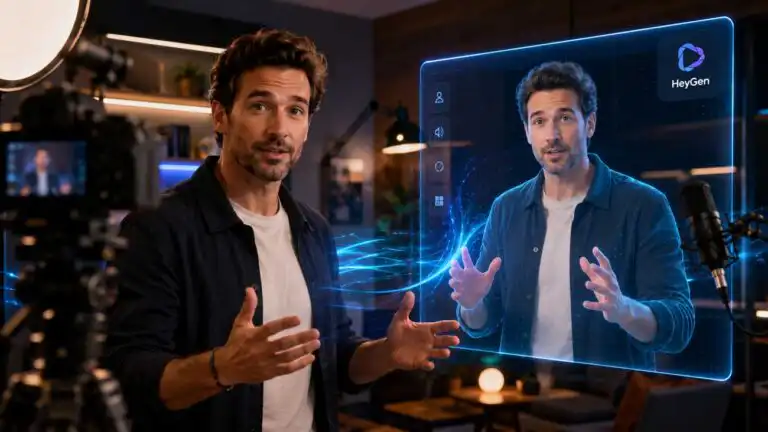
HeyGen is one of the strongest AI video platforms for creating presenter-led marketing videos, training content, product explainers and translated versions of existing footage. Its best feature is no longer simply the ability to make a photograph talk. The platform now combines realistic Digital Twins, three avatar engines, voice cloning, lip-synced translation, an agent that assembles complete videos and a conventional scene editor for correcting the result.
Our HeyGen review focuses on the parts that determine whether the platform is actually suitable for production: Avatar V realism, identity consistency, voice and lip-sync, gesture control, translation, Video Agent, editing workflow, and the limitations that become obvious once a project moves beyond a polished demo. DIY AI scores HeyGen against the same video-generation criteria used across our category dataset.
Our verdict is positive, but specific. HeyGen is worth testing for talking-head video, localisation and repeatable brand content. It is not a replacement for cinematic generators such as Runway, Kling or Veo, and premium avatar generation makes script approval and revision discipline more important than the headline plan limit suggests.
| HeyGen review summary | DIY AI assessment |
|---|---|
| Overall score | 8.2/10 |
| Best for | Avatar videos, localisation and fast marketing explainers |
| Strongest qualities | Voice and lip sync, render speed, ease of use and commercial licensing |
| Main weakness | Premium avatar engines and failed iterations can raise the effective production cost |
| Best-value engine | Avatar III for routine presenter videos |
| Best-quality engine | Avatar V for realistic, video-trained human Digital Twins |
| Recommended first plan | Creator for evaluation, Pro for regular premium-engine production |
Bottom line: HeyGen is worth trying if a presenter, spokesperson or translated speaker is central to the video. It is a weaker purchase for users who mainly want cinematic scenes, elaborate camera moves, or characters physically interacting with objects.
How DIY AI evaluated HeyGen
DIY AI evaluates video generators across output quality, prompt accuracy, voice and lip-sync, editing flexibility, render speed, character consistency, templates, commercial licensing, and ease of use. The scoring framework and category methodology are published on our AI tool data methodology page, while the current results sit in the AI video generation tools dataset.
HeyGen scores 8.2/10 overall. Its 9.2 scores for render speed and ease of use make it one of the quickest platforms to learn, while voice and lip sync score 8.9. Prompt accuracy is lower at 7.2 because a convincing avatar delivery does not guarantee that every gesture, scene choice, or agent-generated visual will follow the instruction precisely.

HeyGen
Scored across 9 practical DIY AI dataset metrics.
- Video Quality7.7/10★★★★★★★★★★
- Prompt Accuracy7.2/10★★★★★★★★★★
- Voice & Lip Sync8.9/10★★★★★★★★★★
- Editing Flexibility7.6/10★★★★★★★★★★
- Render Speed9.2/10★★★★★★★★★★
- Character Consistency8.5/10★★★★★★★★★★
- Templates/Presets8.3/10★★★★★★★★★★
- Commercial Licensing8.9/10★★★★★★★★★★
- Ease of Use9.2/10★★★★★★★★★★
What is HeyGen?
HeyGen is an AI video platform built around digital presenters and identity-preserving avatars. A user can select a stock avatar, train a Digital Twin from personal footage, animate a photograph, clone a voice, paste a script and generate a presenter-led video without filming every delivery.
That description now covers only part of the product. AI Studio provides scene-based manual editing. Video Agent can plan and generate a complete video from a prompt, a script, a URL, or an uploaded source. Translation tools dub existing footage and rebuild the speaker’s lip movements. LiveAvatar supplies real-time, conversational avatars for websites and applications. Business plans add collaboration, interactive video, SCORM export, and learning management integrations.
The key distinction is between identity-led video and open-ended scene generation. HeyGen is designed to preserve a recognisable presenter, voice and message across repeated videos. A cinematic generator is designed to create new environments, camera movement and physical action. HeyGen can insert generated B-roll and visual assets, but its avatar remains the centre of gravity.
HeyGen Avatar V review: The most realistic option for a personal Digital Twin
Avatar V is HeyGen’s premium engine for realistic human Digital Twins. It learns movement from a short reference recording and combines that motion profile with a base look and voice. The objective is not just accurate lip movement. The objective is to retain the person’s expressions, gaze, gesture style, and general on-camera energy across new scripts and settings.
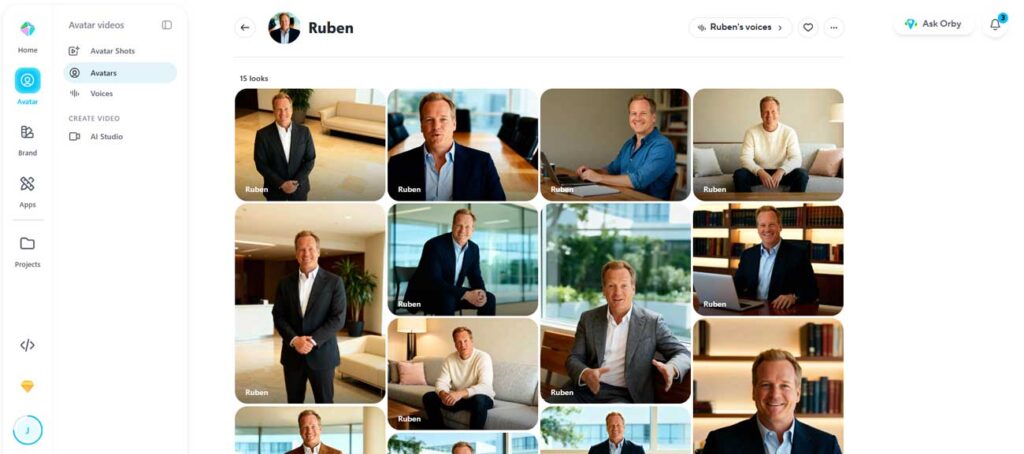
The 15-second recording has more influence than most users expect
Avatar V learns its movement from a 15-second video. That sounds convenient, but it also means the source clip carries a great deal of responsibility. A reserved recording tends to produce restrained output. A more expressive recording provides clearer examples of hand movement, facial response and eye contact for the model to reuse.
The sensible workflow is to record several short motion references rather than treating the first acceptable clip as permanent. Create one calm reference for educational material, one more energetic reference for social content and another with restrained hand movement for tightly framed product videos. This gives the platform a better starting point than trying to force every performance through text instructions later.
Voice quality is part of the animation system
Avatar V uses the audio delivery as a major motion signal. Flat narration can make the visual performance feel stiff even when the avatar image is strong. A dedicated voice clone, recorded with natural changes in pace, emphasis, and emotion, generally provides the engine with more useful information than relying on the audio captured during avatar training.
This creates a practical dependency that is easy to miss. Improving the avatar image alone will not solve dull delivery. The recording, voice clone, and base look need to work as a single system.
Base-look quality controls identity consistency
The base look is the reference image used to define the presenter’s identity, clothing and initial framing. Clear facial detail, a natural expression and an angle that matches the intended motion reference provide the safest foundation. Large smiles, obscuring accessories and unusual side angles create more opportunities for the generated mouth, teeth or face shape to drift.
Avatar V is particularly useful when one person needs several visual versions of the same identity. Different clothes, settings and formats can be created without filming a new delivery each time. The limitation is that generated looks still need inspection. Identity can remain recognisable even as smaller details, such as jewellery, teeth, fingers, clothing edges, or background objects, change.
Where Avatar V still looks artificial
The strongest outputs are usually waist-up or close-up presenter shots with a clear script and a controlled background. The illusion becomes less reliable when the scene demands full-body movement, prop interaction or a sequence of precisely timed gestures. Eye contact can also feel too fixed, and repeated head movements may become predictable in longer clips.
Avatar V should therefore be treated as a high-quality virtual presenter, not as an actor who can be directed through a complex physical scene. Cutting between the avatar, screen recordings, diagrams and B-roll usually produces a more convincing result than leaving the Digital Twin on screen continuously for several minutes.
Avatar III vs Avatar IV vs Avatar V
HeyGen’s three avatar engines are not simple quality tiers where the newest model should always be selected. Each engine is better suited to a different production job, and the difference in generation cost is large enough that using the premium engine everywhere can make an otherwise sensible workflow unnecessarily expensive.
| Avatar engine | Best use | Practical strength | Cost profile | Main trade-off |
|---|---|---|---|---|
| Avatar III | Routine presenter videos, explainers and high-volume updates | Efficient, consistent generation | Lowest | Less advanced motion and expression |
| Avatar IV | Photo avatars, stylised characters, 2D or 3D subjects and non-human presenters | Creative prompting and expressive photo animation | Higher | Premium generation is less forgiving of unnecessary rerenders |
| Avatar V | Real people, video-trained Digital Twins and identity-sensitive content | Stronger human consistency, mannerisms and natural performance | Highest | Input quality and revision discipline have a larger effect on value |
Choose Avatar III when the message matters more than the performance
Avatar III is the sensible default for recurring internal updates, simple tutorials, product announcements and scripts where the presenter mainly needs to speak clearly. It is also the best engine for testing scripts, layouts and pacing before committing premium credits to the final render.
A strong cost-control workflow is to draft the whole project with Avatar III, approve the script and scene timing, then switch only the most visible scenes to Avatar V. There is little value in paying the premium rate for an avatar that appears briefly between long stretches of screen recording or B-roll.
Choose Avatar IV for creative photo-based characters
Avatar IV remains relevant because it handles photo avatars and stylised characters that do not have a real person’s motion profile. It is the better fit for mascots, illustrations, historical photographs, fictional presenters and non-human subjects. Free-text motion prompting also gives it useful creative flexibility.
Choose Avatar V for a recognisable person
Avatar V is the better investment when viewers already know the presenter, when brand identity must remain stable or when a founder wants to produce repeated videos without recording each script. Its value comes from preserving the person, not from creating elaborate scenes.
Creating a HeyGen Digital Twin without wasting the first training attempt
A Digital Twin is more demanding than uploading a convenient clip from a phone. The recording needs to provide the model with clean information about the face, voice, posture, and movement. Cuts, camera changes, poor audio, heavy compression and inconsistent lighting weaken that information.
Use a continuous take, keep the camera stable and frame the subject closely enough to preserve facial detail. Look towards the lens rather than a nearby script window. Natural movement is useful, but the speaker should not leave the frame or repeatedly cover the face. A plain or uncluttered background also makes the body’s edges easier to model.
Record motion and voice for different purposes
The avatar recording teaches visual identity and movement. The voice-clone recording teaches tone, pronunciation and vocal character. Combining both tasks into one rushed clip is convenient but rarely optimal. A separate voice sample can include controlled changes in pace, questions, emphasis and specialist terminology without forcing the avatar-training footage to carry the same burden.
Build a small library of approved looks
Generating dozens of outfits before approving one strong base look wastes credits and makes quality control harder. Start with a neutral, reusable appearance. Check the face from several script lengths and emotional deliveries. Only then create additional looks for different campaigns, backgrounds or aspect ratios.
The operational goal is consistency, not maximum novelty. A small set of dependable looks is more valuable than a large gallery that needs to be checked from scratch in every project.
Gesture control is useful, but it is not full scene direction
Avatar IV and Avatar V support instructions for facial expression, hand gestures, body posture, gaze and stillness. Avatar V also provides structured controls for expression, gesture and gaze. These controls can improve a scene when the required action is visually simple: looking towards the camera, nodding, waving, leaning forward or keeping the hands still.
The reliable prompting pattern is one visible gesture paired with one expression. For example, asking the avatar to nod confidently while maintaining eye contact is more controllable than requesting a sequence of waving, pointing, turning, walking and picking up an object.
Motion prompts do not control camera zooms, pans, scene changes, lighting, backgrounds, prop use or walking around the space. Those elements need to be created elsewhere in the editor or supplied as separate footage. This is one of HeyGen’s clearest boundaries and should shape the script before generation begins.
HeyGen AI Studio review: Better for finishing than starting from a blank timeline
AI Studio is HeyGen’s scene-based editor. It combines scripts, avatars, voice controls, uploaded media, stock footage, captions, text, music, transitions and brand assets. Users can import a presentation or PDF, record a screen, save templates and switch between landscape and vertical formats.
The editor is easier to learn than a traditional video editor because it treats each section as a scene rather than a continuous timeline. That simplicity is also a limitation. Precise audio mixing, advanced compositing, masking and detailed keyframe work still belong in a dedicated editor.
Voice Director and Voice Mirroring improve delivery in different ways
Voice Director uses written direction to influence tone, pace and emotion. It is useful when the script is final, and the required performance can be described clearly. Voice Mirroring is speech-to-speech: the user records the delivery, and the selected voice follows its rhythm and emotional shape.
Voice Mirroring is often the more controllable route for a specific line because the performance is demonstrated rather than described. It also reduces the tendency to keep rewriting punctuation in the hope that a text-to-speech engine will infer the intended emphasis.
Previewing the right elements saves credits
Layout, captions, media placement and timing can be adjusted without regenerating the avatar. Changes to the script, voice or avatar performance can require another render. Approve the non-generative parts first, then lock the script before spending credits on the final avatar scenes.
This is a small workflow choice with a large cost effect. The expensive mistake is using a premium engine while the team is still debating wording, slide order or caption style.
HeyGen Video Agent review: A useful first cut, not an autonomous editor
Video Agent can take a prompt, script, URL, or uploaded material and create a planned video featuring an avatar, voiceover, captions, B-roll, generated visuals, motion graphics, and transitions. It offers a chat-led planning mode and a more automated mode that moves from the brief into production with less intervention.
The planning stage is the valuable part. A user can review the proposed structure, refine the script, define the visual style and request changes before generation. This reduces the risk of paying for a polished version of a weak plan.
Use Video Agent for assembly, then AI Studio for control
The best workflow is not to ask Video Agent for a finished masterpiece and publish whatever appears. Use it to create the first coherent cut, then transfer a copy into AI Studio. There, individual media assets, captions, timing, transitions, layouts, voices and avatar scenes can be corrected directly.
A recurring pattern in real-world user reports is that agent-generated video feels efficient until one scene is wrong. Vague correction prompts can alter elements that were already acceptable. Editing one scene at a time and stating both what should change and what must remain fixed produces a more predictable result.
Generated B-roll is not automatically relevant B-roll
Video Agent can create or select visual material that matches the broad topic while missing the specific claim being made. A business video may look polished but still feature generic offices, abstract graphics, or product footage that provides no evidence. Review each visual against the sentence it supports, especially in technical, financial or regulated content.
The agent is strongest at format and pacing. Editorial accuracy remains the user’s job.
Check the in-product cost before generation
HeyGen’s public pricing page and its current help documentation do not show the same standard Video Agent credit rate. The product displays the expected cost before generation, so that estimate should be treated as the final figure for the selected model and settings. This is particularly important when cinematic asset models are enabled, because they can consume substantially more credits than a basic agent project.
Voice cloning and third-party voices
HeyGen includes voice cloning on paid plans and supports more than 175 languages and dialects. AI Studio can also use different voice engines, including HeyGen’s expressive options and connected third-party voices. This gives teams a choice between convenience, emotional control, multilingual coverage and an established external voice library.
Voice quality should be tested with difficult material rather than a friendly marketing paragraph. Names, abbreviations, product codes, prices, dates and specialist terminology expose weaknesses quickly. A brand glossary and pronunciation review are more valuable in production than another minor improvement in general voice naturalness.
Voice Mirroring is the practical answer to awkward emphasis
Text instructions such as “sound confident” are open to interpretation. A reference recording provides the system with actual timing, stress, and emotional shape. For founder videos, sales messages and scripts with deliberate pauses, mirroring can save several rounds of regeneration.
The trade-off is time. Recording every line reduces the benefit of automation. Use it for openings, calls to action, sensitive claims and lines where delivery carries meaning. Standard text-to-speech is usually sufficient for connective narration.
HeyGen video translation and lip sync
HeyGen can translate existing videos, clone or replace the speaker’s voice, and rebuild the mouth movements to match the target language. This is one of the platform’s clearest commercial strengths because the original presenter, framing and visual edit can be reused across markets.
There are three distinct cost and quality levels: audio dubbing without lip-sync, standard lip-synchronised translation, and Precision translation. Audio-only dubbing is cheapest. Standard lip-sync is a sensible default for short marketing material. Precision mode costs more and should be reserved for close-up footage, important launches or languages where the standard result produces visible timing errors.
Translation quality needs a human review before lip sync
Generating the final mouth movement before approving the translated script can waste the most expensive step. Review brand names, technical terms, numbers, claims and cultural phrasing first. Pro and higher plans include translation-script editing, a meaningful upgrade for teams producing customer-facing material.
Multiple speakers, fast dialogue, overlapping speech and frequent cuts increase the review burden. The tool can dramatically reduce localisation work, but it does not eliminate the need for a fluent reviewer who understands the subject.
Other HeyGen features worth testing
Generated looks and personal model training
HeyGen can create new appearances for a Digital Twin and train a personal model to improve the generation of looks. This is useful for recurring campaigns where the same identity needs different clothing, environments or visual themes. The sensible order is identity approval first, personal model training second and look expansion last.
Product Placement
Product Placement combines an avatar with a product image to produce presenter-led advertising footage. It can accelerate early ad concepts and product demonstrations, but the product must be carefully checked for altered labels, proportions, reflections, and grip. It is better suited to concept testing and lightweight social creative than evidence-heavy demonstrations of how a physical product operates.
Speech Cleanup
Speech Cleanup removes pauses, filler words, and mistakes while attempting to hide the visual cuts they create. This is more useful than audio-only cleanup for talking-head footage because a clean soundtrack paired with visible jump cuts still looks edited. The feature is most effective on small corrections; aggressive removal can make timing and body movement feel unnaturally compressed.
Batch Mode and personalised video
Batch Mode can produce multiple single-scene avatar videos from structured scripts, while personalised-video workflows can populate templates with recipient or account data. These features are valuable for sales outreach, onboarding, and localised campaigns, but they introduce an approval problem: a single template mistake can be replicated across every generated asset. Test a small batch and inspect the variable fields before scaling.
HyperFrames, integrations and agent-led workflows
HeyGen is expanding beyond its own editor through pre-built agent workflows, cloud rendering, MCP connections and integrations with automation platforms. A script or trigger can move from another system into video generation without manual copying. This is useful for repeatable content such as product updates, support explainers and internal reports.
Automation magnifies both good and bad inputs. Brand rules, approved templates, pronunciation data, content checks and credit limits should be established before an automated workflow is allowed to publish or create large batches.
LiveAvatar is a separate product for real-time conversations
LiveAvatar streams an avatar that can listen and respond during a live session. It is designed for virtual sales assistants, tutors, support agents, interactive demonstrations and other experiences where the user speaks to the avatar rather than watching a pre-rendered video.
The avatar provides the face, lip sync and body language. A language model, knowledge base, and speech system still need to control what they say. This makes LiveAvatar an application component rather than a no-code substitute for a complete conversational system.
Custom setup also requires more demanding source footage than a short Avatar V motion reference. Developers need to plan session handling, latency, fallback behaviour, moderation, prompt length and the cost of keeping an avatar stream active. For most marketing teams, pre-rendered HeyGen video is the simpler product. LiveAvatar is justified when two-way interaction creates measurable value.
HeyGen pricing: what you need to know before subscribing
HeyGen’s current web plans include Free, Creator, Pro, Business and Enterprise. At the time of this update, the official HeyGen pricing page lists Creator at $29 per month with 600 credits, Pro at $49 per month with 1,000 credits, and Business at $149 per month with 1,500 shared credits. Those figures are useful for orientation, but they are not enough to predict the real cost of a workflow.
Different avatar engines, translation modes, Video Agent settings and other premium features consume credits at different rates. That means two creators on the same subscription can get very different amounts of usable output. Rerenders matter as well. A team that still changes scripts, voices, or scene structure during premium generation can burn through an allowance much faster than a team that approves those elements first.
For most individuals, Creator is the sensible paid starting point. Pro is easier to justify when premium avatar generation, 4K export or edited translation scripts become routine. Business is primarily a team and governance decision because it adds collaboration, SSO, centralised billing, longer projects and additional custom-avatar capacity.
HeyGen’s direct API uses a separate billing system from normal website credits, so API economics should not be inferred from a Creator or Pro allowance. We keep the live model rates, cost-per-minute calculations, translation scenarios, API charges and plan breakpoints in our full HeyGen pricing, credits and API cost guide. The review only retains pricing where it changes the product verdict.
HeyGen’s real limitations
Premium generation makes experimentation more expensive
Avatar V looks impressive enough to invite experimentation with gestures, looks and voices. Each retry still consumes part of the production allowance, so premium generation is a poor place to continue basic script and layout decisions. Teams should approve the script, voice and framing with lower-cost previews before exploring minor performance variations.
See more of our reporting in Google Top Stories, AI Overviews and AI Mode.
Long continuous avatar footage exposes repetition
A Digital Twin can remain coherent for extended scripts, but repeated gestures, fixed eye contact, and uniform framing become easier to notice over time. Breaking a long video into visual chapters with diagrams, screen recordings and relevant B-roll improves both realism and viewer attention.
Prompts cannot direct physical acting
HeyGen can influence a presenter’s expression and simple body language. It cannot reliably choreograph a person walking through a room, using a device, drinking from a cup or interacting naturally with several objects. Those scenes still need recorded footage or a different generation system.
Video Agent needs editorial supervision
An automatically assembled video may be coherent without being accurate, distinctive or on-brand. Generic visuals, repeated stock concepts and weak scene choices can make a correct script feel disposable. The agent removes assembly work, not editorial responsibility.
Credit consumption can change between product updates
HeyGen has moved away from older unlimited and premium-credit structures toward a shared-credit model. Feature consumption can change as models and plans are updated, so an old tutorial or review can become a poor reference for budgeting, even when the monthly subscription price looks familiar. Check the cost shown inside the generation flow before approving a large batch.
Realistic does not mean undetectable
Strong lip sync and identity consistency can still be undermined by overly smooth skin, a fixed gaze, repetitive hand movements, odd teeth, or a voice that lacks natural breath and emphasis. The best result is often a well-edited hybrid video, not an uninterrupted avatar monologue.
Common HeyGen mistakes and how to avoid them
| Mistake | Better workflow |
|---|---|
| Using Avatar V for every draft | Approve scripts and timing with Avatar III, then upgrade selected scenes |
| Training from flat, low-energy footage | Record expressive motion references with clear eye contact and stable framing |
| Trying to solve voice problems with visual prompts | Create a dedicated voice clone or use Voice Mirroring for important lines |
| Requesting several gestures in one prompt | Use one clear movement with one supporting expression |
| Generate lip sync before checking translation | Proofread names, claims, numbers and terminology before the final render |
| Publishing a Video Agent result unchanged | Move the project into AI Studio and review each scene against the script |
| Buying Business for cheaper credits | Choose it for collaboration, security, learning features and governance |
| Automating before establishing quality checks | Define approved templates, fallbacks, credit limits and human review first |
HeyGen pros and cons
| Pros | Cons |
|---|---|
| Excellent voice and lip-sync performance. Avatar V creates convincing human Digital Twins. Avatar III supports affordable high-volume production. Strong multilingual translation workflow. Fast, accessible scene-based editor. Useful voice mirroring and performance controls. Video Agent creates editable first drafts. Business features cover training and collaboration. API and automation options support scaled workflows | Avatar IV and V consume credits quickly. Failed or rejected generations raise real costs. Complex physical action remains outside its strengths. Long avatar shots can expose repeated movement. Video Agent still needs editorial correction. Advanced editing is limited beyond dedicated software. LiveAvatar requires technical implementation. Credit consumption can change between product updates. Not a general cinematic text-to-video replacement |
Who should use HeyGen?
- Marketing teams: for product explainers, campaign variations, social videos and presenter-led landing-page content.
- Training departments: for reusable presenters, interactive lessons, SCORM export and multilingual updates.
- Founders and subject specialists: for creating a Digital Twin that can deliver approved scripts without repeated filming.
- Localisation teams: for dubbing and lip-syncing existing video into multiple languages.
- Agencies: for repeatable avatar production, client templates and controlled brand systems.
- Developers: for personalised video, automated generation and real-time avatar applications.
Who should avoid HeyGen?
- Filmmakers who mainly need cinematic scenes, complex camera movement or physical acting.
- Users who want a flat monthly fee without needing to monitor generation credits.
- Teams that cannot review translations, synthetic voices or generated visuals before publication.
- Creators whose videos depend on natural demonstrations with products, tools or changing locations.
- Low-volume users who already film comfortably and only need conventional editing.
HeyGen vs Synthesia, Arcads and cinematic AI video tools
| Comparison | Choose HeyGen when | Choose the alternative when |
|---|---|---|
| HeyGen vs Synthesia | You prioritise realistic personal Digital Twins, social content and flexible avatar presentation | You prioritise a more traditional enterprise training environment and corporate presenter workflow |
| HeyGen vs Arcads | You need broad avatar, translation, training and automation capabilities | You mainly need rapid AI UGC advertising concepts and direct-response creative variations |
| HeyGen vs Runway, Kling or Veo | A consistent speaker or translated presenter is central to the message | The scene, camera, environment and physical action are central to the message |
| HeyGen vs ElevenLabs | You want voice, avatar, lip sync and editing in one platform | Voice quality, control and audio production are more important than the visual presenter |
HeyGen and a specialist voice platform can also work together. The strongest workflow may use an external voice for narration and HeyGen for visual identity and lip sync. This adds another subscription and another approval step, but it can improve important founder, training or advertising content.
HeyGen review verdict: Who should buy it?
HeyGen is worth testing because it solves a well-defined production problem: turning a consistent person, character, or translated speaker into repeatable video without filming each delivery. Avatar V strengthens the product for recognisable human Digital Twins, while Avatar IV remains useful for photo-based and stylised characters. Avatar III is still the practical choice for routine presenter work where clarity and consistency matter more than expressive performance.
The strongest reason to choose HeyGen is the combination of avatar identity, voice, translation, and a usable editor in a single workflow. The main reason not to choose it is equally clear. It does not provide the same control over cinematic scenes, complex camera movement, or physical acting as tools designed for open-ended video generation.
The best HeyGen workflow is hybrid. Use a lower-cost avatar mode for drafts; reserve Avatar V for identity-critical scenes; use Video Agent for assembly; and use AI Studio for correction and for external footage wherever physical action or visual proof is required. That approach plays to HeyGen’s strengths without asking the avatar engine to behave like a complete film studio.
If that production model fits your work, the next decision is plan configuration rather than product suitability. Use the dedicated pricing guide above for current credits, model rates, API costs, and workload calculations, rather than relying on pricing figures in a review.
HeyGen frequently asked questions
Is HeyGen free?
Yes. The Free plan allows a limited number of short videos each month and provides trial access to core avatar and agent features. It is suitable for checking the workflow and output quality, but not for regular production.
How much does HeyGen cost?
HeyGen currently offers a free tier; Creator starts at $29 per month, Pro at $49, and Business at $149, before additional seats. The useful comparison is not just the subscription fee because premium avatar, translation and agent workflows consume credits differently. Current workload calculations are maintained on the dedicated HeyGen pricing guide.
What is the difference between Avatar III, Avatar IV and Avatar V?
Avatar III is the low-cost engine for basic presenter videos. Avatar IV is strong for photos, stylised characters and creative prompting. Avatar V is designed for realistic human Digital Twins trained from video-based motion.
Does HeyGen clone your voice?
Yes. Paid plans include voice cloning, and AI Studio also supports voice mirroring, directed delivery and selected third-party voice integrations.
Can HeyGen translate an existing video?
Yes. It can provide audio-only dubbing, standard lip-synchronised translation or a higher-cost Precision mode. Translation scripts should be reviewed before generating the final lip sync.
Can HeyGen videos be used commercially?
HeyGen supports commercial use, subject to its current terms, the user’s rights to all uploaded media and any restrictions attached to third-party assets or voices. Teams should keep consent and licensing records for custom avatars and cloned voices.
Can HeyGen create full cinematic videos?
Video Agent can assemble avatars, B-roll, generated visual assets, captions and motion graphics. HeyGen is still strongest for presenter-led video. Runway, Kling and Veo are better suited to open-ended cinematic scenes and complex physical action.
Does HeyGen have an API?
Yes. The API supports avatar generation, translation, Video Agent and other automated workflows. Direct API billing is separate from normal website subscriptions, and some custom-avatar capabilities require enterprise access.
Is HeyGen better than Synthesia?
HeyGen is often the better choice for personal Digital Twins, social and marketing video, expressive voice control and flexible avatar-led production. Synthesia may suit organisations that prioritise structured enterprise training and a conventional corporate presenter workflow.
You Might Also Like:

Best AI Video Generators

Best Image To Video AI

7 Day Free Trial AI Video Generator
