
Microsoft Clarity Review 2026: Free AI Visibility, Heatmaps and Recordings

Microsoft Clarity has developed from a free heatmap and session-recording tool into one of the most useful entry points for measuring AI-driven discovery. Its AI Visibility workspace can show when pages are cited in AI answers, the retrieval queries associated with those citations, which automated systems crawl the site and how visitors arriving from AI platforms behave after landing.
The main appeal is not that Clarity replaces a full analytics platform or a specialist AI visibility suite. It does not. Its advantage is that it connects three stages that are usually reported separately: AI bot access, use of content in generated answers and the on-site behaviour of people who click through. This Microsoft Clarity review explains what each report can generate, how to interpret the metrics, where the data can mislead and which teams will get the most value from it.
Microsoft Clarity review: the quick verdict
| Review area | Assessment |
|---|---|
| Best for | Publishers, marketers, product teams and small businesses needing a free baseline for AI citations, crawler activity and user behaviour |
| Strongest feature | The connection between AI visibility data and Clarity’s recordings, heatmaps and traffic segments |
| Biggest limitation | Citation and prompt reports are not a complete view of every AI platform, answer or user journey |
| Pricing | Free, although server or CDN integrations used for Bot Activity can create costs elsewhere |
| Verdict | An excellent free measurement layer and a sensible starting point before paying for a specialist AI visibility platform |
Pros
- Free citation, prompt, crawler and behavioural reporting
- Shows cited pages and grounding queries rather than only a visibility score
- Topic Insights adds custom prompt and competitor analysis
- AI traffic can be filtered into recordings and heatmaps
- Bot Activity uses server-side request data rather than browser tracking alone
- Simple enough for smaller teams to use without a dedicated analyst
Cons
- Citation counts do not reveal position, prominence or sentiment
- Grounding queries are retrieval phrases, not necessarily the user’s original prompt
- Custom prompt reports are directional and can vary between runs
- Bot crawling does not prove that a page was used in an answer
- Some AI visits lose their referral source and appear as direct traffic
- Cross-platform coverage is narrower and less transparent than specialist paid tools
What Microsoft Clarity has become
Clarity still performs the job most people know it for. It records user sessions, builds click and scroll heatmaps, surfaces frustration signals and lets teams filter behaviour by page, device, channel, campaign and event. Those capabilities make it easier to see what visitors actually did rather than relying only on aggregate page metrics.
AI Visibility adds a different kind of measurement. Instead of observing only people inside the website, Clarity now reports signals from before and after a visit. Bot Activity shows automated access. Citations show when content contributes to AI-generated answers. Topic Insights runs controlled prompt research around selected subjects. AI traffic segments then show what referred visitors do after they arrive.
This creates a useful measurement chain:
- An AI crawler or agent requests content from the site.
- An AI system retrieves a page while constructing an answer.
- The page is cited or used as supporting material.
- A person may select the citation and visit the site.
- Clarity records how that visitor reads, clicks, scrolls and converts.
No single report proves that all five stages happened in sequence. The value comes from comparing them without pretending that one metric explains the next.
Clarity AI Citations shows where your content enters generated answers
The Citations dashboard is the strongest part of Clarity’s passive AI visibility reporting. It uses observed citation activity rather than asking the user to first build a list of prompts. Once the domain is verified, the report can surface page citations, share of authority, AI referral traffic, grounding queries and cited URLs.
| Clarity metric | What it tells you | What it does not tell you |
|---|---|---|
| Page citations | How often pages from the domain were referenced in supported AI-generated answers | Where the citation appeared or how influential it was |
| Share of authority | The site’s share of citations among domains participating in the same observed query set | Overall market share across every AI platform or topic |
| AI referral traffic | The proportion of tracked sessions arriving from recognised AI assistants | Every visit influenced by an AI answer |
| Grounding queries | The retrieval phrases AI systems used to find supporting content | The exact wording typed or spoken by the user |
| My cited pages | The URLs receiving citations and the queries associated with them | Whether the answer described the page positively or recommended its subject |
The most useful field is often the grounding query. Traditional keyword data describes how people search. A grounding query describes how an AI retrieval system reformulates a need before searching for evidence. The wording may be more descriptive, comparative or task-focused than the original question. It can expose missing subtopics that broad keyword clusters hide.
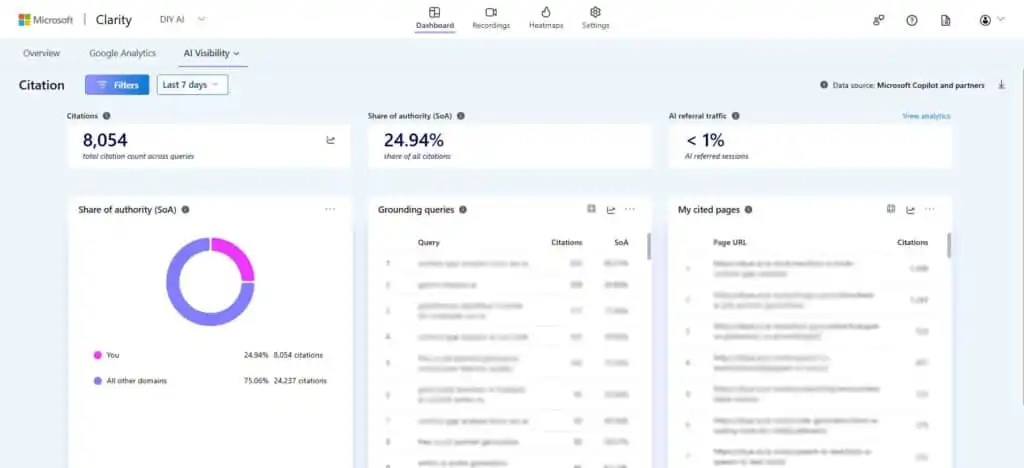
Grounding queries should not be copied into headings as though they were verified search terms. A better workflow is to cluster them by intent, identify the page currently receiving citations and check whether that page answers the underlying question clearly. This approach fits well alongside a conventional AI content gap analysis, because it adds retrieval behaviour rather than replacing keyword, competitor and backlink research.
Share of authority also needs careful handling. Microsoft’s calculation focuses on query days in which the domain participated, so the percentage may appear stronger than a market-wide visibility score. It is best used to compare movement within the same report and topic, not as a universal score to place beside data from another platform.
Microsoft’s official Clarity AI Visibility documentation is explicit that citation counts measure references, not ranking or prominence. That warning should govern every decision made from the dashboard. Ten minor supporting citations are not automatically more valuable than one prominent citation that sends qualified traffic.
Topic Insights turns selected prompts into a competitive research report
Topic Insights takes a more controlled approach. You define a topic, representative prompts and competitors. Clarity then evaluates the generated answers, identifies cited domains and pages, estimates how much each source supports the answer, and aggregates the results into topic-level views of visibility, influence, competition, and opportunity.
This is closer to a lightweight AI prompt-tracking platform than the passive Citations dashboard. It can answer questions such as:
- Does the brand appear for the questions buyers ask before choosing a product?
- Which competitors are repeatedly cited for a topic?
- Which pages support those competitor citations?
- Does the domain contribute a small fact or a meaningful share of the answer?
- Which content gaps appear across several related prompts?
The feature is particularly valuable for small teams because it makes controlled prompt monitoring available without a separate subscription. Recurring practitioner feedback on the release has focused on the same practical point: free prompt tracking is useful only when it links back to specific pages and actions. A visibility score alone creates another dashboard. A prompt, cited competitor page, and clear content gap can become a brief.
There are important limits. Topic Insights is currently a beta feature. Microsoft states that it uses GPT-5.3 with WebIQ as the grounding layer, allows a limited number of reports per project each week, and that it should be treated as directional monitoring. The output is derived from the representative prompts you select, so weak prompt design yields weak conclusions.
How to build a useful Topic Insights prompt set
Do not fill the report with minor wording variations of one commercial query. Build prompts around different stages of a real decision:
- Problem recognition: questions asked before the reader knows which product category solves the problem
- Evaluation: comparisons, alternatives, reliability, compatibility and workflow questions
- Risk: privacy, data handling, implementation effort, hidden costs and failure cases
- Purchase: pricing, free plans, contract terms and suitability for a named use case
- Post-purchase: setup, troubleshooting, migration and optimisation
This produces a topic report that reflects an actual customer journey. It also reduces the temptation to declare success because the domain appears for a narrow set of prompts written to favour its existing pages.
Bot Activity measures access, not AI visibility success
Bot Activity is the most technically distinctive Clarity report. It relies on server-side request logs provided via supported WordPress, server, or CDN integrations. This allows Clarity to identify automated operators, calculate the share of requests attributed to AI bots, group activity by purpose and show which paths receive the most automated requests.
That makes it useful for questions browser analytics cannot answer:
- Which AI crawlers are accessing the site?
- Are bots repeatedly requesting a small set of pages or assets?
- Is automated traffic creating a meaningful load on the infrastructure?
- Are blocked or non-compliant bots ignoring robots.txt rules?
- Does heavy crawling on a content cluster correspond with citations or referrals later?
The hidden limitation is causality. A request proves that a bot accessed a URL. It does not prove that the content was indexed, embedded, retrieved, cited or shown to a user. Teams often overvalue crawler logs because they are concrete and high-volume. The better question is whether a heavily crawled page also gains citations, AI referrals or commercially useful engagement.
Bot Activity may also carry an indirect cost. Clarity does not charge for the dashboard, but a CDN or Cloud platform may charge for log delivery, storage, request processing or associated services. Disconnecting the dashboard alone may not stop provider-side log forwarding, so the integration should be documented like any other infrastructure change.
AI referral filters connect visibility with recordings and heatmaps
Citations are valuable even without a click, but most businesses eventually need to know whether AI visibility produces useful visitors. Clarity classifies recognised referrals from major AI assistants into AI Platform and Paid AI Platform channel groups. Those segments can be applied to the dashboard, heatmaps and session recordings.
This is where Clarity becomes more useful than a citation counter. A team can isolate AI-referred visitors and inspect:
- Which landing pages receive AI visits
- How far those users scroll
- Which links and calls to action they select
- Whether they arrive on a page that assumes too much prior context
- Where rage clicks, dead clicks or quick exits occur
- Whether the visit reaches a signup, enquiry, download or purchase event
AI-referred users often land deep inside a site after the assistant has already explained part of the topic. That changes the page’s job. A visitor arriving on a detailed comparison may not need a long category introduction. They may need a concise verdict, evidence, pricing context and a clear next step.
Referral analysis still undercounts influence. Some AI products hide or strip referral information, visits from embedded assistants may not be identified, and a user may read an AI answer before returning later through another channel. Clarity can measure known referred sessions. It cannot reconstruct every assisted journey.
What useful outputs can Microsoft Clarity generate?
The dashboard is most valuable when its reports are converted into repeatable work. The following outputs are realistic without inventing a single universal AI visibility score.
| Output | Built from | Practical use |
|---|---|---|
| AI citation baseline | Page citations, cited URLs and share of authority | Track whether a topic is gaining or losing participation in supported AI answers |
| Retrieval-intent cluster | Grounding-query export | Group the questions AI systems associate with existing pages and find missing coverage |
| Competitor citation map | Topic Insights prompts and cited domains | Identify the competitors and pages repeatedly supporting answers in a chosen topic |
| Content update brief | Grounding queries, topic gaps and cited-page review | Specify sections, comparisons, evidence or explanations an existing page lacks |
| AI crawler audit | Bot operators, request share and path requests | Separate productive access from excessive crawling or infrastructure waste |
| AI landing-page UX review | AI Platform segment, recordings and heatmaps | Find friction affecting visitors who arrive from assistant recommendations |
| AI visibility funnel | Bot Activity, Citations and AI referral sessions | Compare upstream access, midstream citation and downstream human behaviour without merging them into one metric |
A practical weekly workflow for Clarity AI Visibility
1. Start with observed citations
Review which pages and themes are already being cited. Separate persistent citations from short spikes. A one-day increase can reflect a temporary query pattern, while repeated selection suggests that the page has become a dependable source for a topic.
2. Cluster grounding queries by decision
Group retrieval phrases into definitions, comparisons, prices, implementation, risks and troubleshooting. Do not create a separate page for every phrasing. Map each cluster to the page that should own the intent and flag genuine gaps.
3. Use Topic Insights for questions you are not yet winning
Create prompt sets around priority products, services or editorial clusters. Add real competitors, not just the largest brands. Inspect which competitor pages are cited and what role they play in the answer before deciding whether to update, consolidate or create content.
4. Compare crawler access with citations
Look for pages with high automated access but no visible downstream result. Possible causes include weak extractability, unclear page purpose, duplicate content, blocked rendering, stale information, or simply crawler activity unrelated to answer generation.
5. Watch AI-referred sessions
Apply the AI traffic segment to recordings and heatmaps. Pay particular attention to deep landing pages, unclear navigation, missing next steps and calls to action that assume the visitor entered through the homepage.
6. Record changes before measuring again
Keep a simple change log containing the page, date, topic, reason and expected signal. Without that record, a later movement in citations or referrals cannot be connected confidently to the work completed.
Clarity works best as the free measurement layer in a broader process. Our comparison of AI search visibility tools explains where paid platforms offer broader model coverage, scheduled prompt monitoring, richer brand-mention analysis, and more formal competitor reporting.
The limitations most Microsoft Clarity reviews miss
Coverage is not the whole AI market
Clarity reports supported AI experiences, recognised crawlers and identifiable referral sources. It should not be treated as a census of every answer produced by every model. Cross-platform visibility can differ because assistants use different retrieval systems, indexes, partnerships and citation policies.
A citation is not an endorsement
A page can be cited to support a definition, limitation, criticism or minor factual claim. The count does not disclose sentiment or whether the brand was recommended. Commercial teams should inspect the surrounding answer where possible rather than reporting every citation as positive exposure.
Prompt trackers measure a designed sample
Topic Insights is shaped by the prompts, competitors and subjects selected by the user. It is excellent for repeatable directional research, but a badly designed sample can create a flattering or misleading view. Prompt sets need version control so that changes in the test do not appear to be changes in visibility.
Bot traffic and citation traffic are different populations
The bot that crawls a page may not be the system that later retrieves or cites it. Some crawlers collect data for search, safety, developer services or general indexing. Comparing stages is useful, but joining them into a supposed page-level funnel would imply tracking Clarity does not provide.
Free data can still create expensive work
The software may be free, but analysing hundreds of retrieval phrases, reviewing competitors’ citations, and watching recordings take time. The solution is not more dashboards. Assign one owner to each priority topic, set a review cadence and define the decision each report is expected to support.
See more of our reporting in Google Top Stories, AI Overviews and AI Mode.
Heatmaps and session recordings remain a major reason to install Clarity
Clarity would still be useful without AI Visibility. Click maps show where visitors interact, scroll maps reveal how far they reach, and area-based views help compare groups of page elements. Session recordings reconstruct journeys across pages and can surface hesitation, repeated clicks, abandoned forms and navigation problems that totals cannot explain.
Copilot-based session insights reduce the need to manually review every recording. Clarity can summarise individual sessions or grouped sets and surface common patterns. These summaries are a triage tool rather than a replacement for reviewing the underlying sessions. Generated conclusions can miss context, especially on complex forms, dynamic interfaces or pages where the user’s goal is not obvious.
The strongest workflow is to begin with a specific segment and question. For example, filter AI-referred visits to one comparison page and inspect whether users reach the verdict, pricing information and next-step links. Watching random recordings without a hypothesis quickly becomes unproductive.
Privacy, consent and data handling need deliberate setup
Session replay software records detailed interaction data, so Clarity should be implemented in accordance with the site’s normal privacy and consent process. Sensitive fields must be masked, consent signals should be passed correctly, and recordings should be checked after installation to confirm that personal or confidential information is not visible.
Microsoft states that Clarity should not be used on websites or apps targeting people under 18. Organisations in regulated sectors should assess whether session recording is appropriate for each page type, rather than applying a single configuration across the whole site.
Microsoft Clarity pricing and setup
Microsoft Clarity is free and does not impose a paid traffic tier. Standard behavioural tracking can be installed using the Clarity script, a tag manager, a supported integration or the WordPress plugin. Domain verification is required before citation reporting becomes available.
The Citations and Topic Insights reports do not require a paid Clarity plan. Bot Activity needs server-side data from a supported integration. Depending on the server, CDN, and logging configuration, the provider may charge for log delivery, storage, or support services, even though Clarity itself remains free.
Microsoft Clarity vs Bing Webmaster Tools and paid AI visibility platforms
| Capability | Microsoft Clarity | Bing Webmaster Tools | Specialist paid platforms |
|---|---|---|---|
| Observed AI citations | Yes | Yes | Varies by provider and method |
| Grounding queries | Yes | Yes | Usually prompt-led rather than identical retrieval data |
| Custom prompt research | Yes, through Topic Insights beta | Limited | Usually a core feature |
| Competitor prompt comparison | Yes | Basic citation competition signals | Usually deeper and more configurable |
| AI crawler logs | Yes, with supported server or CDN setup | No equivalent behavioural log workspace | Uncommon |
| AI referral recordings and heatmaps | Yes | No | Usually no |
| Cross-model coverage | Useful but not complete | Centred on Microsoft’s supported experiences | Often broader, but methodology varies |
| Cost | Free | Free | Usually subscription-based |
Clarity and Bing Webmaster Tools overlap, especially around observed citations and grounding queries. Clarity’s extra value lies in Topic Insights, server-side bot analysis and the connection to behavioural data. Paid tools become easier to justify when a team needs scheduled monitoring across many models, countries, brands and prompt sets.
Who should use Microsoft Clarity?
Microsoft Clarity is a strong fit for:
- Publishers that want to identify which articles support AI answers
- Small businesses testing AI visibility before paying for specialist software
- Product and conversion teams already using recordings and heatmaps
- Agencies needing a free, explainable baseline for client reporting
- Technical teams investigating AI crawler behaviour and infrastructure load
- Content teams turning retrieval queries into update briefs
It is less suitable as the only platform for a large international brand that needs daily monitoring across many assistants, markets and languages. It is also a poor fit for teams that want a simple score but have no process for reviewing pages, prompts or visitor behaviour. Clarity gives useful evidence. Someone still has to make the editorial, technical and commercial decisions.
Microsoft Clarity review verdict
Microsoft Clarity is one of the best free tools available for understanding how AI systems and AI-referred users interact with a website. Citations reveal where content is being used. Grounding queries expose retrieval intent. Topic Insights adds controlled competitive research. Bot Activity shows the automated access that happens before citation, while recordings and heatmaps reveal what referred visitors do afterwards.
Its limitations are significant but manageable. The reports do not cover the whole AI market, citation volume is not the same as prominence and crawler activity is not proof of influence. Topic Insights also needs careful prompt design and should be treated as directional while it remains in beta.
For most publishers, marketers, and small teams, the decision is easy: install Clarity, configure privacy settings properly, and use AI Visibility as a baseline. Pay for a specialist platform only after the free reports reveal a reporting need Clarity cannot meet. The tool’s real strength is not a single AI score. It is the ability to connect machine access, content influence and human behaviour without charging for three separate products.
Frequently asked questions
Is Microsoft Clarity AI Visibility free?
Yes. Clarity, Citations, Topic Insights and the Bot Activity dashboard do not require a paid Clarity subscription. Bot Activity integrations can still create charges from a CDN, cloud or logging provider.
Does Microsoft Clarity track ChatGPT citations?
Clarity reports citation activity across supported AI experiences, but it should not be interpreted as a complete record of every ChatGPT answer or citation. Platform coverage and attribution methods differ, so the report is best treated as verified activity within Microsoft’s supported dataset.
What is a grounding query in Microsoft Clarity?
A grounding query is a retrieval phrase used by an AI system to find supporting information before generating an answer. It may differ from the user’s original prompt because the system can rewrite, expand or split the request.
Is Share of Authority the same as AI market share?
No. Share of Authority describes the domain’s citation share inside the eligible observed query set and calculation period. It does not represent every AI platform, prompt or competitor in the market.
Can Microsoft Clarity replace an analytics platform?
Not completely. Clarity is strongest for behaviour analysis, session replay, heatmaps and its emerging AI Visibility reports. Most organisations will still use a broader analytics platform for acquisition, attribution, revenue and business reporting.
You Might Also Like:

Best AI Productivity Tools 2026

Auto Typer Chrome Extension

ChatGPT Review 2026
