Ledger Nano X Review: Is It Still Worth Buying?
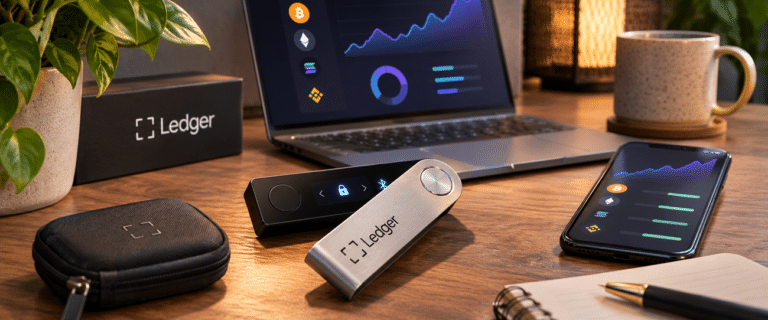
The Ledger Nano X is still worth buying in 2026 if you want a compact hardware wallet with Bluetooth connectivity for iPhone or Android, without paying for a touchscreen. At Ledger’s published US reference price of $99, it remains a reasonably priced option for occasional cryptocurrency transactions and long-term storage.
The harder question is whether it makes sense alongside the newer $179 Ledger Nano Gen5. Both support mobile signing, but Gen5 adds a much larger screen, transaction checks and newer recovery features. This review examines the practical differences, including Bluetooth reliability, battery maintenance, transaction verification and whether the $80 saving justifies the older design.
Our assessment: Research-based review using Ledger’s published specifications, support documentation and recent owner reports, checked on 15 November 2026. DIY AI has not completed independent hands-on testing of these devices, so we have not assigned a laboratory performance score.
Ledger Nano X review: our verdict
| Category | DIY AI assessment |
|---|---|
| Verdict | A worthwhile budget-friendly Bluetooth hardware wallet, provided you accept its small screen and battery maintenance. |
| Best for | Occasional transactions, mobile crypto management and existing Ledger users wanting a secondary device. |
| Biggest strength | Bluetooth connectivity for iPhone and Android at a lower price than Ledger’s touchscreen models. |
| Main limitation | Its small, two-button display makes complex transaction verification less convenient. |
| Additional concern | The non-replaceable battery introduces maintenance and eventual ageing. |
| US reference price | $99, compared with $179 for Nano Gen5. Actual checkout prices may differ. |
| Review score | Not assigned. No independent hands-on benchmark completed. |
Our recommendation: Choose Nano X if Bluetooth is essential and you mainly send or receive cryptocurrency. Choose Nano Gen5 if you frequently approve transactions or interact with decentralised applications. Its additional screen space is a meaningful usability upgrade, not just a cosmetic improvement.
You can check the current Ledger Nano X price before deciding whether the saving remains worthwhile.
Ledger Nano X pros and cons
| Pros | Cons |
|---|---|
| Bluetooth connectivity with compatible iOS and Android phones | Small monochrome screen with two-button navigation |
| USB-C connection for desktop and compatible Android use | Non-replaceable battery requires periodic charging |
| Dedicated Secure Element keeps signing keys isolated | No Transaction Check feature found on newer models |
| Supports many assets through Ledger Wallet and compatible third-party wallets | Bluetooth pairing can require troubleshooting after updates |
| Lower purchase price than Nano Gen5 | No NFC or included Ledger Recovery Key |
Ledger Nano X vs Nano Gen5: is saving $80 worthwhile?
Ledger’s official comparison of Nano and touchscreen models lists Nano X at $99 and Nano Gen5 at $179 in the US. These are published reference prices, not guaranteed current checkout quotes. Regional pricing, promotions, tax and delivery can change the difference.
| Feature | Ledger Nano X | Ledger Nano Gen5 |
|---|---|---|
| Published US price | $99 | $179 |
| Screen | 1.1-inch OLED, 128 x 64 pixels | 2.8-inch E Ink touchscreen |
| Navigation | Two physical buttons | Touchscreen |
| Connectivity | Bluetooth, USB-C | Bluetooth, USB-C, NFC |
| Secure Element certification | CC EAL5+ | CC EAL6+ |
| Transaction Check | No | Yes, for supported transactions |
| Recovery Key included | No | Yes |
| Best purchase case | Occasional mobile signing | Frequent signing and detailed verification |
The price difference should be judged against how frequently you approve transactions, not the value of cryptocurrency held. Someone transferring Bitcoin into storage occasionally may rarely benefit from the larger touchscreen. Someone reviewing contract permissions several times a week has much more reason to pay extra.
There is also a less obvious benefit to the newer display: it reduces the friction of actually reading transaction information. If checking details becomes tedious, users may start approving requests without examining them properly.
At an $80 difference, Nano X remains competitive for straightforward transfers. If a promotion reduces the gap substantially, Nano Gen5 becomes easier to recommend.
Does Ledger Nano X Bluetooth work well with an iPhone?
Bluetooth is the main reason to buy Nano X instead of the cheaper, wired-only Nano S Plus. It lets iPhone or Android users prepare transactions in the Ledger Wallet app (formerly Ledger Live) and approve them on the physical device.
The signing process still requires interaction with Nano X. Bluetooth transports the information between the phone and device; it does not remove the need to verify and confirm a transaction on the hardware.
For occasional mobile transfers, that is a practical arrangement. You can manage an account without carrying a laptop, provided the relevant asset and wallet workflow are supported.
What happens when Bluetooth pairing stops working?
Recent owner discussions include repeated pairing failures, intermittent connections, and difficulty reconnecting after software updates. These reports do not establish a defect rate, but they highlight an ownership problem worth considering.
Ledger’s troubleshooting process includes checking firmware and app versions, resetting the device’s Bluetooth pairings, removing its existing entry from the mobile app and forgetting the device in the phone’s Bluetooth settings before reconnecting.
There is an additional complication with older firmware. Ledger states that Bluetooth firmware updates require Ledger OS 2.4.1 or later. A device running an older version may need a wired desktop or Android connection before it can be updated.
The iPhone fallback is the important limitation. Nano X supports a wired USB connection to computers and compatible Android devices, but USB is not its normal supported iPhone signing route. If Bluetooth becomes unusable, an iPhone-only owner may need access to another computer to troubleshoot or continue signing.
Before buying, check that your particular wallet application, blockchain network and transaction type work with Ledger on iOS. General Bluetooth compatibility does not guarantee every third-party wallet integration works on a phone.
The battery is Nano X’s biggest long-term maintenance concern
Unlike Nano S Plus, Nano X contains a rechargeable battery. That allows it to operate wirelessly, but it also adds a component that can degrade while the rest of the hardware remains functional.
Recent owner reports describe devices displaying erratic battery percentages, charging errors and units that only operate when connected by cable. Others report successful recovery after troubleshooting. These are individual experiences rather than controlled failure-rate measurements.
Ledger’s published Nano X guidance recommends fully charging the device every few months during prolonged storage, switching it off, and keeping it somewhere cool and dry. Leaving it at a very low charge for extended periods can negatively affect battery capacity.
That creates an unusual trade-off for a cold-storage device. Someone who deliberately avoids touching their wallet for months still needs to remember the battery occasionally.
Can you still use Nano X when its battery fails?
Yes, as long as the device itself remains functional. Nano X can operate through a USB connection even when the battery no longer holds a useful charge.
This preserves a route to signing on a supported computer or Android device, but eliminates much of the convenience that originally justified buying Nano X over the battery-free model.
The battery is not designed for user replacement, and Ledger’s published manual does not offer a battery replacement programme. Buyers should therefore regard wireless capability as a feature with a finite maintenance life, not something guaranteed indefinitely.
If the wallet will spend most of its life stored securely and rarely switched on, the simpler Nano S Plus may be a more logical purchase. Nano X earns its extra cost when wireless use is genuinely useful.
How much does the small display affect transaction safety?
Nano X uses a 128 x 64-pixel OLED display controlled by two physical buttons. For entering a PIN, opening an application or confirming a simple transfer, this remains a workable arrangement.
The limitations become more noticeable when reviewing long addresses, unfamiliar network details or smart-contract interactions. Information must be presented across multiple screens, requiring more navigation before the complete request can be understood.
A useful distinction is between verifying an ordinary transfer and understanding a contract permission.
For a straightforward cryptocurrency withdrawal, key checks include the destination address, network, and amount. With a complex token approval, the relevant information may include which contract receives permission, the assets involved and the allowance being granted.
Nano X supports readable transaction information where the relevant application and integration provide it. However, Clear Signing coverage is not universal, and Nano X does not have the Transaction Check feature available on newer touchscreen models.
Transaction Check adds supported scam-pattern checks, but should not be interpreted as a guarantee against malicious transactions.
Our buying rule: If your normal activity involves numerous smart-contract approvals, prioritise a device that makes the entire request easier to inspect. A smaller screen is not inherently insecure, but it increases the effort required to exercise good judgement.
Is Ledger Nano X still secure in 2026?
Nano X uses Ledger OS and a CC EAL5+ certified Secure Element. Private signing keys remain within the device’s protected hardware rather than being managed directly by the phone or computer.
Nano Gen5 uses an EAL6+ certified chip. That represents a different certification level, but it would be misleading to treat the difference as a direct numerical measurement of how likely either device is to be compromised.
For most buyers, the more immediate security questions concern transaction approval, recovery phrase protection, firmware trust and the authenticity of the device received.
Ledger also has a partly closed-source firmware model. Buyers who require publicly reviewable firmware should assess that trust requirement before choosing any Ledger model.
Physical supply-chain security deserves particular attention following Ledger’s October 2026 disclosure involving tampered devices distributed through resellers. Our wider Ledger hardware wallet review examines the incident, recovery arrangements and the broader security trade-offs across the product range.
Buy through a trusted source, perform the official authenticity checks and never accept a device supplied with a preconfigured PIN or recovery phrase. A successful software authenticity check is useful, but cannot guarantee that an attacker has not physically modified other parts of a genuine device.
Most importantly, never enter the wallet’s recovery phrase into an email, website, browser extension or unsolicited support form. A hardware wallet cannot protect funds after the recovery phrase has been disclosed.
See more of our reporting in Google Top Stories, AI Overviews and AI Mode.
What does Nano X actually cost to own?
The $99 US reference price covers the device, not an ongoing custody subscription. Ledger Wallet’s core account management functions do not require a compulsory monthly payment.
Additional costs depend on how you use the ecosystem. Sending assets incurs blockchain network fees. Integrated buying, selling, swapping and staking services may involve provider charges, spreads or other costs.
Ledger Recover, the optional identity-based recovery subscription, is separate from the standard recovery phrase and isn’t needed to use Nano X. Nano Gen5 also includes a Ledger Recovery Key, a physical NFC backup card rather than the paid Recover service.
The practical ownership cost is therefore a combination of the purchase price, any services you choose and the possibility of eventually replacing or supplementing the device if battery portability becomes unreliable.
None of those extras automatically makes Nano X expensive. However, a buyer choosing it solely to save $80 should consider whether they may subsequently purchase a touchscreen model because the original display becomes frustrating.
Who should buy Nano X instead of another Ledger?
| Your situation | Our recommendation | Reason |
|---|---|---|
| You occasionally transfer cryptocurrency using an iPhone | Nano X | Bluetooth at a relatively low purchase price. |
| You mostly store Bitcoin and use a desktop computer | Nano S Plus | No battery upkeep or Bluetooth requirement. |
| You frequently approve DeFi transactions | Nano Gen5 | Larger secure display and supports Transaction Check. |
| You want a compact secondary Ledger | Nano X or Nano S Plus | Choose based on whether wireless access is necessary. |
| You want easier recovery and a touchscreen | Nano Gen5 | Includes a compatible Recovery Key and newer interface. |
| You require fully open-source firmware | Compare other manufacturers | Buying a more expensive Ledger does not remove its firmware trust model. |
One further limitation is worth remembering: secure custody and investment research are different jobs. Protecting signing keys does not tell you whether a token is legitimate, fairly valued or exposed to concentrated ownership. Our comparison of AI crypto research tools covers the separate task of investigating assets and on-chain activity.
Five checks to make before relying on a Nano X
Anyone purchasing Nano X should validate the full workflow before transferring substantial holdings. These checks are particularly useful for identifying an inconvenient phone or wallet compatibility issue while the device is still new.
- Complete setup and protect the backup. Generate the recovery phrase on the device, record it offline and complete the provided verification process. Never photograph it or enter it into an online form.
- Test Bluetooth on your actual phone. Connect through Ledger Wallet, close and reopen the application, restart the signer and confirm that it reconnects reliably.
- Check transaction visibility. Prepare a small, legitimate transaction and inspect the destination, amount and available details on the device before approving it. Do not approve an unknown transaction merely to complete a test.
- Verify wired access. Confirm that a supported computer or Android device can recognise Nano X over USB. This gives you a useful fallback if mobile connectivity fails.
- Confirm asset and recovery compatibility. Check the precise network, account and external wallet applications you need. Ensure your offline backup can restore the intended accounts using Ledger’s supported recovery procedure.
These checks are more informative than simply confirming that the device turns on. They reveal whether your workflow is dependable and whether you can recover access if your most convenient connection stops working.
Final verdict: Ledger Nano X is still worth buying, but no longer the default upgrade
Ledger Nano X remains a credible purchase in 2026. Its compact design, Bluetooth connectivity and dedicated signing hardware give it a clear role for people who want mobile self-custody without spending more on a touchscreen.
However, Nano Gen5 changes the value calculation. The additional $80 in Ledger’s published US price comparison buys a larger display, newer transaction protections, NFC features, and an included recovery accessory.
Our preference is Nano X for occasional mobile transactions where cost matters. For frequent approvals, first-time buyers concerned about checking transaction details or anyone who expects to use the device daily, Nano Gen5 is the stronger purchase.
Before ordering Nano X, make sure the savings are meaningful at your local checkout, your essential mobile integrations are supported, and you have a workable USB fallback. Those three checks determine whether the older model remains good value long after the initial purchase.
You Might Also Like:
Nansen AI Review

Best AI Crypto Research Tools

Ledger Review