Ledger Nano S Plus Review: Value, Setup and Limits
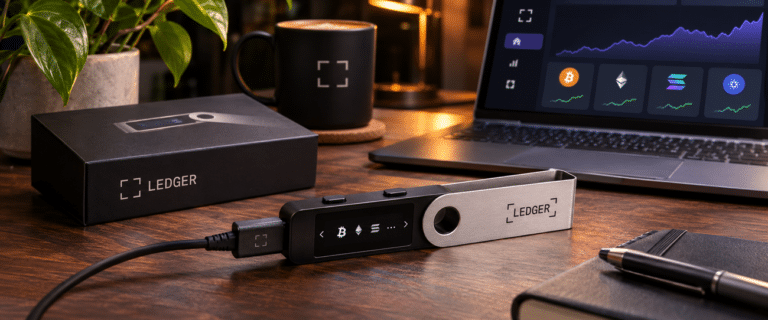
The Ledger Nano S Plus remains a sensible hardware wallet for someone who buys crypto, moves it into self-custody and rarely needs to sign a transaction. Its USB-C connection, battery-free design and physical buttons keep the routine straightforward. Those same choices become inconvenient when you start using decentralised applications or signing transactions every day.
This review looks at its practical value, safe first-time setup, recovery risks and the limitations that matter before you buy. Our assessment is based on current manufacturer documentation and recurring owner feedback, not a claimed hands-on endurance or security test.
| DIY AI verdict | Assessment |
|---|---|
| Best use case | Occasional Bitcoin or multi-asset transfers from a desktop computer, with long periods between transactions |
| Strongest advantage | No battery to charge or manage, with the core Ledger signing and recovery model |
| Main limitation | Small 128 x 64-pixel display and button-based navigation make frequent signing and long passphrases laborious |
| Editorial score | Not independently scored; this is a documentation-led buying assessment, not a physical device test |
Quick verdict: Buy the Nano S Plus for deliberate, infrequent transactions. Choose a larger-screen signer if you routinely approve contracts or want an iPhone-based workflow. Check Ledger Nano S Plus availability and current price.
Is the Ledger Nano S Plus still worth buying in 2026?
Yes, provided the cable and small screen fit how you actually handle your assets. The Nano S Plus uses a certified CC EAL6+ Secure Element, Ledger OS and an on-device display for checking and approving transactions. It is a current model, not the discontinued original Nano S.
Its most practical advantage is the absence of a rechargeable battery. A wallet left in a drawer for months does not need charging before use, although its display, USB connection and other components can still wear out. Battery-free should not be confused with failure-proof or automatically more secure than a Bluetooth model.
Recent owner discussions reveal a useful split: occasional users often prefer the simplicity of a wired device, while people signing regularly put greater value on screen size and easier input. That is a workflow preference, not evidence of comparative hardware failure rates.
| Ledger model | What changes in everyday use | Best fit |
|---|---|---|
| Nano S Plus | USB connection, no battery, two buttons and compact OLED display | Occasional desktop or Android transactions |
| Nano X | Adds Bluetooth and a rechargeable battery, but retains the small button-operated screen | People wanting wireless phone use without a touchscreen |
| Nano Gen5 | Larger touchscreen and a more readable transaction-review workflow | More regular signing and mobile use |
| Flex | Premium touchscreen experience and wireless connectivity | Frequent transactions where confirmation comfort matters |
If you are comparing the security and recovery trade-offs across the whole range rather than just this model, see our broader Ledger review.
What the small screen costs you when signing transactions
For a straightforward transfer, the Nano S Plus is adequate: connect it, unlock it, inspect the transaction details and confirm with the buttons. The 128 x 64-pixel monochrome display becomes harder work when you need to examine long addresses, move through several fields or repeat approvals.
Consider two owners. One sends Bitcoin to cold storage once a month and checks the receiving address carefully. The other uses decentralised finance applications several times a day, often switching networks and confirming contract interactions. Both need the same basic protection, but the second owner must spend far more time navigating the signer. The cheaper device stops feeling cheap when reviewing transactions becomes a chore.
More importantly, an approval shown on a hardware wallet is not proof that a contract is safe. The amount of human-readable transaction information varies by asset, application and integration. If the device presents opaque data you do not understand, a secure chip cannot tell you whether your intended action matches the contract you are authorising. Refuse the transaction rather than treating a button press as a security guarantee.
Our decision rule is simple: occasional transfers favour the Nano S Plus; regular token approvals, NFT activity and complicated smart contracts justify prioritising a larger screen and better transaction visibility. Even then, check the actual supported signing information for the application you use.
Ledger Nano S Plus setup: six checks before moving significant funds
- Check the source and packaging. Buy from Ledger or a recognised authorised reseller. A device supplied with a completed recovery sheet, predetermined PIN or instructions to type seed words into a website is a serious warning sign.
- Install the authentic Ledger Wallet application. Ledger Wallet is the current name for the software previously called Ledger Live. Obtain it through Ledger’s official website, not a search advert, emailed installer or reseller download.
- Generate a new recovery phrase on the device. Choose your own PIN and write down the 24 words in their exact order, offline. Do not photograph them, store them in cloud notes or enter them into the desktop application.
- Complete the Genuine Check. Run Ledger Wallet’s device-authenticity check before depositing anything. Ledger explains that this verifies the Secure Element but cannot detect every possible unauthorised physical modification. Its official device-purchasing and Genuine Check guidance is worth reading before using a reseller.
- Update and check the actual receiving address. Install the relevant coin app, add the account and confirm the address on the Nano S Plus screen, not only in the computer interface. Start with a small transfer using the correct network.
- Verify the backup before relying on it. Use Ledger’s on-device Recovery Check process to confirm the written phrase, and protect the backup separately from the signer. Do not perform a factory reset as your first way of testing an unverified backup.
The computer or phone prepares transactions; the Nano S Plus approves them. That separation helps only when you read what the device itself displays and keep the recovery phrase away from connected devices.
The recovery phrase matters more than the device’s lifespan
Your crypto is recorded on its blockchain, not stored inside the Nano S Plus. The device protects the keys used to access it. If the signer fails or goes missing, the correct recovery phrase can restore access on a compatible replacement. Losing the phrase and the device can mean losing access permanently.
Three incorrect PIN entries reset a Ledger device. That protects against repeated guessing, but it also makes a verified recovery backup essential. A handwritten recovery sheet left next to the hardware wallet is a weak arrangement: one theft, fire or accidental disposal could affect both.
The optional passphrase feature introduces a second trade-off. It creates a separate set of accounts and can be entered temporarily or linked to a secondary PIN. Linking it to a PIN reduces the need to type a long passphrase repeatedly, which is particularly helpful on the small Nano S Plus screen. But even one incorrect character leads to a different set of accounts. A missing passphrase cannot be reconstructed from the 24 recovery words alone.
Ledger Recover is an optional paid recovery service supported on the Nano S Plus through the desktop application. It is not required to use the device. Some buyers prefer its identity-based recovery option; others prefer sole custody of an offline backup and object to trusting Ledger’s firmware and recovery architecture. Ledger’s Secure Element protection and closed-source low-level firmware are both relevant to that decision. Neither choice removes the need to understand who can recover your keys.
Will it work with your phone, coins and other wallets?
The Nano S Plus connects over USB-C and is intended for supported Windows, macOS and Linux computers and compatible Android phones. It does not work directly with iPhones, and Ledger lists Chromebooks as unsupported. Android users may need a suitable data-capable USB cable or adaptor; the cable supplied in the box is USB-C to USB-A.
Ledger advertises support for thousands of crypto assets, but that number is not the same as the list you can manage directly within Ledger Wallet. Some assets need an external wallet interface such as MetaMask, Rabby, Electrum, Phantom or Solflare, alongside a compatible Ledger device app. Support can also vary by chain, token standard and wallet integration. Check your exact asset and preferred wallet before purchasing, especially if you hold less common tokens.
Installed coin apps use device storage, but removing an app does not remove its associated funds or invalidate the recovery phrase. It simply means reinstalling the app when you next need to manage that asset. For a long-term holder, that is manageable. For someone moving between many chains every day, it adds yet another small interruption.
See more of our reporting in Google Top Stories, AI Overviews and AI Mode.
The hidden costs and compromises behind the lower price
The Nano S Plus has no mandatory ongoing hardware subscription. Its purchase price is only part of the ownership decision: network fees still apply when moving assets, some integrated swap or staking services charge their own fees, and optional recovery or backup products can add costs. Compare the current UK checkout total including delivery and taxes rather than relying on an old advertised price.
There is also a time cost. If you approve a transaction every few months, paying more for a touchscreen may offer little benefit. If you sign daily, repeated scrolling, awkward passphrase entry and the lack of iPhone connectivity may matter more than the upfront saving. The Nano X improves wireless access but does not solve the small-display problem; moving to Nano Gen5 or Flex is a more meaningful interface change.
A different hardware wallet brand can make sense if publicly inspectable firmware is your priority. Ledger publishes substantial parts of its software stack, but some low-level Secure Element firmware remains proprietary. A certified chip and an open-source firmware policy answer different security questions, so decide which trust model you are comfortable maintaining.
Ledger Nano S Plus pros and cons
| Pros | Cons |
|---|---|
| Battery-free USB design suits occasional, long-term use | Small screen increases effort when reviewing complex transactions |
| Secure Element and physical confirmation of signing requests | No direct iPhone support or wireless connection |
| Works with Ledger Wallet and numerous compatible third-party interfaces | Some assets need additional apps or wallet integrations |
| Lower-cost entry into Ledger’s current hardware range | Passphrases are cumbersome to enter; low-level firmware is not fully open source |
Our verdict: buy it for occasional custody, not constant activity
The Ledger Nano S Plus is still a strong-value option for someone who wants to move funds off an exchange, verify occasional transactions and leave the device disconnected the rest of the time. Its lack of battery is genuinely useful in that routine. It is also a reasonable spare or replacement signer if you already understand how to restore your accounts safely.
Skip it if your primary device is an iPhone, you frequently approve complicated contracts or you expect a large display to make every transaction readable. Pay for interface improvements where they reduce the chance of hurried approval, rather than paying more simply because a model is newer.
Frequently asked questions
Can I use the Ledger Nano S Plus without a computer?
Yes, with a compatible Android phone and wired connection. It has no battery and must draw power from the connected device. It is not suitable for someone who relies exclusively on an iPhone.
Does uninstalling an app delete the crypto?
No. The assets remain on their blockchains. You can reinstall a compatible app when required, provided you retain access to the keys and any additional passphrase used for those accounts.
Is the Nano S Plus more secure than the Nano X because it has no Bluetooth?
Not inherently. The Nano S Plus removes the wireless connection and battery from your workflow, but transaction safety still depends on device authenticity, firmware trust, careful approval and secure recovery-word storage. Choose between them primarily on how you intend to connect and sign.
You Might Also Like:

Nansen AI Review

Best AI Crypto Research Tools

Ledger Review