Ledger Flex Review: Is the Touchscreen Worth It?
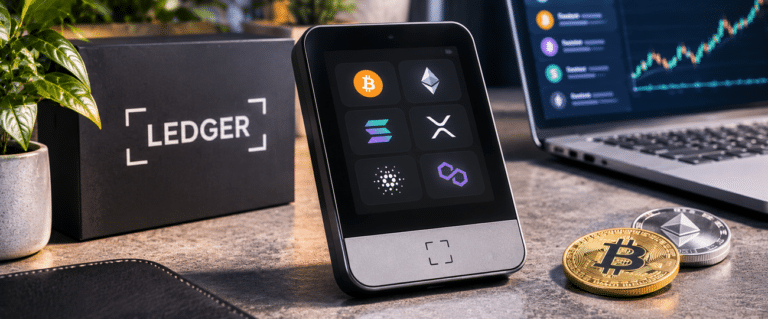
Ledger Flex is worth considering if you regularly check transactions on a hardware wallet and want a sharper screen. For most people buying their first Ledger touchscreen, the cheaper Nano Gen5 is better value. Both offer a 2.8-inch secure E Ink display, Bluetooth, USB-C, NFC and the same certified Secure Element. This Ledger Flex review examines what its higher-resolution screen changes in an actual signing workflow, where it falls short and whether the price premium makes sense.DIY AI verdict Ledger Flex Recommendation Worth shortlisting for regular signers who value a sharper transaction display; not an automatic upgrade over Nano Gen5. Best for People who frequently review token transfers, contract calls and wallet approvals. Biggest strength 480 x 600-pixel, 16-greyscale secure E Ink touchscreen with Gorilla Glass. Main limitation Same screen area and core security as Gen5, with E Ink visibility and responsiveness trade-offs. DIY AI score Not scored. This is a research-based review, not a hands-on device test. Published US reference price US$249, compared with US$179 for Nano Gen5. Check the local checkout total.
Buying decision: The extra US$70 is for the interface, not a stronger security certification. Check the Ledger Flex price and available configurations before deciding; promotions, bundles and UK taxes may change the comparison.
Ledger Flex vs Nano Gen5: where the extra money goes
| Feature | Ledger Flex | Ledger Nano Gen5 | Practical consequence |
|---|---|---|---|
| Screen | 2.8-inch E Ink, 480 x 600, 16 greyscale | 2.8-inch E Ink, 300 x 400, monochrome | Flex can render finer text and graphics, but does not give you a physically larger viewing area. |
| Cover and body | Gorilla Glass; aluminium frame, plastic back | Scratch-resistant glass; plastic frame and back | Different finish and feel, not proof of greater impact resistance. |
| Security | ST33K1M5 Secure Element, CC EAL6+ | ST33K1M5 Secure Element, CC EAL6+ | No published Secure Element certification advantage for Flex. |
| Connection | USB-C, Bluetooth 5.2, NFC | USB-C, Bluetooth 5.2, NFC | The same main desktop, mobile and supported tap-based workflows. |
| Battery claim | Up to 10 hours of normal use | Up to 10 hours of normal use | No manufacturer-rated endurance advantage for Flex. |
| Recovery | Ledger Recovery Key included | Ledger Recovery Key included | Both provide a physical NFC backup option alongside a recovery sheet. |
The distinction is narrower than the older Nano-to-Flex comparison suggests. Moving from a button-operated Nano to either touchscreen changes how you navigate and read prompts. Moving from Gen5 to Flex buys increased pixel density, greyscale and different materials. It does not add another 2.8 inches of space or remove the need to check every relevant field.
Will the sharper screen make transaction checking easier?
Potentially, but resolution is only half the answer. A 480 x 600 display can draw finer character edges than a 300 x 400 display of the same physical size. This could make addresses, amounts and menu labels more comfortable to inspect. Whether a particular transaction fits on fewer screens also depends on the wallet application’s layout, font sizes and data presented. Pixel count alone cannot establish that.
For a straightforward Bitcoin or Ethereum transfer, the important checks are the destination address, asset, network and amount, not the attractiveness of the interface. For a token approval, the spender contract and allowance may matter more than the transaction’s nominal value. A premium display is worthwhile when it makes people more willing to read these details instead of tapping through them.
The hidden limitation: neither Flex nor Gen5 can translate every possible contract interaction into meaningful language. Ledger’s Clear Signing works where the relevant network, wallet and interaction are supported; Transaction Check adds warnings for certain suspicious activity. Neither guarantees protection against a malicious contract. If a prompt requires blind signing or presents opaque data, extra pixels do not restore the missing information.
A practical way to evaluate the Flex before moving funds
Use three increasingly demanding checks rather than judging the touchscreen from the lock screen. These are suggested evaluation steps, not tests DIY AI has performed on the device.
- Check a receiving address. Use the intended wallet application and verify the address on the hardware screen, including more than just a familiar-looking prefix. Confirm that the asset and network match the transfer you plan to make.
- Prepare a small outgoing transfer. Compare the on-device recipient, amount and network with the information you independently intended to use. Confirm you can move through the details without skipping a field.
- Inspect a contract approval without confirming it. Where supported, look for the spender, permission type and allowance. If the device shows only opaque information, cancel and investigate through a trusted route rather than enabling blind signing merely to complete the action.
Run the same checks in the lighting where you normally use your wallet. If you are upgrading from a Gen5, compare identical prompts in the same wallet application and firmware versions. That controls for differences in transaction formatting that a screen comparison cannot explain.
E Ink looks tidy, but dim light and touch response matter
Ledger Flex’s E Ink panel uses ambient light rather than a phone-style backlight. The result can be easy to see in a well-lit room yet inconvenient at a dim desk or in bed. The anti-glare coating does not create light. Buyers expecting to adjust brightness as they would on a phone should not expect that control.
E Ink also refreshes differently from an OLED or LCD. Navigation and entering a recovery phrase may feel more deliberate, especially if you are used to instantaneous phone taps. Owner accounts repeatedly split on this: some appreciate the readable layout and touch keyboard; others find the response slow or the display harder to see than anticipated. Those reports describe usability preferences, not controlled measurements.
There are also isolated owner accounts of touch input becoming unresponsive and devices needing support or replacement. They are worth considering when checking warranty and return terms, but they do not justify inventing a failure rate. A buyer who only signs a few times a year should weigh the extra touchscreen complexity against a simpler wired device.
Bluetooth, NFC and recovery are useful, but not Flex exclusives
For an iPhone or Android user, Bluetooth is the main convenience over a wired-only Nano S Plus. Both Flex and Nano Gen5 support Bluetooth 5.2, while USB-C provides a desktop connection and useful fallback if wireless pairing becomes inconvenient. Check your wallet application’s exact support before assuming every asset and action works over mobile.
NFC is easy to misunderstand. Ledger identifies it for the Recovery Key and Security Key workflows; it is not a universal tap-to-sign replacement for a supported USB or Bluetooth wallet connection. Flex and Gen5 both support compatible passkey and two-factor authentication uses, so these aren’t persuasive reasons to spend more on Flex.
Both packages include a Ledger Recovery Key. Treat it as one possible backup, not permission to neglect recovery planning. Keep the recovery phrase securely offline and separately protected, understand what any additional passphrase changes, and never enter recovery words into a website or wallet extension. Losing the signer is manageable with a valid backup; exposing the backup is a different and potentially irreversible problem.
See more of our reporting in Google Top Stories, AI Overviews and AI Mode.
What matters more than the screen when using DeFi
The most expensive mistake may be approving the wrong permission, not misreading a character. A token allowance can remain active after the hardware device is disconnected, and an approved spender may be able to move assets later. Split long-term holdings from experimental DeFi activity, check allowances and revoke permissions you no longer need.
Ledger cannot establish whether an unfamiliar project, deployer or counterparty is trustworthy. For that separate research task, our Nansen AI review examines wallet activity and labelled entities, while our comparison of crypto research tools covers other investigation options. Research can reveal warning signs, but no analysis tool makes an unsafe approval safe.
For other questions about Ledger’s firmware trust model, recovery services and device sourcing, see our Ledger hardware wallet review. Those considerations apply whichever screen you choose.
Who should buy Ledger Flex instead of Nano Gen5?
| Your main use | Better starting point | Reason |
|---|---|---|
| Occasional transfers into long-term storage | Nano S Plus or Nano Gen5 | The Flex display premium earns little if you rarely sign. |
| Regular transfers and contract approvals | Nano Gen5 first; Flex if text clarity is a priority | Both offer secure touchscreens, with a sharper panel on Flex. |
| Frequent signing with visual-accessibility concerns | Inspect Flex and Gen5 in person if possible | Pixel density helps some readers, but neither has a larger viewing area or illuminated screen. |
| iPhone-first wallet management | Either Flex or Gen5 | Both support Bluetooth; verify the exact app and asset workflow. |
| Budget-conscious buyer expecting better protection from the premium | Nano Gen5 | The published Secure Element chip and certification are the same. |
At Ledger’s published US reference prices, Flex costs US$70 more than Gen5. The relevant question isn’t how much crypto you hold, because the certification doesn’t change with portfolio size. Ask instead how often you inspect complex prompts, whether higher-resolution text genuinely helps you read them, and whether the finish is worth paying for. UK checkout prices and promotional bundles may produce a different gap.
Our verdict: a sharper screen, not a safer tier
Ledger Flex is a credible choice for someone who signs frequently and prefers a finer, greyscale display. Its screen and aluminium-framed build are meaningful differences from Gen5, and its Bluetooth, NFC and included Recovery Key make it a practical modern hardware signer.
Our default recommendation remains Nano Gen5 for most new touchscreen buyers. It offers the same screen size, Secure Element certification and principal signing features for less. Choose Flex when the higher-resolution display matters in your transaction-review routine, not because a higher price tag suggests stronger custody protection.
You Might Also Like:
Nansen AI Review

Best AI Crypto Research Tools

Ledger Review