
Fixing Pacing Drift When Teams Translate Video to English

Software educators routinely encounter clipped endings and breathless narration when they translate Video into English or push regional tutorials across multiple markets without first auditing sentence duration. An explainer recorded cleanly in Tokyo or Paris carries natural visual pauses aligned to local phrasing; swap that voice track automatically into English or Spanish and timing spreads unevenly across tight software demo cuts.
The mismatch rarely stems from pure speech generation quality. Modern synthesis hits natural vowel timbre comfortably enough, yet still breaks down around three operational bottlenecks: dense technical acronyms read literally instead of spelt cleanly, bottom-third subtitle collisions over native UI text, and aggressive lip-sync warping applied to tiny corner presenter frames.
Don’t bother running deep voice-synced dubbing if your target video consists strictly of noisy live conference room banter with three people talking over microphones simultaneously. Subtitled transcripts serve messy panel recordings far better than dubbing over crosstalk; reserve spoken video localisation for clear single-speaker product demos, training lessons, and structured help articles.
Why translated Audio drifts out of sync when teams translate Video to English
Audio drift starts before voice generation begins. Different languages communicate identical software commands using noticeably different syllable counts per clause:
- Dense compound phrasing or polite honorific openers in German, Japanese, and Spanish regularly run 15 to 25 per cent longer in syllable length than terse English UI imperatives, forcing time-compression filters to race uncomfortably fast through the second half of a scene.
- Machine dictionaries rewrite proprietary SaaS feature labels (“Workspace”, “Pipeline”, “Billing Tier”) into generic dictionary nouns unless locked deliberately ahead of rendering, confusing users following along inside an English software interface.
- Hard-coded Text overlays baked inside original .mp4 camera exports linger under translated subtitles, stacking double lines of conflicting Text near bottom corners where player pause bars also live.
- Turning optical lip-sync on for presenters smaller than 15 per cent of canvas width, angled sharply sideways, or obscured by microphone boom arms creates blurred jaw smears that distract viewers immediately.
Diagnostic check: script translation vs uploaded MP4 dubbing
Notice two distinct technical routes inside localisation platforms so you don’t force .mp4 fixes into the wrong stage. When teams already own an editable project timeline containing separate Text layers, Audio script boxes, and slide shapes, duplicating the master project and translating script + canvas strings preserves scene timing control cleanly (expandable pauses adjust cleanly without chopping spoken Audio).
Conversely, when handing off finalised external .mp4 or .mov Video renders recorded elsewhere with baked pixels, Audio dubbing extracts spoken voice directly, translates narration, and generates matched replacement Audio over original background screens. Knowing which file stage sits on your hard drive prevents spending half an hour trying to edit canvas Text on flattened movie frames.
Fixing broken timing and terminology step by step
When product operations teams inspect pacing bottlenecks carefully before clicking export, moving tutorials through a structured AI video translator cuts post-edit rework down cleanly without abandoning editorial quality standards.
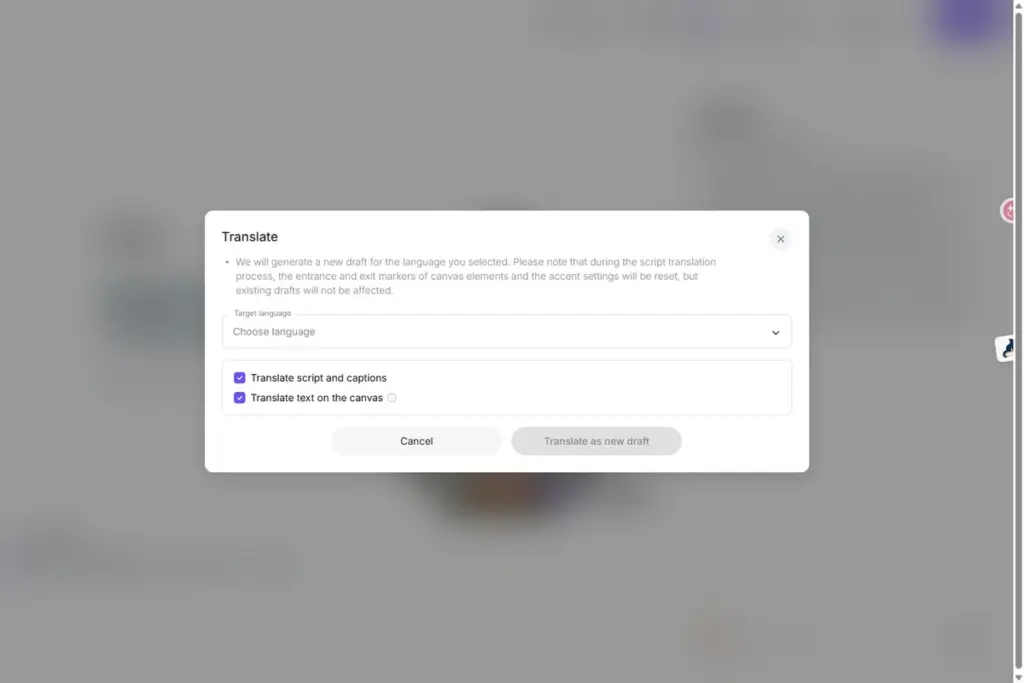
Configuring project-level draft duplication with script, caption, and on-canvas Text translation switches inside Leadde.
Run broken or awkward clips through these six troubleshooting steps before publishing:
- Separate workflow entry cleanly inside Leadde based on source format: upload finalised .mp4/.mov recordings into Video Dubbing (15+ supported dubbing languages billed by credit, with optional Lip-sync toggle), or open existing Leadde projects and run Translate (88 platform languages) to create an editable localised duplicate draft whenever slide headers also need manual Text resizing.
- Edit the generated target-language draft Text aggressively before committing final voice synthesis: tighten long verbose clauses down to active verbs (“Select Settings, then Export CSV” rather than “To move ahead, you must navigate over to Settings…”) until spoken runtime roughly equals original scene length.
- Add explicit comma breaks and short periods wherever rapid technical specifications run back to back, giving synthetic speakers clear micro-breaths aligned cleanly with mouse click transitions.
- Set custom Pronunciation hints inside Leadde’s voice settings for brand trademarks, API identifiers, and numbers (v3.2, PostgreSQL, OAuth) so spoken syllables read naturally instead of spelling out raw characters letter by letter.
- Disable optional Lip-sync deliberately whenever presenters sit tiny inside screen-share corners, shift across profile camera angles, or carry reflections across eyeglass lenses, keeping optical jaw matching strictly on clean front-facing talking segments.
- Preview finished .mp4 downloads locally alongside downloaded .srt or .vtt subtitle tracks (supported on Starter and Creator plans) across desktop Chrome to verify mute-mode captions stay safely above mobile playback scrubbers.
Check one technical constraint cleanly too: if a recording mixes critical original demo sound effects behind human narration, separate or rebalance track volumes deliberately using multi-track controls where editable project drafts allow (Video Agent handles 0 to 4x per-track volume adjustments cleanly on editable generated scenes, whereas flattened uploaded .mp4 dubbing replaces dialogue tracks directly).
See more of our reporting in Google Top Stories, AI Overviews and AI Mode.
Verifying translated exports with real UI consistency checks
Automated voice renders fail fastest around screen-label accuracy, not accent tone. Have a bilingual product specialist scrub through the three most click-heavy tutorial scenes with live software open beside the player, checking every spoken button label verbatim against localised or English product UI strings.

Verifying spoken technical terminology and visual caption spacing on localised product walkthrough renders.
Never publish translated tutorial embeds without exporting matching .srt captions alongside the Audio track either. Even fluent native English viewers working from shared desks frequently play help-centre videos muted with captions enabled, catching any fast acronym clarification right away from clean closed Text.
Quick troubleshooting answers for Video translation
Why does English voiceover still race too fast after translating a slower language?
Translators optimise for literal semantic faithfulness first, often keeping long subordinate clauses intact; cutting conversational filler from translated script lines in the editor fixes rushed cadence immediately without cutting visual screens.
Should teams keep original background UI Text untouched when translating spoken tutorials?
Only if international customers actually operate the software in English; if regional buyers use translated product dashboards (Spanish, French, Japanese), rebuild localised Video drafts from editable projects so on-screen slides match live buttons verbatim.
How can product teams avoid paying twice for pronunciation mistakes?
Always test one 15-second passage containing your nastiest technical acronyms and brand names first, adjust Pronunciation rules and punctuation spacing until spoken Audio hits cleanly, and only then run full multi-minute exports.
Fixing timing drift across translated software videos rarely requires hiring external editing houses. Match editable projects versus flat MP4 dubbing cleanly up front, trim verbose sentences down to natural spoken beats, and toggle lip sync strictly where camera angles justify it.
You Might Also Like:

Best AI Video Generators

Best Image To Video AI
Capcut Review 2026
