
Machine Translation Review 2026: Is MachineTranslation.com Worth It?
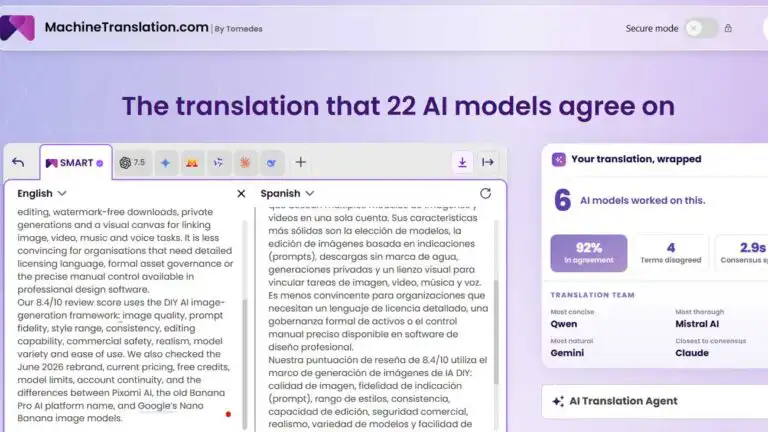
MachineTranslation.com is a specialist AI translation platform that compares outputs from multiple translation engines rather than asking users to trust a single model. Its main appeal is not raw translation speed. Google Translate, DeepL and general AI assistants can already translate a paragraph in seconds. The useful part is the extra quality-control layer: side-by-side outputs, SMART consensus, terminology choices, document translation, privacy controls and optional human verification.
This Machine Translation review assesses the platform using the DIY AI 2026 text-generation scoring framework, current plan limits, public user feedback and the practical risks of multi-model translation. It covers translation quality, the workflow spanning up to 22 engines, document formatting, supported languages, privacy, API access, pricing and the cases where a professional translator is still necessary.
| MachineTranslation.com review summary | DIY AI verdict |
|---|---|
| Overall score | 8.6/10 |
| Star rating | ★★★★☆ 4.3/5 |
| Best for | Comparing translation engines, multilingual documents, terminology control and translation quality assurance |
| Not best for | Certified translations, highly literary localisation or teams that only need occasional one-line translations |
| Free access | Short translations and partial previews, subject to changing fair-use limits |
| Paid options | From $1.50 for a single full-translation payment, $9.50 for 24-hour access or $39 per month for Pro |
| Main strength | Multi-engine comparison reduces dependence on one model and makes disagreements visible |
| Main weakness | Consensus is a reliability signal, not proof that the selected translation is correct |
What is MachineTranslation.com?
MachineTranslation.com is an AI translation platform developed by Tomedes. It brings specialist machine translation systems and general-purpose large language models into one interface, then lets users compare the results. The current engine pool includes names such as DeepL, ChatGPT, Claude, Gemini, Grok, Qwen, Mistral, DeepSeek, Meta models, AWS Translate and AI21, with broader access reserved for paid plans.
The platform supports more than 330 languages and accepts pasted text, office documents, spreadsheets, subtitles and common image formats. Uploads can be up to 70 MB. Word documents and open PDFs can be returned with much of the original layout preserved, making the service more practical for reports, product documentation, and multilingual business files than a simple text-box translator.
Its position in the market is unusual. It is not meant to replace every translation management system, nor is it a full localisation platform for software teams. It is best understood as a translation comparison and review workspace with attached document handling.
How DIY AI scored MachineTranslation.com
MachineTranslation.com ranks sixth in the DIY AI 2026 text-generation dataset. The score reflects its specialist strength in multilingual work rather than treating it as a direct substitute for the leading general writing models in our best AI writing tools comparison.
| Scoring category | Score | Review finding |
|---|---|---|
| Output quality | 8.6/10 | Strong for clear informational and business text, with visible alternatives when phrasing differs. |
| Creativity | 7.6/10 | Lower by design. Faithful translation should preserve meaning rather than invent new copy. |
| Fact accuracy | 8.8/10 | Cross-model checking helps expose obvious divergences, but names, numbers and specialist terms still need review. |
| Tone adaptability | 8.5/10 | The AI Translation Agent adds useful control over style, audience and formality. |
| Speed | 8.6/10 | Fast for text, although large files and multiple-engine processing can take longer. |
| Context memory | 8.4/10 | Saved preferences and translation memory improve consistency for registered users. |
| Integration ease | 8.8/10 | Browser access, common file support and a paid API cover most practical workflows. |
| Cost efficiency | 8.7/10 | The 24-hour plan is unusually useful for short, high-volume projects. |
| Multilingual support | 9.8/10 | The strongest score in the category, with broad language and file coverage. |
| Overall | 8.6/10 | A strong specialist platform for translation comparison and multilingual quality assurance. |
How SMART consensus works
SMART is the feature that separates MachineTranslation.com from a standard single-engine translator. The platform sends the source text to available AI engines, compares the results at the sentence level and selects the version supported by the strongest agreement. A confidence signal helps the user see how closely the sources align.
This solves a real workflow problem. Without an aggregator, a user may paste the same paragraph into DeepL, Google Translate and an AI assistant, then manually compare three browser tabs. MachineTranslation.com consolidates that comparison into a single workspace and presents a recommended version. For users who cannot fully judge the target language, seeing where engines disagree is often more valuable than receiving another confident-looking translation.
The important limitation: several models can share the same mistake
Majority agreement should not be confused with verified correctness. Modern models are often trained on overlapping public material and may learn similar terminology, conventions and biases. Several engines can therefore prefer the same inaccurate legal phrase, flatten the same cultural reference or mistranslate the same low-resource language construction.
The sensible interpretation is that consensus reduces dependence on one model and highlights outliers. It does not remove the need for domain checks. Names, measurements, product terms, safety instructions, contractual wording and culturally specific phrases should still be reviewed against the source. This is the point most shallow reviews miss.
Translation quality: where it works and where it needs help
MachineTranslation.com is strongest on structured, literal and moderately formal content. Product descriptions, support articles, internal documents, straightforward reports and general correspondence benefit from comparing engines because the source meaning is usually stable and differences are easy to inspect.
Technical material can also work well when the user controls terminology. The Key Term Translations feature identifies up to ten specialist terms and offers candidate translations from multiple sources. Selecting the preferred version before final export helps prevent a product name or industry term from changing halfway through a document.
The harder cases are literary prose, humour, slogans, legal ambiguity and language pairs with limited training data. A fluent sentence can still be wrong in register, implication or cultural meaning. G2 feedback checked in June 2026 follows the same pattern: users frequently praise the side-by-side comparison and ease of use, while reported weaknesses include highly technical or literary passages, idioms, large-document processing and advanced formatting control.
A useful workflow is to translate first, inspect disagreements, lock key terminology and then run the final copy through a language-aware editor or one of the tools in our AI proofreading guide. Proofreading does not validate the translation itself, but it can catch punctuation errors, repeated wording, and awkward target-language structure after the meaning has been checked.
Document translation and formatting
Document support is one of the product’s better practical features. Supported uploads include PDF, DOCX, TXT, CSV, XLSX, SRT, JPG, JPEG, PNG, BMP and GIF. Images are processed with text extraction, while Word files and open PDFs can retain their original structure in the translated download.
Layout preservation should still be treated as assistance rather than a guarantee of finished desktop publishing. Tables, text boxes, multi-column PDFs, scanned pages, unusual fonts and languages with substantial text expansion can shift during translation. Public reviewers have also reported that long files sometimes process slowly or require additional formatting.
For a serious document batch, test two representative pages first. Check headings, tables, page breaks, footnotes and text direction before sending the remaining files. This small step prevents a translation job from becoming a formatting repair job at the end.
AI Translation Agent, memory and terminology controls
The AI Translation Agent asks questions about tone, terminology, audience and style, then refines the result. Registered users can save preferences so the platform applies earlier choices to later translations. This is useful for recurring brand language, formal customer communication and repeated document types.
It is not the same as a mature enterprise translation memory with complete segment history, approval states and localisation project management. Teams managing software strings across many releases may still need a dedicated translation management system. For a smaller team translating reports, marketing pages or support content, the lighter memory system is easier to adopt.
There is also a Bilingual Segments view, which aligns source and translated passages for review. That makes corrections safer because an editor can see exactly which source segment a sentence belongs to rather than editing a detached block of target-language text.
Privacy and Secure Mode
MachineTranslation.com states that customer content is not used to train AI models. Free-plan translation data is described as not being stored, while Pro users can opt in to translation-history storage. Logged-in users who activate memory should remember that saved preferences and instructions must be retained for the feature to work.
Two paid controls are particularly relevant for sensitive material:
- Data Anonymisation masks details such as names, numbers and email addresses before the text is sent to AI sources.
- Secure Mode limits processing to AI sources the platform identifies as SOC 2-compliant.
These controls improve the workflow, but they do not automatically make every upload suitable for external processing. Legal, medical, financial and employee data may be governed by contracts, sector rules or internal policies that require a documented data-processing review. The platform’s privacy tools are useful safeguards, not a substitute for that review.
API access and integrations
API access is included with Pro and Tailored plans. This allows an application to send text for translation and receive the output without requiring a user to navigate the browser interface. Free users do not receive API access.
The API is useful for content systems, support workflows and internal tools that want the platform’s translation layer without building separate integrations for several providers. Teams that need direct control over a single provider, regional deployment settings, or a larger cloud stack should also review Microsoft’s text translation documentation before choosing an aggregator.
The broader limitation is that MachineTranslation.com is not presented as a complete developer localisation suite. Repository synchronisation, string keys, release branches, screenshots and in-context software review remain specialist localisation tasks.
MachineTranslation.com pricing in 2026
| Plan | Price | What it includes | Best for |
|---|---|---|---|
| Free | $0 | Core engines, basic LLM access, short translations and partial previews under fair-use limits | Occasional checks and testing output quality |
| Single translation | From $1.50 | Provides a full translation without requiring a recurring plan | One document or an isolated longer translation |
| 24-Hour | $9.50 one-time | All Pro features for 24 hours, with no renewal | Deadline-driven batches and short localisation projects |
| Pro | $39 per month | All available engines, advanced LLMs, unlimited text and document translation, formatted downloads, API access, Secure Mode, anonymisation and up to 2,000 words of human verification monthly | Professionals and teams translating every week |
| Tailored | Custom | Custom integrations, volume arrangements and negotiated data-handling terms | Large or regulated deployments |
The 24-hour option is the most distinctive plan. It avoids paying for a month when a team only needs to process a batch of product pages, reports or subtitle files over a weekend. The monthly plan makes more sense once translation becomes recurring work and the API, privacy controls or saved preferences are used regularly.
“Unlimited” still needs context. The published pricing information applies fair-use limits, including a stated daily limit of 100,000 words for downloads of original-layout documents. Teams with unusually large batches should confirm current operational limits before purchasing access.
MachineTranslation.com pros and cons
| Pros | Cons |
|---|---|
| Compares multiple AI translation sources in one interface. SMART consensus makes engine disagreements visible. Excellent 330+ language coverage. Useful terminology, tone and memory controls. Supports documents, spreadsheets, subtitles and images. 24-hour access is good value for short high-volume jobs. Optional anonymisation, Secure Mode and human review | Several models can agree on the same incorrect translation. Complex literary, legal and cultural material still needs expert review. Large files can be slower to process. Formatting may need manual correction after export. Free-plan limits are variable, and advanced engines require payment. Not a complete software localisation or translation management platform. Human verification claims should not be read as literal infallibility |
MachineTranslation.com versus the main alternatives
| Tool | Best use | Control and verification | Main trade-off |
|---|---|---|---|
| MachineTranslation.com platform | Comparing engines, translating documents and checking terminology | Multi-engine views, SMART consensus, quality scores, glossary controls and human verification | Consensus can still repeat shared errors |
| DeepL | Fast, polished translation for supported high-resource languages | Strong single-provider workflow with glossary and document features | Less useful when the user wants to compare independent engines |
| Google Translate | Free everyday phrases, websites, camera translation and quick comprehension | Very easy to access, but with fewer professional review controls | Not designed as a translation quality-assurance workspace |
| ChatGPT or Claude | Context-rich rewriting, tone adaptation and discussion of ambiguous passages | Flexible prompting and explanation | May over-edit, paraphrase or sound convincing while changing meaning |
| Professional translator | Legal, certified, literary, regulatory and reputation-critical work | Human judgement, accountability and cultural adaptation | Higher cost and longer turnaround |
See more of our reporting in Google Top Stories, AI Overviews and AI Mode.
Who should use MachineTranslation.com?
MachineTranslation.com is a good fit for content teams, researchers, ecommerce businesses, support departments and professionals who regularly receive files in several languages. It is especially useful when the user wants to inspect alternatives without opening and managing multiple translation tools separately.
The 24-hour plan suits one-off batches. Pro is better for recurring document translation, API workflows and sensitive material that benefits from anonymisation or a restricted engine pool. Teams producing localised graphics, narrated videos or multilingual audio will still need a creative production layer after translation. DIY AI Studio can then be used to compare image, video, audio, and music models in a single workspace.
Who should skip it?
Casual users translating a menu, sign, or short message may be satisfied with a free single-engine app. Software companies managing thousands of interface strings need a translation management system with repository synchronisation and release workflows. Anyone submitting certified, regulatory, or safety-critical material should consult a qualified professional rather than rely on an AI consensus score.
A practical workflow for better translations
- Clean the source text before translation. Fix incomplete sentences, inconsistent terms and ambiguous abbreviations.
- Translate a short representative sample before uploading the full document.
- Inspect sentences where engines disagree instead of accepting the SMART result automatically.
- Choose preferred key terms and protect brand names, product names, units and legal references.
- Use anonymisation or Secure Mode where the data classification requires it.
- Check all names, dates, figures, currencies and measurements against the source.
- Review formatting in the exported document, especially tables, text boxes and right-to-left languages.
- Escalate public, contractual, medical, legal or culturally sensitive content to a qualified linguist.
For translated scripts that will be spoken aloud, test pronunciation and rhythm separately. Written translation can be technically correct but sound stiff in speech. Our guide to Spanish text-to-speech tools explains why local accent, pacing and spoken phrasing need their own review.
Final verdict: Is MachineTranslation.com worth it?
MachineTranslation.com is worth using when translation quality matters enough to compare sources, but not enough to justify sending every first draft directly to a human translator. Its best features are the comparative view, SMART recommendation, terminology controls, broad language support, document handling and flexible 24-hour access.
MachineTranslation.com
Scored across 9 practical DIY AI dataset metrics.
- Output Quality8.6/10★★★★★★★★★★
- Creativity7.6/10★★★★★★★★★★
- Fact Accuracy8.8/10★★★★★★★★★★
- Tone Adaptability8.5/10★★★★★★★★★★
- Speed8.6/10★★★★★★★★★★
- Context Memory8.4/10★★★★★★★★★★
- Integration Ease8.8/10★★★★★★★★★★
- Cost Efficiency8.7/10★★★★★★★★★★
- Multilingual Support9.8/10★★★★★★★★★★
The platform earns 8.6/10 in the DIY AI dataset because it adds a genuine review layer to machine translation. It does not earn a higher score because model agreement can create false confidence, large documents may need patience, and high-stakes translation still requires specialist human judgement.
The buying decision is straightforward. Use the free tier to judge a representative language pair. Buy 24-hour access for a concentrated batch. Choose Pro when translation is recurring, and the API, privacy controls, saved preferences, or formatted downloads save enough manual work to justify the monthly fee.
Frequently asked questions
Is MachineTranslation.com free?
Yes, short translations can be completed for free under fair-use limits. Longer content may show only a partial preview. Full access is available through a one-time full-translation payment, the $9.50 24-hour plan, the $39 monthly Pro plan or a Tailored agreement.
How accurate is MachineTranslation.com?
Accuracy varies by language pair, source quality and subject. Comparing multiple engines can reduce reliance on one weak result, but it cannot guarantee correctness. Technical terms, names, numbers, legal wording and cultural references still need deliberate review.
Is SMART better than using DeepL or Google Translate alone?
SMART is better for comparison and uncertainty management because it shows where models align or disagree. A single tool may still produce the best translation for a particular language pair. The advantage is visibility and choice, not a guarantee that the majority result always wins.
Can MachineTranslation.com preserve PDF and Word formatting?
It can preserve layout for supported Word files and open PDFs, and paid users can download translated versions. Complex tables, scans, text boxes, unusual fonts and substantial text expansion may still require manual correction.
Is it safe for confidential documents?
The provider states that customer content is not used for AI training. Paid users can apply data anonymisation and Secure Mode, which restricts processing to sources identified as SOC 2 compliant. Organisations should still confirm that the workflow complies with their own contracts, data policies and regulatory requirements.
Does MachineTranslation.com replace a human translator?
No. It can produce and compare strong first drafts, reduce routine review time and route important work to human verification. Certified, legal, medical, regulatory, literary and reputation-critical translations still need qualified human judgement.
You Might Also Like:

Best AI Writing Tools 2026

Quillbot Review 2026

Copyleaks Review

definitely a game changer for efficiency between cross referencing models and accuracy! im not sure DeepL as a main competitor works they arent really a platform just translation.