
Hemingway Editor Review 2026: AI Features, Pricing and Limitations
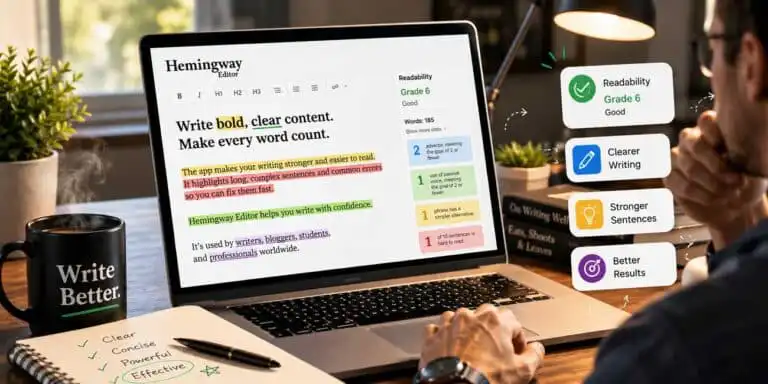
Hemingway Editor remains one of the clearest tools for finding dense prose. The free editor assigns a readability grade and highlights difficult sentences, passive voice, adverbs, and phrases that can be simplified. Hemingway Editor Plus adds grammar correction, AI rewrites, tone controls, document feedback and file imports and exports.
In our 2026 benchmark, Hemingway Editor scored 7.8/10. It is excellent for a final readability pass and fast sentence simplification. It is less effective as a complete grammar platform or long-document editor because its rules are deliberately narrow, and some rewrites remove useful nuance.
This review covers readability, AI rewriting, voice preservation, grammar, long documents, exporting and value. The comparisons with Grammarly and ProWritingAid remain brief, so this page stays focused on Hemingway.
Hemingway Editor review: quick verdict
| DIY AI benchmark score | 7.8/10 |
|---|---|
| Star rating | 3.9/5 |
| Best for | Readability checks and concise prose |
| Free version | Unlimited readability analysis |
| Paid price | From $10 monthly or $100 annually |
| Main strength | Makes difficult passages visible immediately |
| Main limitation | Can reward oversimplification |
Our verdict: Hemingway is worth using as a focused final editing tool. The free version delivers most of its diagnostic value. Editor Plus is reasonably priced for writers who regularly need one-click simplification and grammar fixes, but it does not replace a full editorial review.
How DIY AI scored Hemingway Editor
Hemingway is not yet in the main DIY AI text-generation dataset. We applied the same nine-category framework to the current editor, published rewrite behaviour, file handling, and the 2026 plan limits, rather than borrowing a third-party rating.
| Category | Score | Finding |
|---|---|---|
| Output Quality | 8.0 | Strong simplification with occasional loss of nuance |
| Creativity | 6.8 | Useful rephrasing rather than original development |
| Fact Accuracy | 8.3 | Usually preserves simple claims |
| Tone Adaptability | 7.8 | Useful styles, but limited precision |
| Speed | 9.4 | Instant scoring and highlights |
| Context Memory | 6.8 | Better for passages than whole documents |
| Integration Ease | 7.8 | Good file support, fewer inline tools |
| Cost Efficiency | 9.0 | Excellent free editor |
| Multilingual Support | 5.5 | Mainly an English product |
| Overall | 7.8/10 | A strong specialist readability editor |
Readability grading is still its best feature
Paste text into the free editor, and Hemingway assigns a grade level. Yellow and red highlights identify difficult sentences, while other colours flag passive voice, adverbs and weakening phrases. Sentence-level warnings are more useful than a single score because one poor paragraph can be hidden inside a reasonable document average.
The target grade can be changed, which matters for specialist audiences. The danger is score chasing. Some technical explanations need longer syntax and careful qualification. Hemingway itself advises writers not to remove every highlight. The aim should be understanding, which also matches the UK government’s plain-language standard, not the shortest possible sentence.
AI rewrites are fast but can be too aggressive
Editor Plus can rewrite highlighted sentences with one click. It is particularly effective on bureaucratic phrasing, stacked clauses and padded expressions. The result is often shorter and easier to scan.
Problems appear when complexity carries meaning. A legal condition, technical limitation or cautious claim may become more definite after simplification. Compare every suggestion with the original and reject changes that alter certainty, attribution or scope.
AI rewrites use sentence credits. Rewriting a four-sentence paragraph consumes four credits. Grammar fixes and document feedback are unlimited, but frequent whole-document rewrites can quickly use up the monthly allowance.
Voice and tone controls
Editor Plus can shorten, expand or make text more confident, friendly, casual, formal or persuasive. Custom rewrites support a specific instruction. These controls are useful for testing alternatives without moving the draft into a separate chatbot.
Hemingway still favours direct, compressed prose. That suits business copy, emails and explanatory articles, but it can flatten humour, rhythm or deliberate complexity. Apply AI changes to selected passages rather than forcing one style across an entire document.
Grammar correction and long documents
The paid grammar checker catches spelling, punctuation and agreement errors that the free readability editor does not fully address. It makes Editor Plus more complete, although Grammarly remains more convenient for continuous correction inside browsers and desktop applications.
The free editor can analyse long text, but hundreds of highlights become difficult to manage. Books and reports are easier to edit chapter by chapter. Editor Plus imports and exports Word, Markdown, and HTML files, preserving more formatting than copying and pasting. Hemingway Editor Classic costs $19.99 once and works offline, but does not include AI features.
Hemingway Editor pricing in 2026
| Version | Price | Best for | Limit |
|---|---|---|---|
| Free web editor | Free | Readability checks | No AI fixes |
| Individual 5K | $10 monthly or $100 annually | Regular editing | 5,000 AI sentences |
| Individual 10K | $15 monthly or $150 annually | Higher volume | 10,000 AI sentences |
| Team 10K | $15 per user monthly | Editorial teams | Cost scales by user |
| Editor Classic | $19.99 once | Offline use | No AI tools |
The 14-day Editor Plus trial includes up to 200 sentence corrections and does not require a card. Most occasional users should begin with the free editor and pay only if manual rewriting becomes repetitive.
Hemingway Editor pros and cons
| Pros | Cons |
|---|---|
| The free readability checker handles long text. Highlights make dense passages easy to find. AI simplification is quick to review. Word, Markdown and HTML exports support publishing. Paid plans are reasonably priced. | Rules can penalise necessary complexity. AI rewrites may weaken nuance or voice. Long documents become visually crowded. Integrations trail Grammarly. Multilingual support is limited. |
See more of our reporting in Google Top Stories, AI Overviews and AI Mode.
Hemingway versus Grammarly and ProWritingAid
| Tool | Best for | Why choose it |
|---|---|---|
| Hemingway Editor | Readability | Fast visual feedback and a strong free editor |
| Grammarly | Everyday grammar | Better browser and desktop coverage |
| ProWritingAid | Books and manuscripts | Deeper style and repeated-pattern reports |
Our Grammarly versus ProWritingAid comparison covers that broader decision. Hemingway is the specialist final-pass tool, not the broadest editor.
Who should use Hemingway Editor?
Hemingway suits bloggers, marketers, students, public-sector writers and technical specialists who write dense first drafts. It is also useful after AI-assisted drafting because it quickly exposes long sentences and repetitive complexity.
It is a poor fit for multilingual editing, citation support or developmental feedback across an entire book. Creative writers should avoid removing sentence variety simply to lower the grade.
Final verdict
Hemingway Editor earns 7.8/10 and 3.9/5. Its free readability analysis remains genuinely useful, while Editor Plus adds enough grammar and AI-rewriting capabilities to justify the modest subscription fee for frequent users.
Use it to find passages that deserve attention, not as an authority every sentence must obey. Grammarly is better for continuous correction, while ProWritingAid offers more depth for manuscripts. Broader drafting tools are compared in our best AI writing tools guide.
Frequently asked questions
Is Hemingway Editor free?
Yes. The web editor provides free readability grading and highlights. AI fixes and advanced grammar correction require Editor Plus.
Is Hemingway Editor worth paying for?
Yes, for frequent users who value one-click simplification. Occasional users can obtain the most diagnostic value from the free version.
Is Hemingway better than Grammarly?
Hemingway is better for readability. Grammarly is better for continuous suggestions on grammar and clarity across applications.
Can Hemingway handle a book?
It can analyse long text, but chapter-by-chapter editing is easier. ProWritingAid offers deeper manuscript analysis.
You Might Also Like:

Best AI Writing Tools 2026

Quillbot Review 2026

Copyleaks Review
