
Fieldy 3 Review for Interviews and Site Visits
Fieldy 3 earns 9.1/10 for turning in-person conversations into searchable notes. It is a good fit for a site visit when your hands are occupied and you can check names and decisions with the speakers.
- Best for
- Hands-free notes from in-person meetings, interviews and site visits
- Main limitation
- Personal accounts lose access to the original audio after transcription, so you cannot replay it to verify a quote.
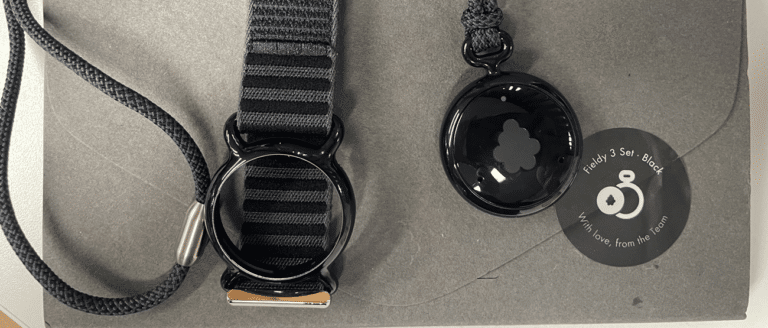
Fieldy 3 earns 9.1/10 in DIY AI’s speech-to-text dataset. It suits people who come away from a meeting or site visit needing a searchable account of what was agreed. The wearable records while your hands are busy, and its companion app lets you read the conversation and request a summary. The main reason to choose a different recorder is quote verification. On a personal account, Fieldy deletes the source Audio after transcription.
This review covers Fieldy 3 in Start & Stop mode. Scores are from our published Speech to Text dataset. Fieldy places second for its hands-free capture workflow. Deepgram also scores 9.1/10 to one decimal place. The choice between them depends on whether you want to wear a recorder or build speech recognition into an application.
What we liked most about Fieldy 3
The feature we value most is being able to check a detail while the person who supplied it is still in the room. Imagine inspecting a replacement window. You can keep both hands on the frame, then take out your phone to see whether the transcript says the hinge is on the left or the right. A file waiting for transcription back at the office is of little use at that moment. This is why speed edges out accuracy in our scorecard.
We also like what happens to the small jobs that rarely make it into formal minutes. Returning a spare key or sending somebody an updated drawing can take five seconds to agree and be surprisingly easy to forget.
What happens when you leave your phone behind?
With the wearable connected to a nearby phone and the app online, you can follow live Text as someone speaks. That earns Fieldy its highest rating, 9.4/10 for speed. There is no file to find and upload after each conversation. If a colleague gives you an unfamiliar surname or part number, you can glance at the Text and ask them to spell it while they are still there.
If you walk out of Bluetooth range, the wearable buffers the recording. Bring it back to the phone and open the app with an internet connection so it can sync for Cloud transcription. A site visit can therefore continue without reception, but the transcript may arrive after you leave. If a handover is due before then, write down the essential measurements and decisions as you go. The Fieldy 3 device guide explains capture and sync.
Why a long workshop can end mid-transcript
One of the more consequential owner complaints is reaching the end of a meeting and finding only part of it in the app. In one incident, 1 owner reported that their device stopped just before three hours. Buying more transcription minutes would have solved the wrong problem. Fieldy’s current instructions say firmware 3.3.8 or later lets you extend the manual recording limit to six hours in Device Settings. When the selected limit expires, Fieldy saves the conversation. You must start the next one yourself.
For a half-day workshop, check the configured limit when you check the agenda. A break between presentations is a convenient point to end one recording, check that its opening and closing remarks are present, and start a fresh session for the next speaker. It also gives you a separate transcript for each presentation. A long battery life tells you surprisingly little about whether the afternoon discussion belongs to an active recording.
How reliably does Fieldy identify who said what?
Choose Start & Stop for an interview or recurring team meeting. The transcript separates speaker turns. If you want Fieldy to recognise a regular participant by name, you first assign five transcript segments to that person. You can also reassign a line that lands under the wrong profile. Always-On capture lacks Speaker Profiles, so the choice of recording mode matters before the conversation starts. See Fieldy’s Speaker Profiles guide.
There are two stages here, and they explain the separate scores for speaker detection (9.2/10) and diarisation (9.3/10). A transcript can show that a second person interrupted without knowing that person’s name. The diarisation score credits tools that let you assign turns to the right profile and recognise that voice again. Your personal Voice ID works after initial setup. The five tagged examples apply to another recurring speaker. Fieldy’s plan comparison lists one speaker profile on Free and unlimited profiles on Unlimited.
That favours a small team that meets every week. Time spent identifying a colleague can pay off across later meetings. For example, a client might propose a Friday deadline and a contractor might agree to check it. If those turns are attributed to the same person, a tidy action list can turn a proposal into an apparent commitment. Check the exchange around an action, including the speaker change, before circulating it. It is easier to resolve the owner and date at the end of a meeting than from a summary the next morning.
For an interview with several unfamiliar names, ask the guest to spell them and keep a short list alongside the transcript. Use it to check the source paragraph before preparing quotes or sending introductions. The same approach works with a drawing number or product code. Repeatedly regenerating a summary from the same mistaken transcript gives you more versions of the mistake.
How Fieldy earned 9.1/10
The DIY AI speech-to-text dataset scores nine criteria. On 24 November 2026, the weighted ratings for Fieldy came to 9.056/10, rounded to 9.1. These are editorial assessments of the documented workflow. An accuracy score of 9.2 does not mean that Fieldy transcribed 92% of a test recording correctly.
| Dataset criterion | Score out of 10 |
|---|---|
| Accuracy | 9.2 |
| Speed | 9.4 |
| Speaker detection | 9.2 |
| Punctuation | 8.8 |
| Diarisation | 9.3 |
| Noise robustness | 8.6 |
| Export formats | 9.2 |
| Cost efficiency | 8.5 |
| Real-time streaming | 9.1 |
Noise robustness at 8.6 matters more on a busy site than at a quiet table. Keep the microphone clear and step away from machinery to confirm a critical instruction. The punctuation rating is provisional because evidence across languages is limited. An editor working on a verbatim interview should allow time to check sentence boundaries as well as names and speaker labels.
Will the microphone hear everyone at a site visit?
Distant voices deserve particular attention because the microphone travels with its wearer. A supervisor standing beside you and a contractor calling from behind a partition can sound equally important to a human listener. They reach the wearable under quite different conditions. Fieldy advises wearing the device facing outwards and keeping heavy clothing clear. On a winter walk-through, look at where the microphone sits after you zip your jacket. For a decision involving the person across the room, move the discussion within ordinary speaking distance.
The 8.8/10 punctuation score matters most where punctuation changes a decision. Consider “Order six? No, four” in a purchasing discussion. A missing question mark or an awkward sentence break could send an editor back to the wrong number even if every word appears. Read the exchange through to the correction and ask the speaker to confirm the final quantity. A nicely punctuated summary is a poor place to settle an ambiguity in the underlying conversation.
How useful are search and summaries a week later?
A dated, searchable transcript can be worth more than an immediate recap, particularly when the same subject returns at every meeting. Try the equivalent with a project that changes over time. Ask what the installer agreed about the delivery in Tuesday’s site meeting, then open the matching exchange. A general question about the delivery could pull Friday’s revised estimate when you need the promise made on Tuesday. Keep the meeting date with any action you copy out. It gives the next person a way to distinguish a missed commitment from a later change of plan.
What do the included minutes and exports cover?
The hardware purchase includes 150 transcription minutes each month. Five interviews with 30 minutes of speech apiece would use that allowance. A weekly check-in with one client may fit comfortably, whereas a researcher conducting two such interviews each week would exceed it. Estimate your ordinary month before buying the device, then check the current membership terms if your schedule calls for Unlimited.
The cost-efficiency rating of 8.5/10 is Fieldy’s lowest. Someone conducting eight interviews with 30 minutes of speech each would need 240 minutes, or 90 minutes beyond the monthly allowance. Someone who needs named profiles for several colleagues might reach for Unlimited after just one short meeting. Add the separate hardware purchase to your comparison. If you conduct most meetings at your computer, calculate how often you would actually leave the desk wearing the device before judging its value against a software subscription.
Free includes TXT export. Unlimited adds PDF for a readable handover, Markdown for notes and JSON for structured processing. Those choices explain the 9.2 export rating, but the documented formats leave a gap for Video editors. If your deliverable is an SRT or WebVTT subtitle file, try converting a sample transcript in your editor and check its timing before committing a project to Fieldy.
Choose an export by who needs to use it next. A project manager who wants two decisions and their owners can paste a checked TXT extract into the project log. A researcher comparing ten interviews may prefer structured data, but should inspect a sample for speaker labels and timestamps before designing an import. For captions, the remaining work includes deciding when each line appears and disappears. Opening a readable transcript in an editor is only the first step.
See more of our reporting in Google Top Stories, AI Overviews and AI Mode.
Phone calls, headphones and the desktop app
The wearable hears the room around it. If the other person is speaking into your headphones, they can be clear to you while their side of the conversation is missing from the wearable transcript. An App Store owner called out the inconvenience of using speakerphone for calls. That matters for interviews conducted from shared offices, where putting the caller on loudspeaker may be inappropriate even when everyone has agreed to transcription.
For a computer meeting, Fieldy documents a separate route through its desktop app. It can capture the microphone and computer Audio, so headphones are compatible. On a Mac, the app needs permission to capture system Audio. Ask a colleague to join a brief test call and verify that both halves of an exchange appear before using it for a remote interview. Buying the wearable for face-to-face visits and using the desktop app for calls are two distinct decisions. Fieldy’s desktop guide covers inputs and troubleshooting.
When to choose a different transcription workflow
For a journalist who must play a disputed quote back to an editor, the deciding feature is access to the recording. Fieldy says it deletes personal-account Audio after processing and retains the transcript. Organisations may have different arrangements. If playback is part of your brief, agree a recording method with participants and keep an authorised original. Check Fieldy’s Audio retention policy for the terms that apply to your account.
For a developer, the distinction is where the live words appear. Fieldy shows Text in its mobile app. Its documented REST API retrieves saved transcript segments. A voice Agent that must respond while someone is speaking needs a streaming speech service. Deepgram and AssemblyAI are better starting points for that job in our speech-to-text tools comparison.
Fieldy makes the most sense when the conversation itself is the work and a checked set of notes is the deliverable for an interviewer who needs exact quotes, or a team whose records must include the original Audio, settle the playback question before buying the wearable.
You Might Also Like:

Best AI Audio Tools

Best AI Video Generators

AI Model Rankings 2026 Cost Effectiveness
