Hype vs Reality: How to Read AI Software Reviews Critically

Every week, a new AI tool promises to “10x your productivity.” The reviews look glowing, the demo videos look flawless, and the star ratings sit at 4.8. Then you sign up, feed it your own data, and the results look nothing like the screenshots.
The gap is not always deliberate, but it is easy to overlook. Some AI software reviews rely on short trials, vendor-supplied examples, affiliate partnerships, or test data cleaned up in advance. Many reviewers focus on features and interface design without asking where the model’s knowledge came from, how the product handles unfamiliar inputs, or what happens to the data users upload.
That last point matters. AI performance depends partly on the quality, coverage, and relevance of the data used to train, fine-tune, and evaluate a system. Data collection, preparation, and annotation can affect what a model recognises, where it performs well, and which cases it struggles with. To understand the foundations of reliable AI systems, explore AI data collection services and the role structured datasets play in AI development.
This guide offers a practical way to separate evidence from marketing. It includes a seven-step checklist, a red-flag table, a quick review scan, and a scoring template you can use before choosing an AI product.
Why AI Software Reviews Are Harder to Trust Than Regular Software Reviews
Traditional software usually follows predictable rules: a spreadsheet formula returns the same result when the inputs stay the same. Generative AI tools are different. Their outputs can vary, and a response that looks convincing may still contain an error.
That creates several challenges for reviewers:
- Cherry-picked outputs. A reviewer runs many prompts and publishes only the strongest results.
- Clean test data. Demos use tidy inputs, while real business data may contain typos, missing fields, inconsistent formats, or incomplete records.
- Changing models. A review may describe a model or feature set that the vendor has since updated.
- Unclear data provenance. A review may not explain what information the product was trained or evaluated on, or how representative that information is of the tasks users need to perform.
The gap between adoption and confidence is visible in developer survey results. The Stack Overflow 2025 Developer Survey found that 84% of respondents were using or planning to use AI tools in their development process. At the same time, 46% said they distrusted the accuracy of AI output, compared with 33% who trusted it. Only 3% said they highly trusted the output.
Positive sentiment toward AI tools is declining
Percentage of developers reporting positive sentiment toward AI tools.

The 2023–2025 figures show positive sentiment, not trust in output accuracy. The distinction matters: developers may find AI tools useful while still checking their answers carefully. The 2025 survey also reports that 66% of respondents were frustrated by AI solutions that were “almost right, but not quite,” while 45% said debugging AI-generated code was time-consuming.
The takeaway is not that every AI product is unreliable. Adoption, usefulness, and accuracy are different measures. A credible review should make clear which one it has tested.
The 7-Step Checklist for Reading AI Software Reviews
Step 1: Find out who paid for the review
Start with the commercial relationship. Look for labels such as “sponsored,” “in partnership with,” or an affiliate disclosure near the beginning or end of the page. Affiliate content isn’t automatically dishonest, but commissions can influence which products get attention and how strongly they are recommended.
Example: Two reviews cover the same AI writing assistant. One earns a commission for every sign-up and calls the product “the best tool on the market. The other explains three tasks where the product failed and compares it with alternatives. The second review gives readers more evidence, even if its tone is less enthusiastic.
Quick test: Does the reviewer explain who should not use the product? Do they recommend a competitor for a particular use case? If every comparison leads to the same winner, look more closely at the methodology and disclosure.
Step 2: Check what data the reviewer actually tested
A tool’s performance on sample files may not reflect how it behaves with your own information. Ask:
- Did the reviewer use real-world inputs or examples supplied by the vendor?
- How many tasks or records were tested?
- Were the inputs varied, or did they all follow the same format?
- Did the review include missing fields, typos, unusual cases, or conflicting information?
- Were failures shown alongside successful outputs?
Data quality matters at several stages of AI development. Training data influences the patterns a model can learn; evaluation data helps reveal whether those patterns generalise to new cases. If a dataset is narrow, outdated, unbalanced, or poorly labelled, an AI system may perform well on familiar examples but struggle with less common inputs. That is why a reviewer should explain the test data rather than claim that a tool is “accurate.”
Example: A review of an AI meeting summariser praises its “near-perfect accuracy.” Later, you discover that the test involved one 15-minute call with two native English speakers and no background noise. If your team has six participants, varied accents, and an unstable connection, the review offers limited evidence about how the tool will perform in your environment.
Step 3: Look for numbers, not adjectives
“Incredibly accurate” is an opinion. “Correctly extracted 41 of 50 invoice totals” is a result that readers can interpret. Strong reviews explain what was measured, how many tests were run, and what counted as a correct answer.
| Vague claim | What a more useful review says |
| “Blazing fast” | “Average response time was 2.4 seconds across 30 prompts.” |
| “Super accurate” | “The tool answered 87 of 100 test questions correctly under the stated scoring rules.” |
| “Understands context” | “It retained key details across a 12-message thread but lost one constraint by message 20.” |
| “Works with any data” | “It processed CSV and text-based PDF files but failed on several scanned documents.” |
| “Saves hours” | “It reduced the weekly reporting task from three hours to 70 minutes, including review.” |
Numbers do not automatically make a review reliable. The reviewer should also describe the sample, test conditions, and limitations. A percentage based on five easy prompts is not comparable to a result based on hundreds of representative tasks.
Step 4: Separate benchmark scores from real-world performance
Vendors often use benchmark scores to demonstrate model capability. Benchmarks can be useful for comparing systems, but a high score does not guarantee strong performance on your specific workflow.
One limitation is benchmark saturation: as models improve, established tests may stop distinguishing between leading systems.
What to do: Treat benchmark scores as an initial filter, not a final verdict. Check which benchmark was used, when it was run, and whether the test reflects the tasks you care about. Then shortlist a few tools and test them on your own data.
Example: A coding assistant ranks highly on a public leaderboard. A data scientist tries it on a legacy pandas pipeline and receives suggestions that rely on outdated functions. The benchmark may have measured clean, self-contained coding problems, while the real task required understanding an existing project and its dependencies.
Step 5: Check the review date and model version
AI products can change quickly. A review should state when testing took place and, where possible, identify the model or product version.
As a rough rule of thumb, rather than a strict standard:
- Published or tested within the last three months: likely to reflect a recent product state, but still check for updates.
- Three to nine months old: review the vendor’s changelog for model, pricing, or feature changes.
- More than nine months old: treat the review as historical context until you verify that its findings still apply.
A recent publication date is not enough on its own. An article may have been updated without retesting the product. Look for a clear note explaining what changed and whether the reviewer repeated the tests.
Step 6: Watch for the “almost right“ problem
Some of the most costly AI errors are not obvious failures. They are plausible-looking answers with one incorrect figure, missing condition, or invented detail.
The Stack Overflow 2025 Developer Survey found that 66% of respondents were frustrated by AI solutions that were almost right but not quite. It also reported that 45% found debugging AI-generated code time-consuming.
A useful review should explain how much human checking the product requires. Measuring the time it takes to generate an answer is not enough; the reviewer should also account for verification and corrections.
Example: An AI tool drafts a 10-page market report in four minutes. The reviewer calls it a major time-saver. But a careful check takes another 90 minutes and reveals two statistics that cannot be verified. The real time saved is much smaller than the headline suggests.
Step 7: Read the privacy and data sections, or notice when they are missing
A review of a business AI tool should explain what happens to the information users submit. Look for answers to these questions:
- Is user input used to train or improve future models?
- Where is the data stored, and how long is it retained?
- Can users opt out of training or data sharing?
- Can users delete uploaded data and account information?
- Does the product offer controls suitable for sensitive business information?
Do not assume that every provider follows the same policy. Terms can differ between consumer and business plans, and settings may vary by region or subscription tier. Check the vendor’s current privacy policy and product documentation before uploading confidential information.
If a review never discusses data handling, treat that as an information gap. For teams working with client records, personal information, or source code, privacy controls can be as important as the feature list.
See more of our reporting in Google Top Stories, AI Overviews and AI Mode.
Where AI Reviews Come From (and How Much to Trust Each)
Different sources can be useful for different questions. Rather than assigning an automatic trust score to an entire category, consider what each source can and cannot establish.
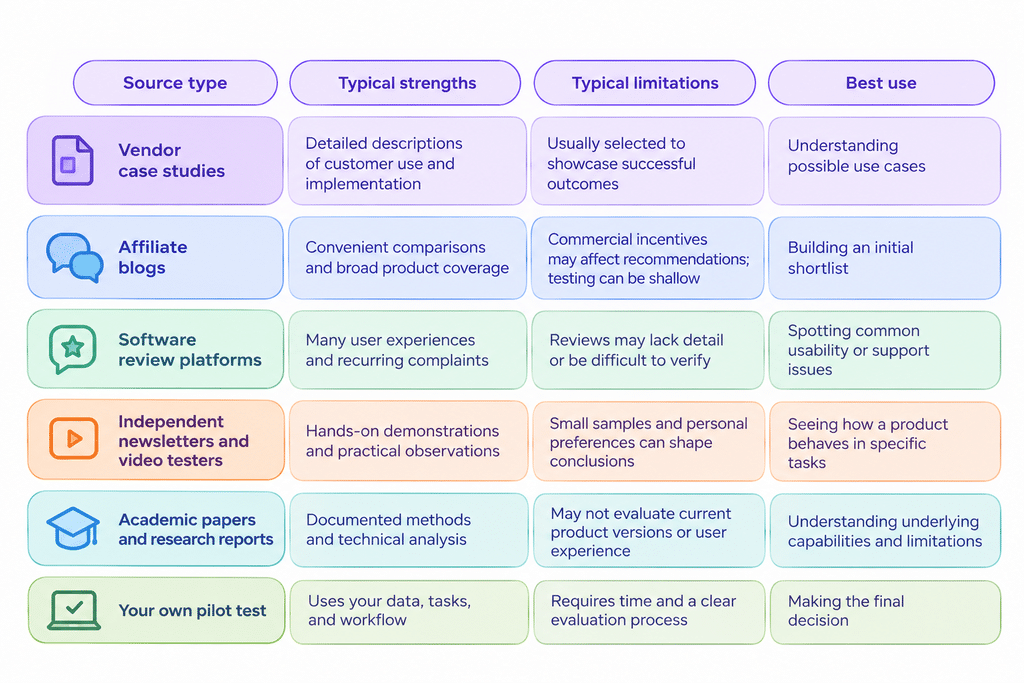
No source type is automatically helpful for understanding. A detailed vendor case study may help you understand implementation, while an independent test may be better for identifying product limitations. The key is to match the source to the question you are trying to answer.
Chart 2. Developer trust in AI output accuracy (2025)
Share of respondents who said they trusted or distrusted the accuracy of AI tool output.

Source: https://survey.stackoverflow.co/2025/ai
The four categories shown above account for 78.4% of responses. The remaining responses are not displayed in this chart, so the figures should not be treated as a complete distribution.
The pattern is still worth noting: more respondents said they distrusted AI output accuracy than trusted it. A review that describes a product as flawless should therefore explain how its claims were tested.
Red Flags vs. Green Flags at a Glance
| Red flag | Green flag |
| Every screenshot shows a perfect result | The review includes failures and explains their causes |
| “Best AI tool of 2026” with no clear use case | A specific recommendation, such as “best for summarising legal PDFs” |
| No test date or product version | A clear test date and version information |
| Only vendor-supplied examples | Reviewer-selected inputs and a described test set |
| Benchmark scores with no context | Benchmarks explained alongside hands-on tests |
| No mention of pricing limits | Notes on usage caps, rate limits, and plan restrictions |
| Silence on privacy | A discussion of retention, training use, and data controls |
| No explanation of how the verdict was reached | A transparent methodology and stated limitations |
A single red flag does not prove that a review is misleading. Look at the overall evidence, the reviewer’s incentives, and whether the claims can be independently checked.
Quick Questions to Ask Before You Trust Any Review
Before relying on an AI software review, ask:
- Would the reviewer lose a commission or other benefit if they gave the product a negative rating?
- Could I reproduce the test using my own data?
- Does the review explain who the tool is not suitable for?
- Are the test date, product version, and pricing details clear?
- Does the reviewer discuss errors and the time needed to correct them?
- Is there enough information about data handling and privacy?
If you cannot answer several of these questions, look for another source or verify the claims directly with the vendor.
Conclusion
AI software reviews are a starting point, not a final answer. The most useful reviews explain their methods, show measurable results, acknowledge failures, and discuss data handling. Less reliable reviews often rely on broad claims, isolated demonstrations, outdated benchmarks, or recommendations that do not disclose commercial incentives.
Use the seven-step checklist to assess the evidence, the 60-second scan to spot gaps quickly, and the scoring template to compare shortlisted products on your own tasks. A short, well-designed test with representative data can tell you more about a tool’s suitability than a page of glowing claims.
You Might Also Like:

Best AI Audio Tools

Best AI Video Generators

AI Model Rankings 2026 Cost Effectiveness