
Fish Audio Review 2026: Is It Safe and Worth Using?
DIY AI verdict: Fish Audio is one of the strongest AI voice generators we have reviewed for expressive text-to-speech, fast voice cloning and character-style voices. It scores 8.7/10 in the DIY AI 2026 audio dataset, placing it second overall behind ElevenLabs and ahead of Play.ht.
This Fish Audio review examines voice quality, cloning, pricing, credits, API access, licensing risk, account deletion, and its comparison to other AI audio tools. The short answer is simple: Fish Audio is worth testing if you want expressive AI voices, a large voice library, quick cloning and developer-friendly access. It is less ideal if you need the safest enterprise narration workflow, heavy audio cleanup, or conservative commercial rights management.
Quick verdict: Who should use Fish Audio?
| Category | Fish Audio review verdict |
|---|---|
| Overall score | 8.7/10 |
| Star rating | 4.4 out of 5 |
| Best for | Expressive TTS, voice cloning, character voices, announcer voices and developer-led voice generation |
| Strongest areas | Emotion range, clone similarity, voice realism, language range and API support |
| Weakest areas | Noise handling, licensing clarity, enterprise maturity and conservative brand controls |
| Best alternative | ElevenLabs for the most realistic and polished voice output |
| Not ideal for | Teams that need a cautious, locked-down narration platform with predictable approval workflows |
Fish Audio is not a generic AI voice tool with a few synthetic narrators bolted on. Its strength is expressive voice generation. That matters for creators making YouTube narration, game characters, short-form video voices, audiobook samples, social content, voice agents and prototypes where the delivery needs more personality than a flat corporate read.
The trade-off is that Fish Audio feels less mature as an enterprise-safe platform than tools built mainly for training, compliance and brand-controlled voice-over. If your main goal is polished internal learning content, our best AI audio tools guide provides more context on business narration, podcast editing, speech cleanup, and music generation.
What is Fish Audio?
Fish Audio is an AI voice generation platform for text-to-speech, voice cloning, voice model discovery, voice changing, speech-to-text, audio separation, audio translation and sound effects.
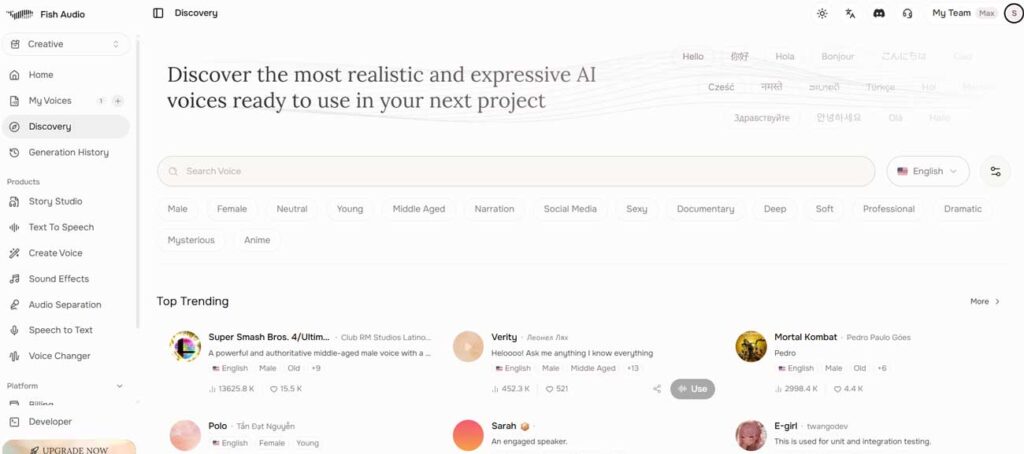
The main workflow is straightforward. You choose or create a voice, paste a script, generate speech, then adjust the output or export the audio. For voice cloning, you provide a reference sample and create a reusable voice model. For developers, Fish Audio also exposes API access for TTS and related voice workflows.
One reason Fish Audio is more interesting than many smaller TTS tools is the model direction behind it. Fish Audio S2.1 Pro is positioned around multi-speaker generation, multi-turn context and instruction-following voice control.
Is Fish Audio safe and legitimate to use?
Yes, Fish Audio is a legitimate AI voice platform, but “safe” needs to be broken down into account safety, voice-data handling, and commercial rights. The service is operated by Hanabi AI Inc., which publishes terms, privacy information, and developer documentation. The more important risk for most users is not whether Fish Audio is a real service. It depends on what you upload, which voice you clone, and what rights you have when the generated audio is published.
| Safety question | DIY AI assessment | What to know |
|---|---|---|
| Is Fish Audio legitimate? | Yes | Fish Audio is an established AI voice service operated by Hanabi AI Inc., with published terms, privacy policies, paid plans and developer APIs. |
| Can I safely clone my own voice? | Generally, with care | Use recordings you own, and avoid uploading confidential or sensitive source audio unless you are comfortable with the platform’s data-handling terms. |
| Can I clone somebody else’s voice? | Only with appropriate permission | A technically successful clone does not give you rights to the speaker’s identity, performance or recording. |
| Are public Fish Audio voices automatically safe for commercial use? | No | Finding a voice in the public library should not be treated as proof that every commercial use of that voice is cleared. |
| Can I use Fish Audio commercially? | Paid plans are the safer route | Fish Audio’s current commercial-use wording is inconsistent for the free tier, so monetised work should not rely solely on the free-plan card. |
| Does Fish Audio offer zero data retention? | Enterprise option | Zero Data Retention is listed as an Enterprise feature rather than the default behaviour of ordinary consumer plans. |
The free-plan commercial-use wording needs caution
There is an unusual contradiction in Fish Audio’s own current pricing information. The Free Tier plan card displays “Commercial use”, while the FAQ further down the same Fish Audio pricing page says free users can only use generated content for personal, non-commercial projects. Fish Audio’s main website also describes the free plan as for personal use only.
For that reason, I would not use a free-plan generation in a monetised YouTube video, client project, advert, audiobook, or paid product solely because the plan card currently says “commercial use”. Use a paid plan and check the rights attached to the specific voice before publication.
What happens to voice recordings and uploaded content?
Fish Audio’s privacy policy states that it can retain content for as long as necessary to operate its systems and provide the service. Its terms also state that ownership of a user’s submissions is not transferred simply by uploading them, although Fish Audio receives the licences required to process and provide those submissions through the service.
For a casual test, this may be acceptable. For unreleased performances, customer recordings, employee voices or other sensitive audio, treat the upload as production data rather than a disposable prompt. Organisations requiring stricter handling should examine the Enterprise controls, including the advertised Zero Data Retention option.
Fish Audio features reviewed
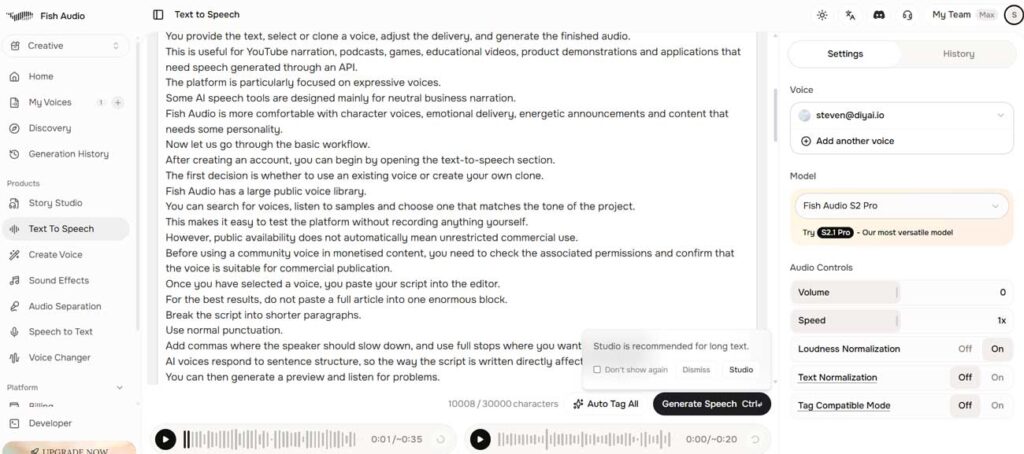
Text-to-speech quality
Fish Audio’s TTS quality is strong enough for publishable creator work, especially where a slightly more animated voice is useful. It is a good fit for YouTube narration, social video, explainers, game dialogue, fictional characters, podcast intros and quick voice-over drafts.
The platform is less convincing when you need a deliberately restrained delivery. Some voices can sound too stylised for corporate narration, and the same script can vary more than buyers expect if they are used to conservative TTS platforms. That does not make Fish Audio worse. It means you need to match the tool to the job.
Emotion and character control
Fish Audio scores 8.9/10 for emotion range, its highest individual mark in the DIY AI audio dataset. That is the clearest reason to shortlist it. It is not only trying to produce a neutral narrator. It works well for expressive reads, character voices, announcer-style delivery, energetic creator content and voices that need more attitude than a standard business explainer.
For a dull compliance training script, that advantage may not matter. For a game character, an animated short, a TikTok story voice, a YouTube intro, or a fictional dialogue scene, it can make a big difference.
Voice library and public models
Fish Audio’s public voice library is useful for fast experimentation. You can test different voice styles before committing to a clone or paid plan. This is also where commercial caution becomes important. Public voices are not automatically safe for every monetised project, especially if the voice resembles a real person, performer or recognisable character.
For commercial work, the safer route is to use voices you own, voices you have explicit permission to clone, or verified commercial voices with clear usage rights. That point is not a legal decoration. It is the difference between using AI audio sensibly and creating a rights problem later.
API access for developers
Fish Audio is a better developer option than many creator-only voice tools. The public developer materials support text-to-speech, voice cloning, and speech-to-text via API access, with SDKs in Python and JavaScript. That makes it relevant for apps, voice agents, content tools, browser products and internal automation workflows.
For production, the main things to test are latency under your real script length, concurrency limits, failure handling, retry logic, output consistency and how the model behaves across languages. A demo sentence is not enough. Run a proper paragraph, a long script, a difficult name list and a noisy edge case before building around it.
Fish Audio voice cloning review: quality, limits and pricing
Fish Audio produces convincing clones when the reference contains a single clear speaker without music, echo, or heavy compression. Poor source audio can carry noise, unstable pacing and pronunciation problems into the generated voice, so improving the recording is usually more effective than repeatedly regenerating the output.
There is no single standalone cloning price. Web plans combine generation credits with limits on private voice models, while API generation is billed separately according to the text processed. Before publishing, confirm that you own the recording or have documented permission to clone and monetise the speaker’s voice.
Fish Audio pricing and credits explained
Fish Audio separates its web subscription from API billing. The web plans provide monthly generation credits, while API use is metered separately. The figures below are Fish Audio’s displayed prices checked in August 2026 and may change, particularly because the annual plans currently include promotional pricing.
| Plan | Current displayed price | Credits and limits | Best fit |
|---|---|---|---|
| Free Tier | $0 | 8,000 credits monthly, up to 7 minutes of generation, 500 characters per generation and 3 public voice slots | Testing Fish Audio before paying |
| Plus | $15 monthly or $5.50/month billed annually ($66/year) | 250,000 credits monthly, up to 200 minutes, 15,000 characters per generation, 10 private voice slots and 1 professional voice slot | Regular creator and solo professional use |
| Pro | $100 monthly or $37.50/month billed annually ($450/year) | 2,000,000 credits monthly, up to 1,620 minutes, 30,000 characters per generation, 3 team seats, unlimited voice slots and 5 professional voice slots | Power users and small production teams |
| Max | $999 monthly or $749/month billed annually ($8,988/year) | 25,000,000 credits monthly, up to 6,250 minutes, 10 team seats and 15 professional voice slots | High-volume production |
| Enterprise | Custom | Organisation controls, volume pricing, Zero Data Retention, on-premise deployment and compliance options | Organisations with stricter deployment or data requirements |
The advertised minutes are not necessarily the same as the usable finished minutes. Fish Audio says generation typically consumes roughly 600 to 625 credits per minute, but every rejected take still consumes time and allowance. If a difficult clone requires several attempts before one version is publishable, the effective cost of the finished audio can be materially higher than the headline minutes suggest.
Fish Audio API pricing
Fish Audio’s API is separate from its monthly web plan allowance and uses pay-as-you-go billing. Current TTS pricing is based on the amount of input text measured in UTF-8 bytes rather than the number of finished audio minutes.
| API model | Current price |
|---|---|
| S2.1 Pro | $15 per million UTF-8 bytes |
| S2.1 Pro Free | $0 per million UTF-8 bytes |
| S2 Pro | $15 per million UTF-8 bytes |
| S1 | $15 per million UTF-8 bytes |
| Transcribe-1 | $0.36 per audio hour |
| Voice Design | $0.01 per successful request |
Fish Audio estimates that one million UTF-8 bytes represents roughly 180,000 English words or about 12 hours of speech. That makes the API relatively easy to model based on script volume, but production buyers should still account for retries, concurrency, and rejected generations rather than calculating cost from a single successful request.
DIY AI dataset breakdown

Fish Audio
Scored across 9 practical DIY AI dataset metrics.
- Voice Realism8.8/10★★★★★★★★★★
- Language Range8.8/10★★★★★★★★★★
- Editing Controls8.6/10★★★★★★★★★★
- Latency8.7/10★★★★★★★★★★
- Licensing8.1/10★★★★★★★★★★
- Clone Similarity8.8/10★★★★★★★★★★
- Emotion Range8.9/10★★★★★★★★★★
- Noise Handling7.8/10★★★★★★★★★★
- API/Integration8.6/10★★★★★★★★★★
The DIY AI audio scoring framework reviews tools across voice realism, language range, editing controls, latency, licensing, clone similarity, emotion range, noise handling and API support. Fish Audio performs best where expressive voice generation matters. It is weaker where the job becomes audio restoration, governance or conservative commercial workflow control.
What do these scores mean in practice
| Scoring metric | Fish Audio score | What it means in practice |
|---|---|---|
| Voice realism | 8.8/10 | Very strong naturalness for TTS, especially when the chosen voice suits the script. |
| Language range | 8.8/10 | Good multilingual coverage for creators and localisation experiments. |
| Editing controls | 8.6/10 | Enough control for most generation workflows, though not as predictable as a traditional editor. |
| Latency | 8.7/10 | Fast enough for developer testing and many voice product workflows. |
| Licensing | 8.1/10 | Usable for commercial projects, but rights around public and cloned voices need careful checking. |
| Clone similarity | 8.8/10 | One of Fish Audio’s clearest strengths is when the source recording is clean. |
| Emotion range | 8.9/10 | Excellent for character reads, announcer voices and expressive narration. |
| Noise handling | 7.8/10 | Not a specialist cleanup tool. Poor source audio still causes problems. |
| API and integration | 8.6/10 | Strong developer direction with REST API access and SDK support. |
| Overall | 8.7/10 | A top-tier expressive AI voice generator, just behind ElevenLabs overall. |
Fish Audio pros and cons
| Pros | Cons |
|---|---|
| Excellent 8.7/10 overall score in the DIY AI audio dataset. | Still slightly behind ElevenLabs for the most refined realism and premium voice nuance. |
| Very strong emotion range at 8.9/10, which suits character voices and expressive narration. | Some voices may feel too stylised for conservative business narration. |
| Strong voice cloning performance when the reference recording is clean. | Poor source audio can create artefacts, unstable cloning or disappointing output. |
| Good developer direction with API access and SDK support. | Production API buyers still need to test concurrency, latency and failure handling carefully. |
| Useful free tier for testing before paying. | Credits, commercial rights, and monthly resets need to be checked before serious production use. |
| Large-scale voice discovery workflow for fast experimentation. | Public or community voices should not be treated as automatically cleared for commercial use. |
How Fish Audio compares with other AI voice generators
Fish Audio sits closest to ElevenLabs in this review because both compete heavily on realistic text-to-speech, expressive delivery and voice cloning. ElevenLabs remains first in the DIY AI audio dataset at 8.9/10, while Fish Audio scores 8.7/10 and is particularly competitive for expressive voices, character work and experimentation.
If those are the two tools on your shortlist, use our Fish Audio vs ElevenLabs comparison. It covers the head-to-head decision in more depth rather than duplicating the same comparison inside this review.
Play.ht is more relevant where scalable TTS production is the priority, Resemble AI suits teams wanting a more technical custom-voice workflow, and Murf AI is easier to position for conventional corporate voice-over work.
How to use Fish Audio
The easiest way to test Fish Audio is to avoid starting with your most important script. Start with a short but realistic paragraph that includes names, numbers, punctuation, pauses and a tone shift. A weak test sentence can hide problems that appear in real publishing work.
- Create an account and test the free tier. Generate a few short samples before adding payment details.
- Choose the right voice style. Match the voice to the script. A character voice that sounds great in a game scene may sound strange in a business explainer.
- Use clean scripts. Break long copy into sections, remove confusing punctuation and write pauses deliberately.
- For voice cloning, record clean reference audio. Use one speaker, no music, no background noise and a natural speaking style.
- Test commercial rights before publishing. Check whether the voice is yours, verified, public, cloned or restricted.
- Export and listen on normal devices. Check headphones, laptop speakers and mobile playback. Some artefacts only become obvious after export.
- For API use, test your real workload. Measure latency, cost, retries, rate limits and output consistency before building it into a product.
When do Fish Audio credits reset?
Fish Audio credits replenish at the start of each monthly billing cycle. Unused monthly allowance does not roll over, so there is little value in preserving credits for a later month.
Fish Audio says generation typically uses roughly 600 to 625 credits per minute. In practice, the more useful number is your cost per accepted minute. If pronunciation errors, pacing problems or clone inconsistencies force three generations before one is usable, your real production allowance is much lower than the plan’s advertised maximum.
How to get more Fish Audio credits
You can move to a higher subscription tier or wait for the next monthly reset. Before upgrading, reduce avoidable regeneration by fixing names, abbreviations, punctuation and reference recordings first. API use is billed separately, so developers should not assume a larger web subscription is automatically the cheapest way to scale production.
How to delete a Fish Audio account
Account deletion should be handled carefully because voice models, project data and unused credits may be affected. Before deleting your Fish Audio account, download anything you may need, remove sensitive cloned voices, cancel any active subscription and check whether unused credits are refundable or simply lost.
The sensible deletion path is:
- Open your Fish Audio account area and check billing, subscription and privacy settings.
- Download or export any content you need to keep.
- Delete private voice models you no longer want stored.
- Submit an account deletion request through the help centre if a self-service option is not visible.
- For privacy or data requests, use Fish Audio support channels and keep a record of the request.
Do not abandon the account if it contains cloned voices or paid subscription details. Close the billing loop properly and keep confirmation.
See more of our reporting in Google Top Stories, AI Overviews and AI Mode.
Where Fish Audio is strongest
Creator voice-over
Fish Audio is a strong choice for creators who need voice-overs that feel more lively than a standard TTS narrator. Short-form video, YouTube intros, storytime content, explainers, fictional clips and character-led narration are natural fits.
Character and game voices
The emotion score matters here. Game dialogue and fictional scenes often need exaggerated personality, not just clean delivery. Fish Audio gives more room for this than many business-first TTS platforms.
Voice cloning experiments
Fish Audio is worth testing if you want to clone your own voice or create a controlled voice asset from clean source material. For serious use, treat consent and rights as part of the workflow, not an afterthought.
Developer prototypes
The API and SDK direction make Fish Audio useful for app builders, voice product teams and automation workflows. It is not enough to test one endpoint. Test your actual script lengths, response times and retry handling.
Where Fish Audio is weaker
Conservative enterprise narration
For regulated training, legal content, internal compliance or approval-heavy brand work, a more conservative platform may be easier to govern. Fish Audio can produce good narration, but its strongest personality-led output is not always what corporate buyers need.
Audio cleanup
Fish Audio is not primarily a cleanup tool. Its noise handling score is 7.8/10, which is respectable but not specialist-level. If your problem is poor microphone audio, echo, or rough interviews, start with a tool such as Adobe Podcast Enhancer or Descript before considering TTS. Our Adobe Podcast Enhancer review explains that lane more clearly.
Risk-free public voice use
The public voice library is useful, but it also creates judgment calls. A voice that sounds like a celebrity, performer, public figure, or recognisable fictional character should not be used commercially just because it appears in a platform search result.
Ideal users for Fish Audio
| User type | Should they use Fish Audio? | Why |
|---|---|---|
| YouTube creators | Yes | Strong expressive narration, character options and enough quality for a publishable voice-over. |
| Game developers | Yes | Good fit for character voices, prototypes and emotional reads. |
| Podcast creators | Sometimes | Useful for intros, ads and voice experiments, but not a replacement for full podcast editing. |
| Marketing teams | Sometimes | Good for energetic ads and social content, less ideal for conservative brand narration. |
| Developers | Yes | API access and SDK support make it worth testing for app-based voice generation. |
| Enterprise training teams | Maybe | Quality is strong, but governance, permissions and approval workflow may matter more. |
| Speech-to-text buyers | Probably not first | Fish Audio has STT features, but dedicated platforms are usually a better starting point. See our best AI speech-to-text tools guide instead. |
Fish Audio buying checklist
Before paying for Fish Audio, run this checklist. It will give you a better answer than a single polished demo.
- Generate a full paragraph, not a single sentence.
- Test the exact voice style you plan to use for publication.
- Check how it handles names, acronyms, numbers and unusual punctuation.
- Run a long script in sections and listen for consistency drift.
- Clone only from clean, consented, single-speaker recordings.
- Confirm commercial rights before using any cloned or public voice in monetised content.
- Compare the same script against ElevenLabs and Play.ht if realism or scale matters.
- For non-English work, test the exact accent or regional style you need. Our Spanish accent text-to-speech guide is a useful reference point for that kind of comparison.
- For British narration, compare against the tools in our British accent text-to-speech guide.
- For API use, calculate the cost based on your actual monthly text volume and test the rate limits.
Fish Audio review FAQs
Is Fish Audio good?
Yes. Fish Audio is excellent for expressive text-to-speech, voice cloning, and character-style AI voices. It scores 8.7/10 in the DIY AI audio dataset, ranking second overall behind ElevenLabs.
What is Fish Audio used for?
Fish Audio is used for AI voice generation, text-to-speech, voice cloning, voice changing, announcer voices, character voices, speech-to-text, audio separation and audio translation. Its strongest use case is expressive generated speech rather than traditional audio editing.
Can Fish Audio clone voices?
Yes. Voice cloning is one of Fish Audio’s main strengths. Results depend heavily on the reference audio. Use clean, single-speaker recordings, and clone only voices you own or have permission to use.
Is Fish Audio free?
Fish Audio has a free tier with monthly credits. The free plan is useful for testing, but for regular production, private voice work, longer scripts, and safer commercial use, a paid plan is usually recommended.
How do I get more credits on Fish Audio?
Upgrade to a paid plan, wait for the monthly reset, reduce wasted generations by properly preparing scripts, or use pay-as-you-go pricing for model API usage when building with the developer tools.
How do I delete my Fish Audio account?
Check your account settings, cancel any active subscriptions, download anything you need, delete sensitive voice models, then submit a deletion request through Fish Audio’s help or support channels if a self-service option is not visible.
Is Fish Audio safe for commercial use?
Fish Audio can be used for commercial projects, but you must check the specific plan, voice type and rights attached to the voice. The safest route is to use verified voices you own or voices with explicit permission for your intended use.
What does Fish Audio have to do with fish?
Nothing practical. Fish Audio is the brand name of an AI voice platform. It is not related to fishkeeping, fishing content, or the Pink Fish Media audio forum.
Is Fish Audio good for announcer voices?
Yes. Fish Audio is a good choice for announcer voices where you want expressive, energetic delivery. For serious broadcast-style work, test several voices with your actual script before publishing.
Final verdict: Is Fish Audio worth it?
Fish Audio is worth using if you want expressive AI voices, strong cloning, fast experimentation and developer access without settling for bland synthetic narration. Its 8.7/10 DIY AI score is justified. The tool is especially strong for creators, game developers, character voices, social video, prototype voice apps and narration that needs personality.
It is not the safest default for every buyer. ElevenLabs remains the stronger overall pick for voice realism. WellSaid Labs and Murf AI can make conservative business narration easier. Dedicated speech-to-text platforms are better when transcription is the primary task. Fish Audio’s public voice library and cloning features also require sensible rights checks before commercial use.
The practical verdict is this: test Fish Audio if your project needs expressive speech, not just clean speech. Use the free tier to assess voice quality, move to Plus if you are publishing regularly, and scale further only after you have tested rights, credits, script handling, and output consistency in your real workload.
You Might Also Like:

AI Voice And Audio Tools
Adobe Podcast AI Enhancer Review

Fish Audio VS Elevenlabs
